# Dopamind Full Content
Canonical site: https://dopamind.app
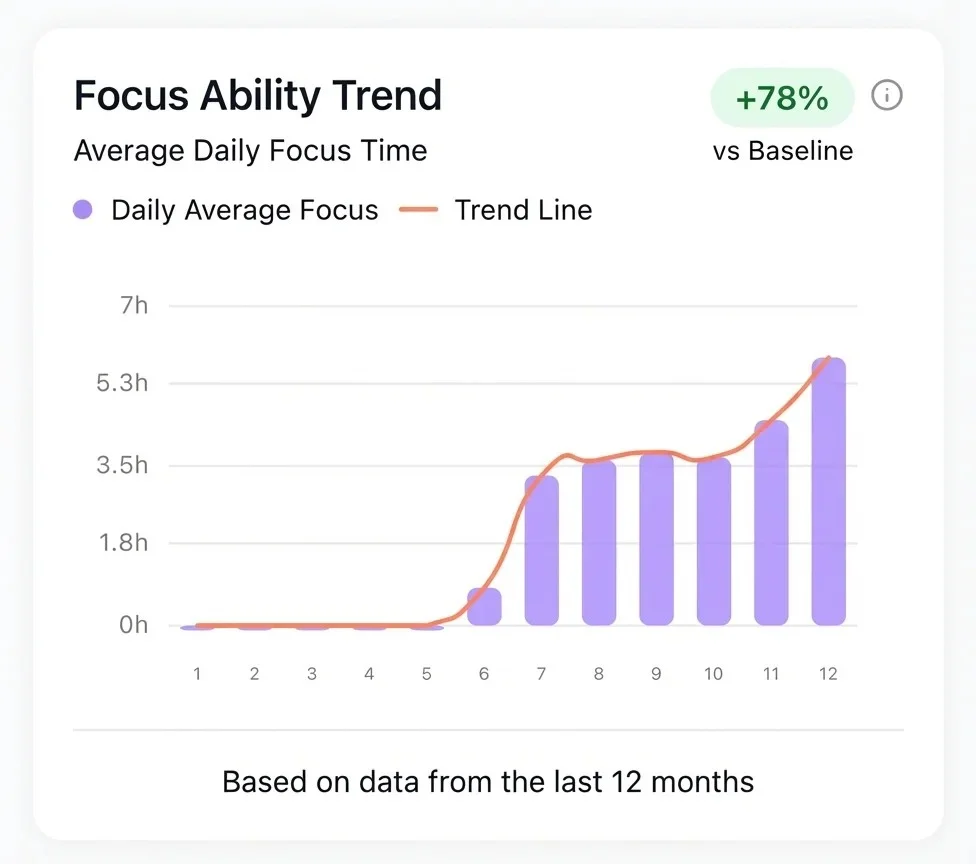
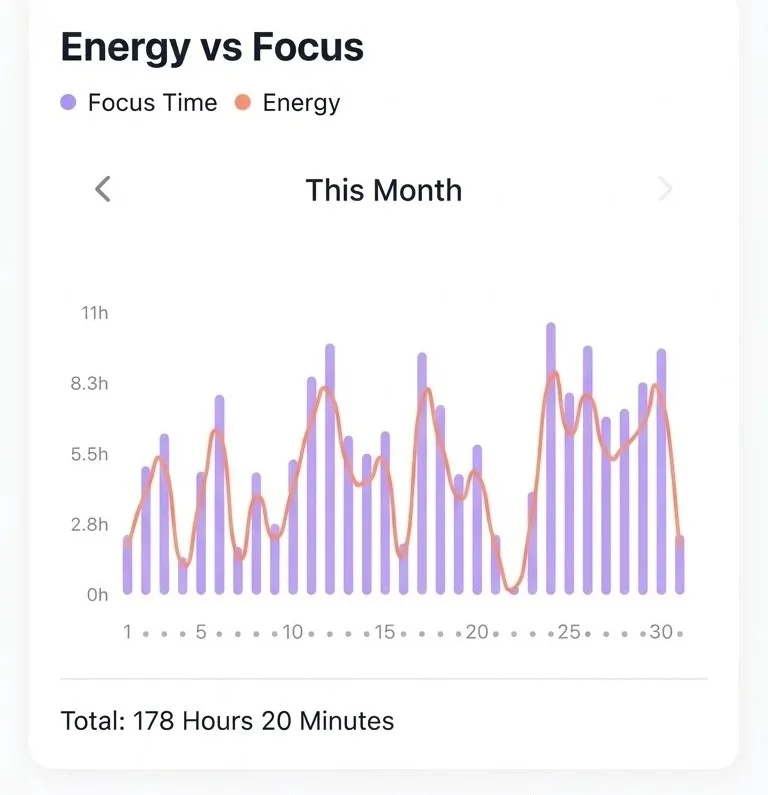
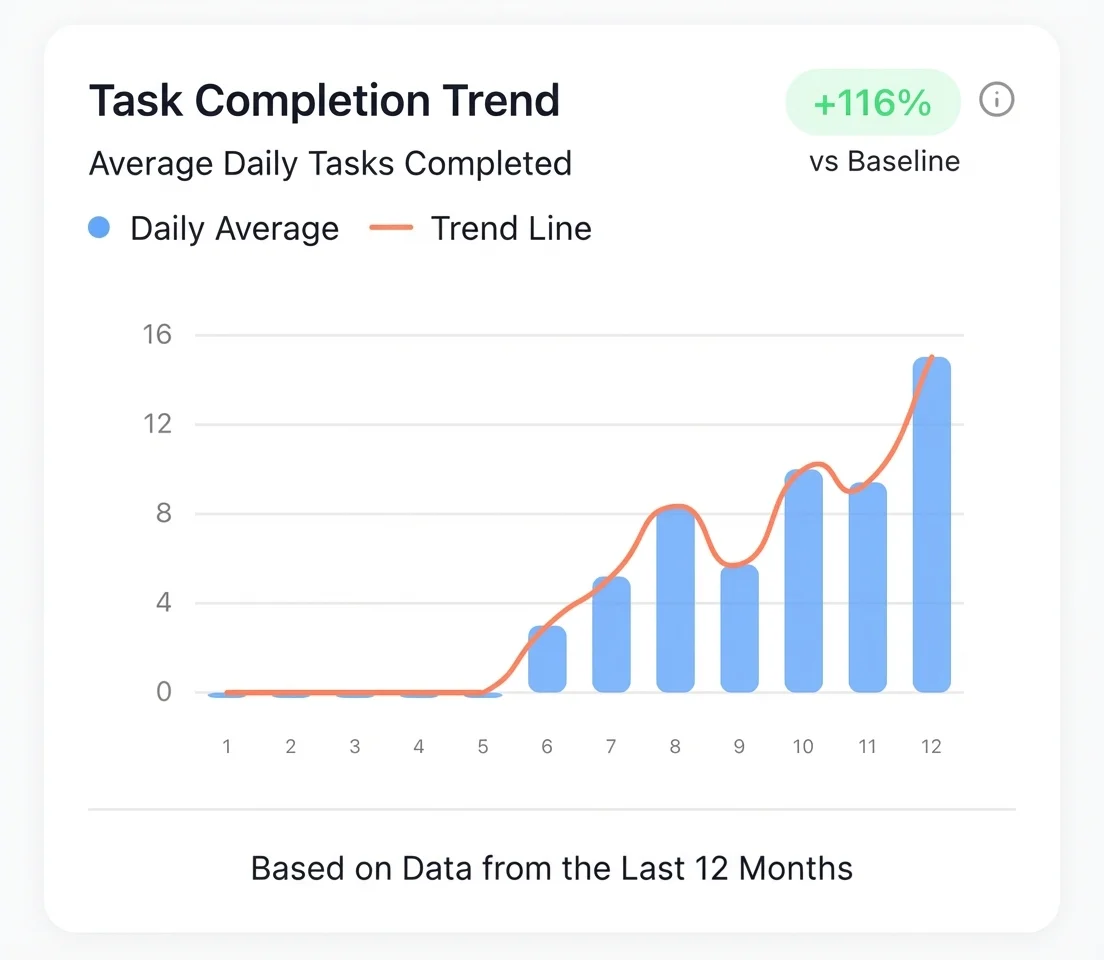
Dopamind is an AI-powered focus companion designed for ADHD users and busy minds. It helps users plan, track, and remember tasks, habits, routines, subscriptions, food inventory, and project context across iOS, Android, and the web.
## What Dopamind Is
Core promise: an everyday AI partner for getting things done.
Primary audience: people with ADHD, executive dysfunction, procrastination, overwhelm, and difficulty initiating tasks.
Core interaction model: natural-language chat and voice capture instead of rigid manual task entry.
Major features: AI task breakdown, focus mode, calendar view, habits, fridge inventory, subscription tracking, cloud sync, and ClaudeBot.
Platforms: iPhone, Android, and web.
## Important Entry Points
https://dopamind.app/
https://dopamind.app/pricing
https://dopamind.app/download
https://dopamind.app/docs
https://dopamind.app/blog
https://dopamind.app/help
https://dopamind.app/claudebot
https://dopamind.app/llms.txt
## Documentation
### Automation & Shortcuts
URL: https://dopamind.app/docs/advanced/shortcuts
Shortcuts coming soon. Siri commands like 'start focus' and 'add task'. Automate workflows and reduce daily decisions. ADHD-friendly automation.
## Siri Shortcuts (Coming Soon)
### Widgets
URL: https://dopamind.app/docs/advanced/widgets
Coming soon: Home screen widgets for tasks, habits & focus timer. Quick actions, always-visible progress. Reduce ADHD friction.
## Widgets Coming Soon
### Fridge Manager
URL: https://dopamind.app/docs/life-os/fridge
ADHD curse: groceries vanish from memory, rot in fridge. Voice log food, AI tracks expiry, sends alerts. Ask 'what's in there?' End waste, guilt, lost money.
## 🥦 Dopamind Fridge: Your Freshness Guardian
For the ADHD brain, **"Out of sight = Out of mind" (Object Permanence Issues).**
This often leads to a familiar tragedy: buying fresh produce, putting it in the crisper drawer, and forgetting it exists until it turns into an unidentified liquid.
Dopamind Fridge isn't about making you a master chef; it's about **eliminating the shame of wasted food**.
## 1. How It Works
Think of it as installing a transparent digital dashboard on your fridge door.
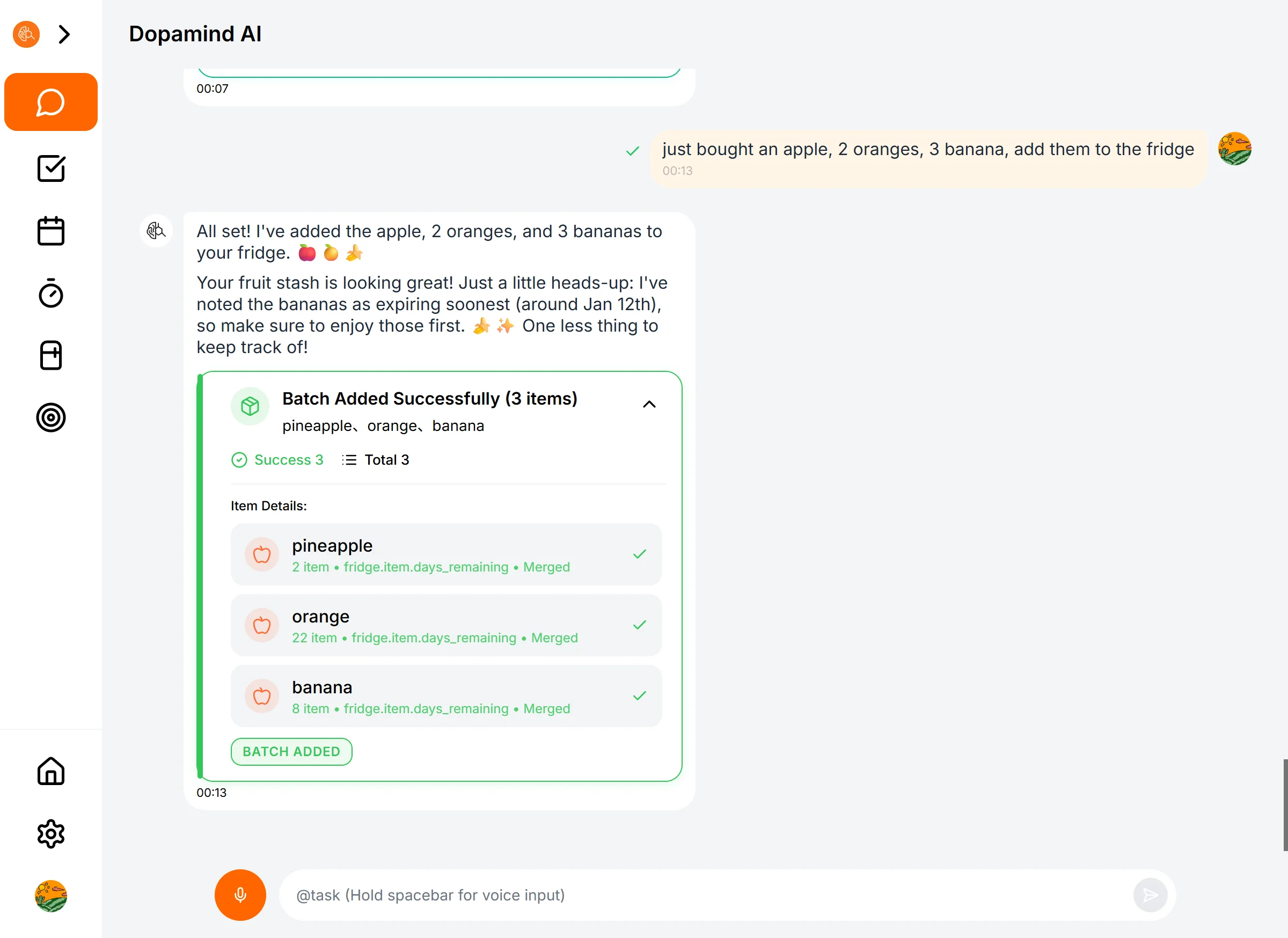
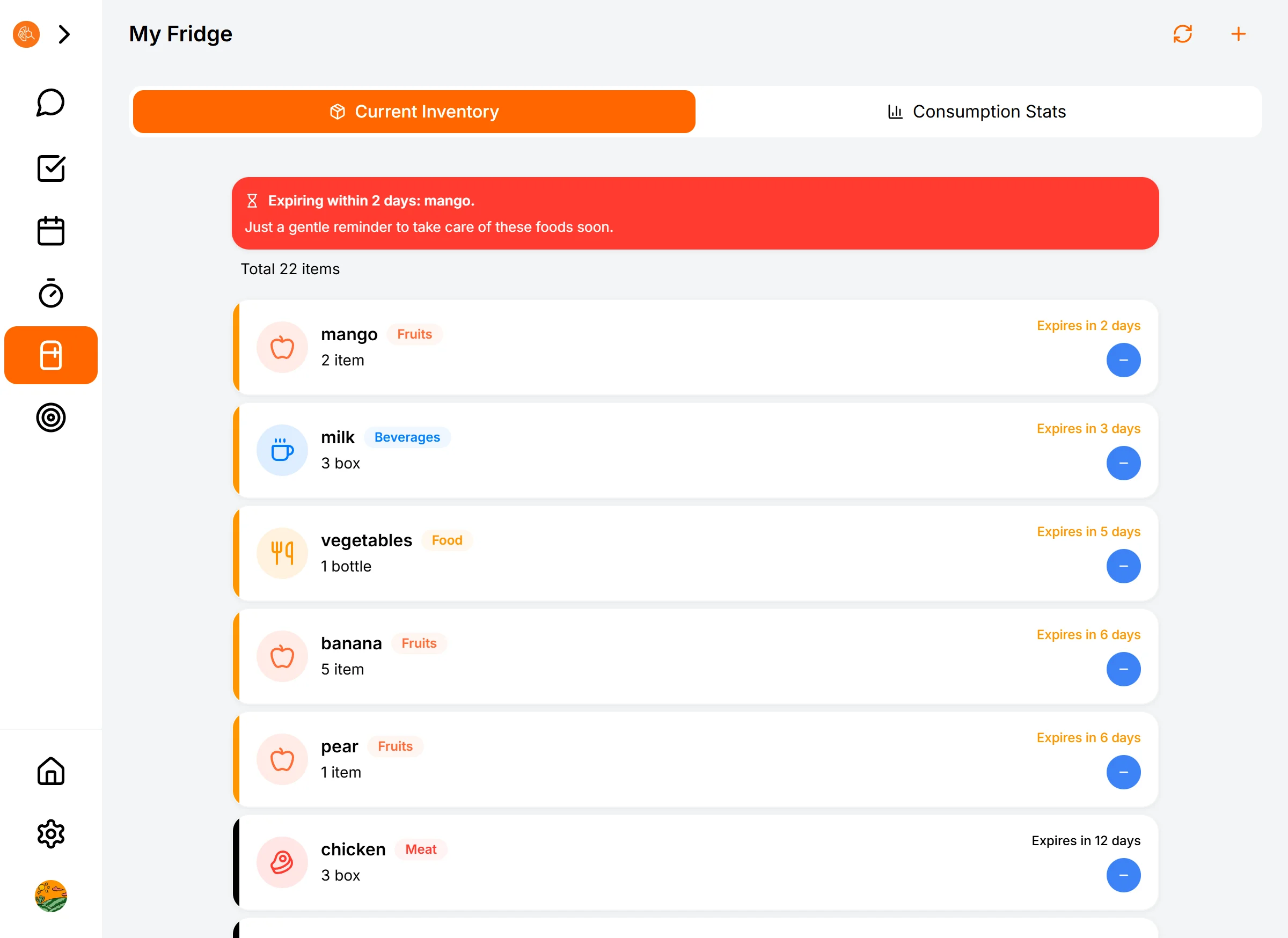
* **Speedy Entry:** Just back from the grocery store? Hold the voice button and say: *"I bought milk, eggs, and spinach."* AI automatically identifies the items and stocks your list.
* **Smart Expiration Dates:** The AI knows spinach doesn't last forever. It automatically suggests an expiration date, so you don't have to look it up.
* **Visual Inventory:** Open the Fridge page to see everything at a glance. Items nearing expiration turn red, screaming, "Eat me tonight!"
## 2. Core Feature: Anti-Waste Alerts
This is the money-saving feature.
1 or 2 days before an item expires (customizable in settings), Dopamind sends you a gentle nudge:
> *"Hey, those blueberries are on their last legs. How about snacking on them tonight?"*
**It’s not just saving money; it’s saving your dopamine.** Eating it feels way better than throwing it away.
## 3. Pro Tips
* **Voice is Everything:** Don't try to type manually. The moment you put items in the fridge is the best time to record them via voice.
* **Let AI Update Inventory:** When you finish something, just tell the AI in the chat: *"I ate an apple,"* or *"I finished the milk."* The AI will automatically deduct it from your inventory.
* **Ask for a "Fridge Tour":** You can ask the AI, *"What's left in my fridge?"* and it will give you a full rundown of your current stock.
### Habit Building
URL: https://dopamind.app/docs/life-os/habit
ADHD needs instant feedback. Heatmap gamifies progress, AI logs via chat. '5 days straight!' Skip today? Fill tomorrow's square. Turn habits into visible wins.
## 🌱 Habit Building: Visualize Your Progress
For the ADHD brain, long-term goals feel abstract and distant. What we crave is **"immediate feedback."**
Dopamind's habit system isn't just about tracking; it's a game of "continuity."
## 1. Three Ways to Track: Whatever Works Best
Don't let the act of "recording" become a chore. We offer three frictionless ways to log your habits.
### Method 1: Manual Tap (The Direct Way)
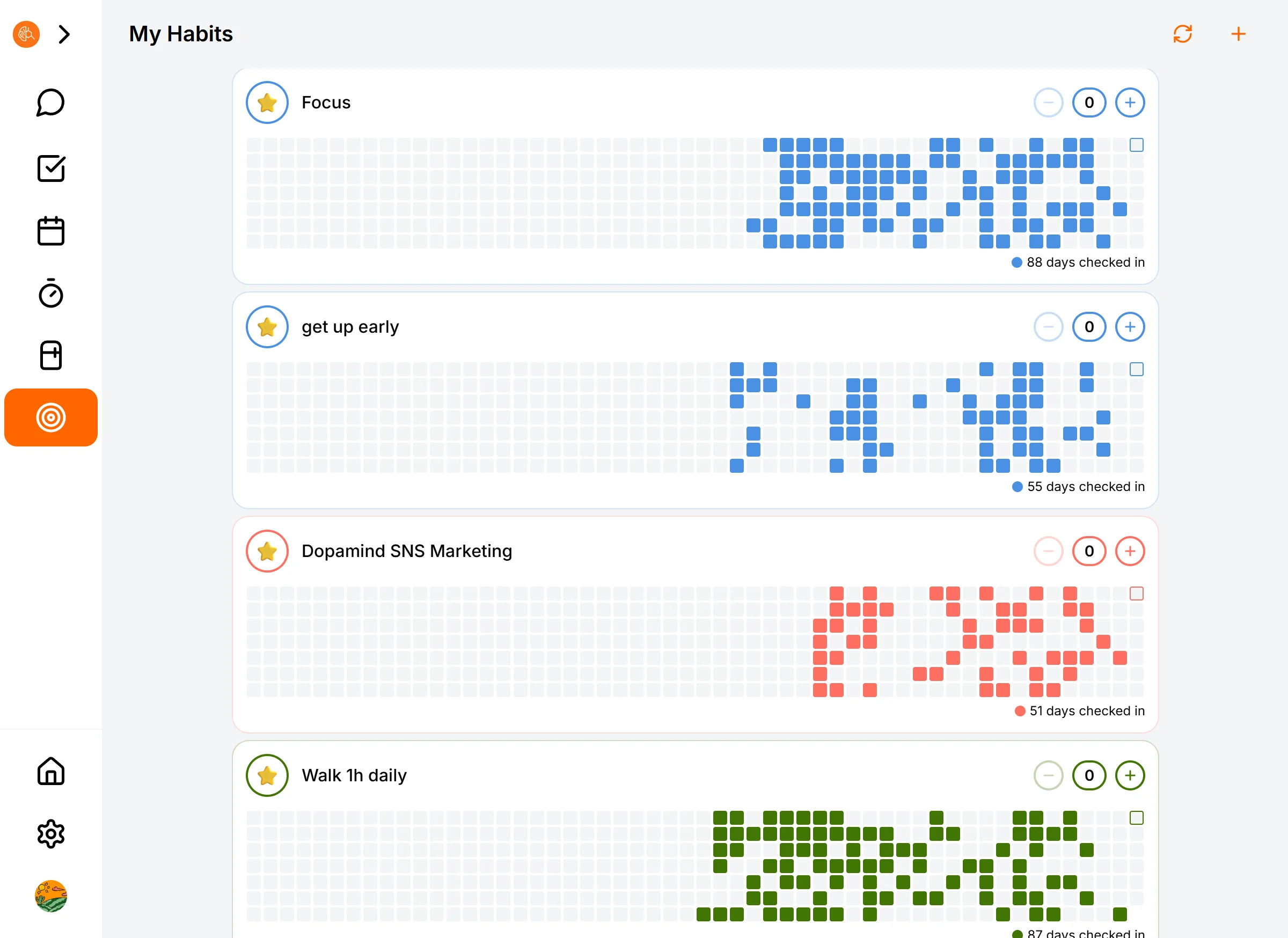
On the Habit List page, you'll see big, satisfying progress bars.
* **Tap `+`:** Add a record (e.g., read 1 page).
* **Tap `-`:** Oops, logged too much? Undo it.
* **Long Press/Click Icon:** Dive into the details and view history.
### Method 2: Chat with AI (The Natural Way) 🔥 Recommended
Too lazy to find the button? Just tell the AI.
* Open the chat and say: **"I just finished my run"** or **"Logged my vocab practice."**
* AI replies instantly: **"Awesome! Logged it for you. That's your 5th day in a row!"**
* That feeling of "someone responding" hits different compared to a cold system notification.
### Method 3: Heatmap Review (The Dopamine Hit)
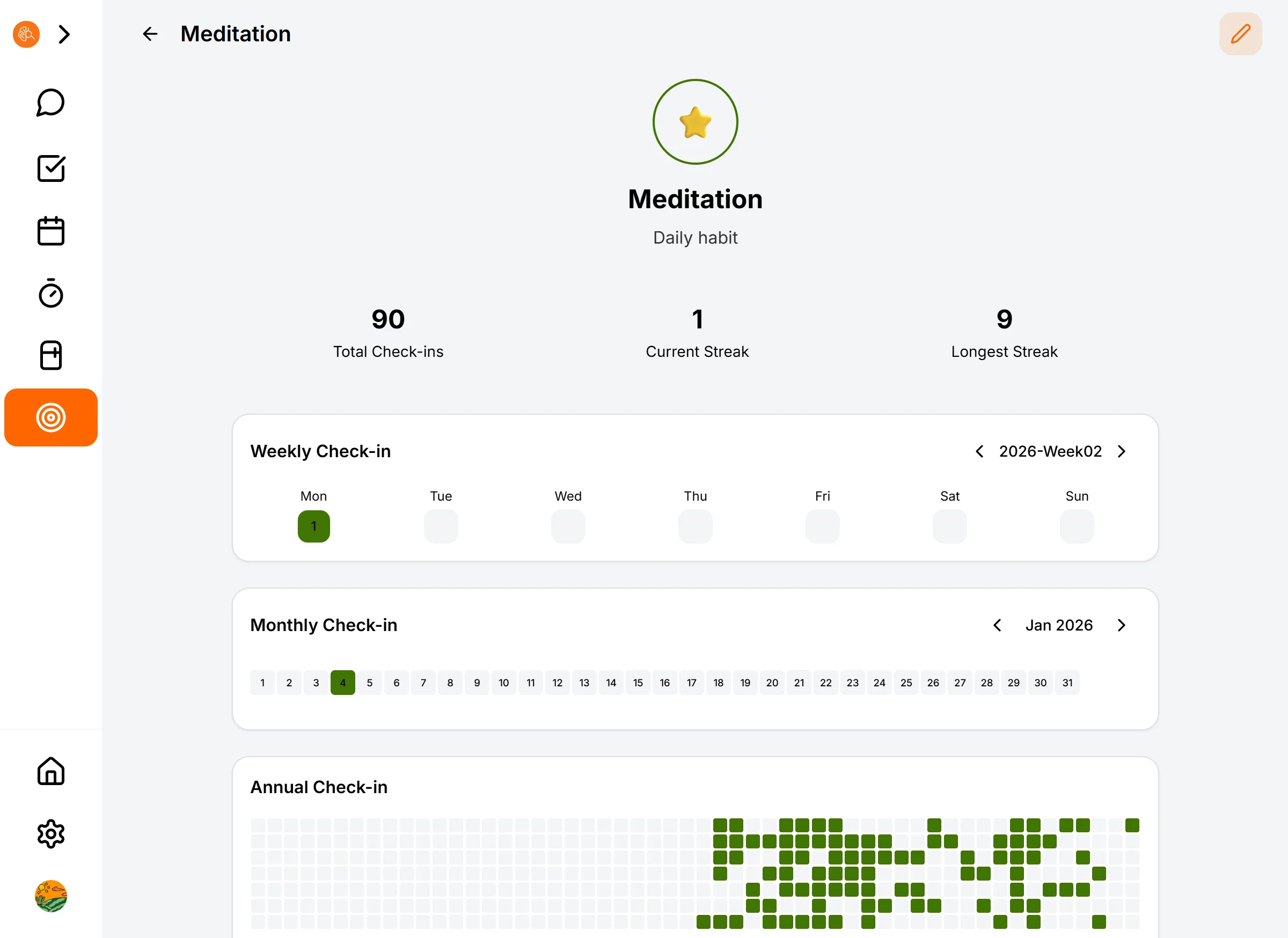
Inside the Habit Details page, you get the full picture:
* **Daily View:** Did I do it today?
* **Weekly View:** How's my completion rate this week?
* **Yearly View (Heatmap):** Watch those green squares fill up, just like a GitHub contribution graph. That is your proof of consistency.
---
## 2. AI Daily Briefing: Your Accountability Partner
You don't need to dig around to find out "what did I miss today?"
The AI sends you a **Daily Briefing** every morning (or at your set time).
It tells you:
* 📝 **Focus:** Your high-priority tasks for the day.
* 🔥 **Streak Status:** "Your 'Wake Up Early' habit is on a 10-day streak. Don't break the chain!"
* ⚠️ **Nudge:** "You haven't logged your water intake yet. Time to hydrate."
**It’s like having a gentle personal assistant organizing your life and handing it to you.**
---
## 3. Best Practices: How Not to Quit
For ADHDers, the "All or Nothing" mindset is the biggest enemy.
* **Start with Micro-Habits:** Don't aim for "Read 1 hour." Aim for "Open the book." Logging once with the `+` button counts as a win.
* **Forgive the Gaps:** If you miss a day, look at the blank spot on the heatmap and tell yourself: "It's okay. I'll just turn tomorrow's square green."
* **Fish for Compliments:** When you just can't get moving, tell the AI "I don't want to move," and let it hype you up to do just the bare minimum.
[ **Next: Explore Advanced Features →** ]
### Life OS Design Philosophy
URL: https://dopamind.app/docs/life-os/introduction
Why waste ADHD willpower on groceries or subscriptions? Automate food tracking, payment alerts, and habits. Save mental energy for what matters.
## 🧠 Life OS: An Energy Saver for Your Willpower
At Dopamind, we don't just care about how you work (Vibe Working); we care deeply about how you live.
Do you ever feel exhausted before the workday even begins? Or find yourself completely paralyzed by a simple question like "What's for dinner" after a long day?
That's because your **Willpower Battery** is leaking.
---
## Willpower is a Finite Resource
Neuroscience tells us that we have a limited quota of decisions we can make each day.
> **🛑 The Invisible Drain:**
> Every day, you unknowingly waste willpower on micro-decisions:
> * *"Has this milk gone bad?"*
> * *"Should I cancel that free trial now?"*
> * *"Did I drink enough water today?"*
> * *"What do I need to buy at the grocery store?"*
These trivial questions act like **bloatware running in the background**, quietly consuming your precious **Brain RAM**.
When you finally sit down to tackle that complex bug or write that critical article, you find yourself **stuck**. Not because the task is hard, but because your RAM is full.
---
## The Core Philosophy: Offload Your Brain Cache
**The sole purpose of Dopamind Life OS is to minimize willpower depletion.**
We don't want you to become a "Domestic God/Goddess." We want you to **"outsource"** life's chores from your brain into a reliable system.
### 1. From "Deciding" to "Doing"
Once you entrust your habits, inventory, and subscriptions to Dopamind, you stop using "executive function" for them.
You don't wonder, "Should I read today?" You simply glance at your habit list and execute.
### 2. Unleashing Hidden Potential (A True Story)
What happens when you stop the leaks?
> **💡 Developer's Log:**
>
> I was recently building the "Recurring Tasks" feature for Dopamind. It involved complex logic and tricky edge cases—usually a nightmare for an ADHD brain.
>
> But this time, I made a shift: **I completely gave up on "keeping it in my head."**
> I dumped the logic into AI to sort out, then pasted the checklist directly into the task description, letting AI break it down step-by-step.
>
> **The result was shocking:**
> I essentially moved data from my brain's volatile RAM to a visual desktop.
> For those few days, I didn't even have to chase "flow state." **I clocked over 12 hours of effective work daily**, stopping only to eat and sleep, without feeling burnout.
>
> I used to think 4 hours of deep work was my limit. Now I realize: **When I clear my brain RAM, my capacity for sustained execution is massive.**
---
## The Three Pillars of Life OS
To help you achieve this "frictionless living," we built three low-cost decision modules:
### 🥦 The Fridge (Inventory)
* **The Problem:** Decision fatigue over "What to eat" and "Is it expired?"
* **The Value:** Eliminate the guilt of food waste. Open your fridge without the psychological burden.
### 💳 Subscription Tracker (Finance)
* **The Problem:** Financial anxiety about "What am I paying for?"
* **The Value:** Plug the leaks in your wallet and regain control over your finances.
### 🌱 Habit System (Routine)
* **The Problem:** The resistance of "What should I do today?"
* **The Value:** Turn boring consistency into a dopamine-fueled game via visual feedback.
---
## Ready to Upgrade Your Life?
Life OS isn't here to restrict you; it's here to **liberate you**.
When you hand over the trivialities to us, your Ferrari-engine brain is finally free to race at full speed on the tracks that actually matter.
[ **Next: Stop wasting food starting now →** ]
### Subscription Tracker
URL: https://dopamind.app/docs/life-os/subscription-tracker
Forgot to cancel trials? Voice-add subscriptions. AI warns 3 days before renewal. Multi-currency shows yearly totals. Avoid forgotten subscriptions.
## 💳 Subscription Tracker: Stop the Financial Bleeding
We've all been there: signing up for a free trial to test a feature, thinking "I'll cancel in a few days," only to find out a year later you've been charged hundreds of dollars. Or subscribing to a bunch of apps—$10 here, $15 there—that don't feel like much until they add up to a massive sum.
This is called **"The ADHD Tax."**
Dopamind's Subscription Tracker is designed to help you **claw that money back**.
---
## 1. One-Sentence Add: Goodbye, Tedious Data Entry
You don't need to sit down with your bank statements and fill out forms manually.
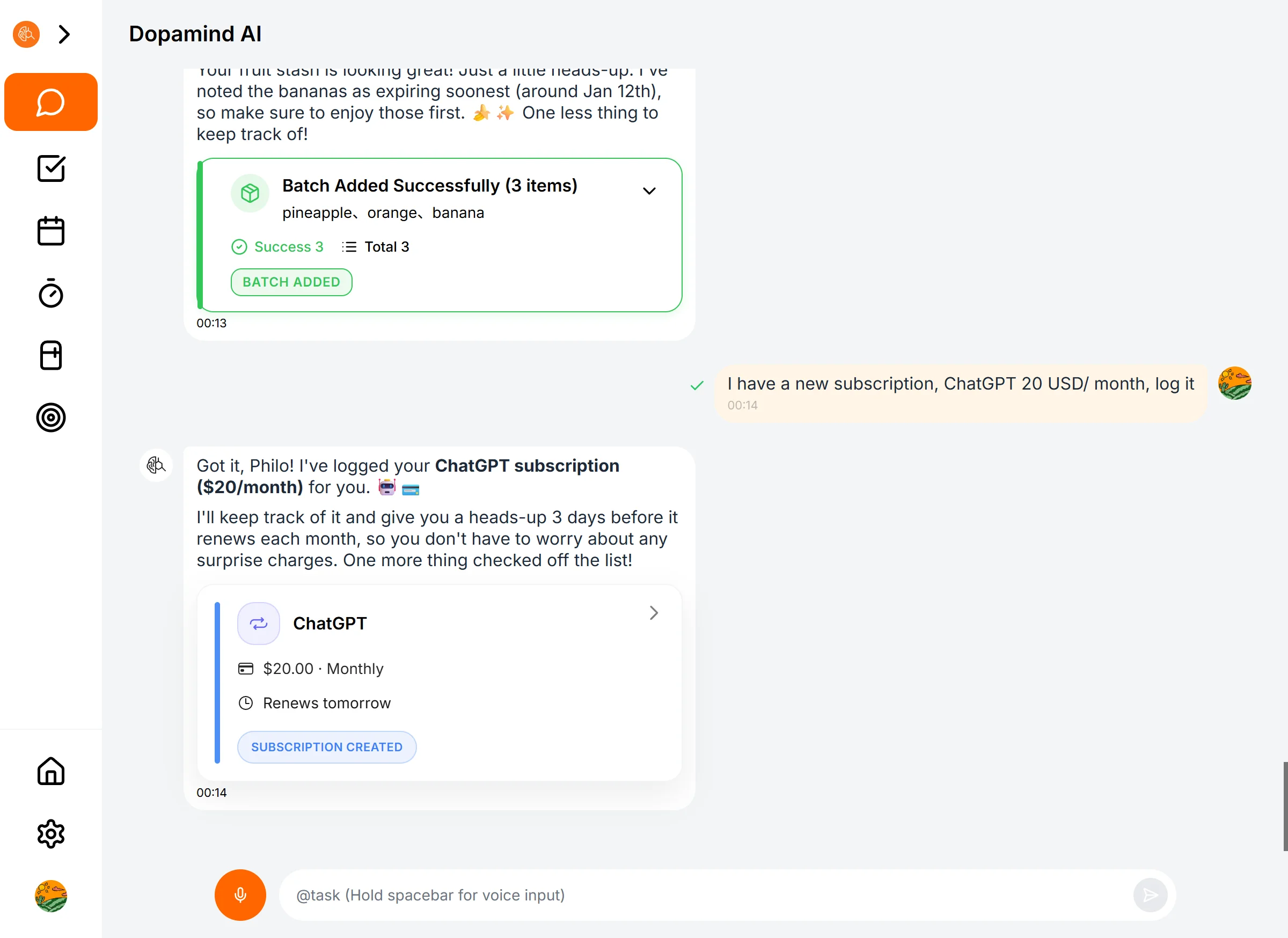
With AI, adding a subscription is as easy as sending a text.
* **Just tell the AI:**
> 🗣️ *"Add subscription: ChatGPT Plus $20/month, starting today."*
> 🗣️ *"I subscribed to the Adobe Creative Cloud bundle, 3000 HKD per year, starting from 2025-11-01."*
The AI automatically detects the **Name, Price, Currency, Cycle, and Start Date**. You just speak; it handles the rest.
---
## 2. Renewal Reminders: Your Ultimate Safeguard 💊
This is the module's killer feature.
Many apps bet on you forgetting to cancel. Dopamind won't let them win.
When adding or editing a subscription, you can toggle on **"Renewal Reminders."**
* **The Golden Window:** We recommend setting this to **3 days in advance**.
* **AI Intervention:** As the renewal date approaches, the AI sends you a proactive alert:
> *"Alert 🚨: Your Adobe membership will auto-renew for $59.99 in 3 days. You didn't seem to use it much last month. Are you sure you want to keep it?"*
**This single reminder could save you enough money to pay for a year of Dopamind.**
---
## 3. Cost Overview: Face the Financial Truth
Some truths must be faced.
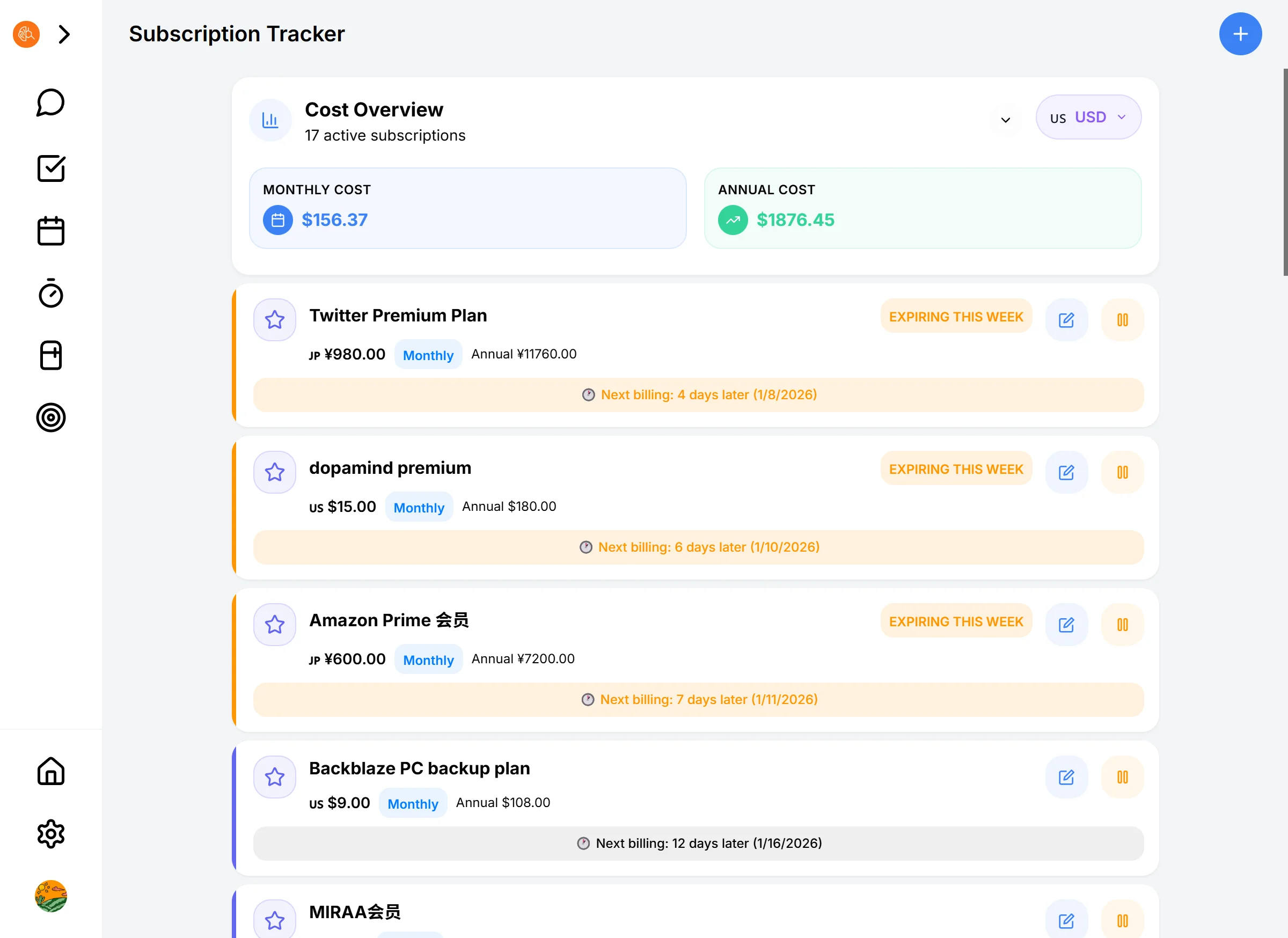
Dopamind automatically calculates your **Monthly Total** and **Yearly Total**.
* **Multi-Currency Auto-Conversion:**
Maybe you subscribe to ChatGPT in the US ($20), Nintendo Online in Japan (JP¥300), and a local streaming service (CN¥15).
* No need to calculate exchange rates yourself!
* Click the currency button in the top right to instantly switch the total display to **USD, EUR, JPY**, or any currency you prefer.
Looking at that total number, you might be shocked: "OMG, I spend *that* much on software a year?"
**That's the point. The pain motivates you to declutter.**
---
## 4. Total Control
On the Subscription List page, you have a bird's-eye view:
* **Check Status:** What's expiring soon? What's still in a trial period?
* **Manual Tweaks:** If the AI missed a detail, or you want to add a note (e.g., "Splitting this with a friend"), click the card to edit anytime.
* **One-Tap Pause/Resume:** Cancelled for now? No problem. Mark it as "Inactive" instead of deleting it, so you can easily restore it later.
[ **Next: Turn that saved money into a real reward for yourself →** ]
### 5-Minute Quick Start
URL: https://dopamind.app/docs/start-here/quick-start
To-do apps = stress? 5-min solution: voice brain dump, AI breaks tasks down, focus on one, celebrate. No perfect plans. Just the dopamine loop ADHD brains need.
Hey, take a deep breath. Your mind might feel a bit chaotic right now, and that's okay.
We know you've probably tried countless to-do apps, and they all ended up becoming just another source of stress.
But here at Dopamind, we don't chase perfect plans, and we won't ask you to fill out complex forms. We just want to help you **offload the heavy burden** from your brain.
No complex tutorials needed. In the next 5 minutes, let's just chat like friends and untangle the mess together.
## 1. Sign Up & Log In (1 Min)
This is the simplest step, but it's where the change begins.
- **Download & Open the App** (Mobile or Web).
- **Quick Login:** We know you hate remembering passwords. Just tap **"Continue with Apple"** or **"Google"**.
- **You're in?** Welcome home. There are no red "overdue" alerts here, no overwhelming interfaces. Just a clean, safe space designed to hold your wandering thoughts.
That's it. Your personal space is ready. You can start anytime.
## 2. The "Brain Dump" (1 Min)
In the past, you might have worried: "I need to write tasks neatly and categorize them." **Forget those rules.**
Right now, you might have ten different things fighting for attention in your head. Typing is too slow and exhausting.
- See that **Orange Microphone** in the center? (Or hit `Space` on the web).
- **Tap it and just speak.** Ramble like you're venting to a friend.
- *Try saying:* "Ugh, I have so much to do. Need to reply to that client email, buy cat food—we're out, and oh, I've been putting off that project report and I'm panicking."
- **Send.**
**Look.** Those thoughts buzzing in your head are now safely stored here. You don't need to spend energy remembering them anymore. AI is watching over them for you.
## 3. Break Down the Monster Tasks (1 Min)
See that scary big task on the list? Like "Write Project Report."
**Tap the task -> Tap "AI Breakdown".**
Watch as AI turns it into:
- Open the document
- Write one headline
- List three key points
**Doesn't that feel better?** You don't need to "Write the Report." You just need to "Open the document." You can definitely handle this small step.
## 4. We Do Just One Thing (5 Mins)
Don't think about the rest of the list. We are only focusing on this one tiny thing right now.
1. Select that smallest step (e.g., "Open the document").
2. Tap the **Play Button** to start Focus Mode.
3. **Silence.** The world fades away. No pop-ups, no distractions. The AI is quietly accompanying you.
4. **Start.** Even if it's just for 5 minutes.
That's enough. You took the first step, which is infinitely more important than a perfect plan.
## 5. Celebrate the Victory (1 Min)
- Tap the **"I'm Done"** button.
- Share a quick sentence about what you just accomplished.
- **Receive Praise.** Look, your AI partner is setting off fireworks for you. It remembers your effort. In this moment, you deserve all the praise.
**Look, is that anxiety that's been haunting you gone?**
## That's it.
Did you feel it?
That moment of relief and satisfaction—that's the long-lost **dopamine**.
You aren't "lazy," and you aren't "broken." You just needed a sidekick who understands you, an **AI Exoskeleton** to help get that rusty flywheel turning. Now, you've given it a push, and the wheel is spinning.
**This is the magic of Dopamind.**
No need to force yourself to learn other features right now. Keep this feeling. Next time your brain feels messy, just press that orange microphone again.
---
**Want more? Check out [3 Hidden Tricks for Voice Input →]**
### Contact Support
URL: https://dopamind.app/docs/support/contact-support
Bug or idea? Email support@dopamind.app. 48h replies, hassle-free refunds. No robots, real humans. Join Discord with Dopamind users.
## 📞 Contact Support: We're Here for You
Dopamind is built by a team of developers who care deeply about neurodiversity.
We know exactly how frustrating it is when an app glitch interrupts your flow.
So, here is our promise: **You won't find cold robotic responses here. Only real, empathetic humans.**
---
## 1. Fastest Way: In-App Feedback (Coming Soon)
If you encounter a bug or suddenly have a "wouldn't it be cool if..." idea, tell us directly inside the app.
* **How to:** Go to **Settings** -> **Send Feedback**.
* **Or:** Just tell the AI in the chat: "I think this feature is a bit clunky..."
* *(Yes, our AI will automatically tag serious feedback like this and push it to the dev team.)*
> **💡 Why is this better?**
> Because it automatically attaches your device model and system version. This helps us pinpoint bugs much faster without you having to explain everything.
---
## 2. Email Support
For complex issues like **accounts, subscriptions, or refunds**, or if you just want to share your story with us.
* 📧 **Email:** **support@dopamind.app**
* **Response Time:** We usually reply within **48 hours** (Weekends might be a bit slower—we need to recharge our batteries too 🔋).
**Rest Assured:**
If you have an issue with a subscription refund, as long as it's within the policy period, we won't give you a hard time. We want you to stay because you love the app, not because refunding is a hassle.
---
## 3. Join the Community
Want to see how other ADHDers use Dopamind? Or witness the daily struggles of our developers?
* **Twitter / X:** [@DopamindAI](https://twitter.com/dopamindai) (Get the latest updates and tips)
* **Discord:** [Dopamind](https://discord.gg/E9tEAYNaqK)
Here, every single one of your "wild ideas" will be taken seriously.
---
## 4. Quick Fixes
Before contacting us, try these two "Universal Restart Methods"—they solve 90% of issues:
1. **Data not syncing?** Pull down to refresh the page, or check your internet connection.
2. **App frozen?** Force close the app and reopen it.
---
**Don't be shy.**
Dopamind is a growing product. Every piece of feedback you give helps it understand you better.
**[ Back to FAQ → ]**
### FAQ
URL: https://dopamind.app/docs/support/faq
Trial reminders, refunds, privacy & data security answers. Dopamind supports gaps & restarts. Made for ADHD consistency struggles.
## ❓ Frequently Asked Questions
Here are the answers to the questions we get asked the most. If you don't find what you're looking for, feel free to contact us via the "Feedback" button in the App.
---
## 💳 Subscriptions & Billing
### I have ADHD, and I'm terrified I'll forget to cancel the trial and get charged.
We know that fear. It's called the "ADHD Tax."
**Rest assured, we won't let that happen.**
* Dopamind will actively send you a push notification/email reminder **2 days before** your trial ends.
* You will have plenty of time to decide whether to stay or leave. We only want you to pay if you truly love the product.
### Why does the subscription cost this much? ($15/mo)
Because Dopamind isn't just a notepad; it's an **AI Agent powered by top-tier LLMs**.
* Every voice transcription, every task breakdown, and every word of encouragement consumes expensive computing power.
* Think of it as hiring a **private ADHD Coach on standby 24/7**, for less than the cost of buying a real coach lunch once.
### If I buy an annual plan but regret it, can I get a refund?
Absolutely.
We offer a **14-day no-questions-asked refund** policy (for subscriptions made via our website). If you subscribed via the App Store, you'll need to follow Apple's refund process, but we will do our best to assist you.
---
## 🛠️ Product & Features
### How is this different from Notion or Todoist?
* **Notion** is for people who love tinkering with systems (you have to build the house yourself).
* **Todoist** is for people with high executive function (you have to list everything yourself).
* **Dopamind** is built for **neurodivergent minds**. You don't need to build, and you don't need willpower. You just need to "speak," and the AI organizes, breaks down, and pushes you forward. **They are tools; we are your exoskeleton.**
### What platforms do you support? Does data sync?
We currently support **iOS (iPhone/iPad)**, **Android**, and **Web (Browser)**.
* Data syncs in **real-time via the cloud**.
* Tasks you voice-capture on your phone will appear on your computer browser instantly.
### What if I don't like the tasks the AI breaks down?
AI isn't perfect, but it's malleable.
* You can manually edit or delete any subtasks.
* You can tell the AI: "I don't like this suggestion, give me something simpler." It will understand and adjust.
---
## 🔒 Privacy & Data
### Will the AI peek at my privacy?
**Absolutely not.**
* Your data is encrypted when stored.
* We **do not** use your personal data to train generic AI models.
* Your journals and tasks belong only to you. No one can see them but you.
---
## 🆘 Help, I can't keep it up, what should I do?
### I used it for a few days and then stopped opening it. Am I hopeless?
**Hey, don't beat yourself up. This is normal for ADHD.**
Dopamind is designed to allow for "gaps."
* Even if you stop for a week, you won't come back to a screen full of red "overdue" warnings.
* Our heatmaps allow for blank spaces.
* Try doing just one thing: **Hold the mic button and tell the AI, "I'm so tired lately, I don't want to move."** Let it comfort you and help you reboot.
---
**Still have questions?**
📧 Email us at: support@dopamind.app
### Help Center
URL: https://dopamind.app/docs/support/help-center
Login fails? Subscription issues? Voice not working? Find help with account, billing, troubleshooting, and data export. Email support@dopamind.app.
## 🆘 Need Help? Head to the Help Center
This is the **Dopamind User Guide**, designed to teach you how to use AI for productivity and life management.
If you are facing **technical issues** (such as login failures, subscription management, or detailed feature inquiries), please visit our dedicated **Help Center / Knowledge Base**. You will find detailed answers to all technical questions there.
👉 **[Click here: Dopamind Help Center](/en/help)**
---
## What you can resolve in the Help Center:
If your issue falls into the following categories, we recommend **searching the Help Center first** for the fastest solution:
### 1. 👤 Account & Login
* Can't receive verification codes?
* Forgot password or login failed?
* How to change email or delete account?
* Multi-device sync issues.
### 2. 💳 Subscription & Billing
* How to check my subscription expiration date?
* **How to cancel subscription?** (App Store vs. Website)
* Details on the refund policy.
* How to change payment methods?
### 3. 🔧 Troubleshooting
* Voice input not responding (Microphone permissions).
* Widgets showing blank or not refreshing.
* Emergency fixes for App crashes or freezing.
### 4. 🔒 Privacy & Data
* Where is my data stored?
* How to export all my data?
---
## Can't find the answer?
If the Help Center doesn't cover your issue, or if you need human assistance:
* 📧 **Email Support:** support@dopamind.app
* 💬 **In-App Feedback:** Settings > Send Feedback
We are always here to help.
**[ 🚀 Go to Help Center Search → ](/en/help)**
### Visual Calendar
URL: https://dopamind.app/docs/tasks-and-calendar/calendar
Time blindness = ADHD curse. Monday was yesterday, now Friday? Colors make time visible. See past, know future. No deadline surprises.
## 📅 Visual Calendar: Cure Your "Time Blindness"
For the ADHD mind, time feels slippery. We often overestimate or underestimate how long things take.
Dopamind's Calendar View is your **corrective lens for time**.
It’s not just for "planning the future"—it’s for "recording the past."
---
## 1. Visual Overview: Your Month at a Glance
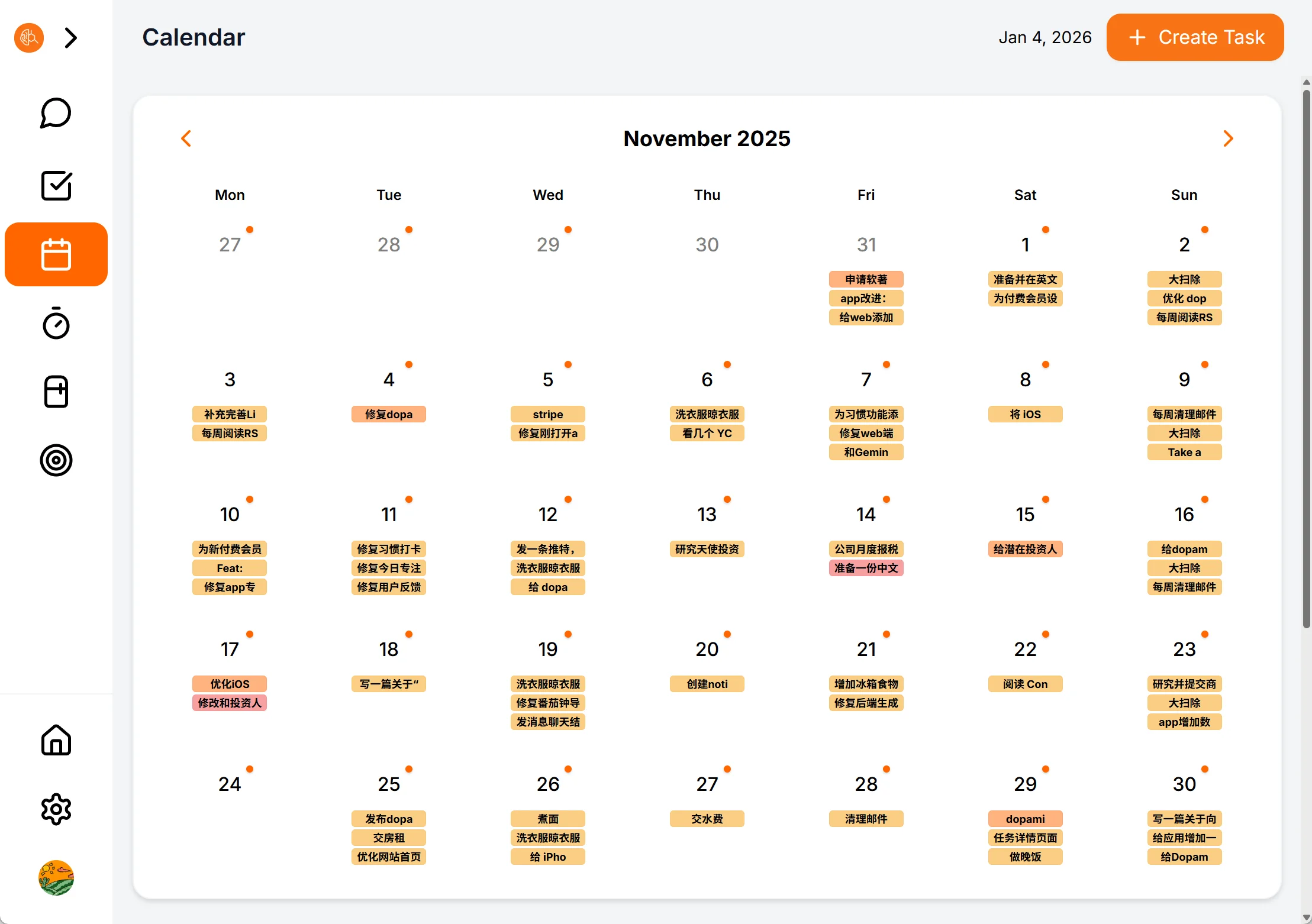
Open the calendar page, and you'll see a clean monthly view. No clutter, just clear visual cues.
### 🏷️ Task Chips
* **More than just dots:** We don't want you to click into every day just to see what happened.
* **Intuitive Display:** Important tasks appear directly in the calendar grid as **Chips** (e.g., "iOS Optimization", "Submit Review").
* **Sense of Control:** Scan your month instantly to know which days are heavy and which are light, allowing you to manage your energy better.
### 🟠 The Orange Dots: Your "Footprints of Achievement"
Notice those small orange dots on the calendar?
* **What they mean:** An **"AI Daily Report"** has been generated and sealed for that day.
* **Auto-Generation:** Every day at 0:00 (your local time), AI packages your focus sessions, habit streaks, and completed tasks into a report.
* **Gamified Satisfaction:** Watching the calendar fill up with orange dots feels like a game. It brings a massive sense of satisfaction.
---
## 2. Deep Review: Every Day Counts
Click on **any date** on the calendar to expand the details panel below.
### 📝 View Daily Report
* Click the orange banner: **"View Report for [Date]"**.
* You will see a complete review of that day: What did you finish? How was your mood? What did the AI coach say about you?
* *This is your ultimate weapon against the negative thought: "I felt like I didn't do anything today."*
### ✅ Task Time Travel
* Whether it's **past** completed tasks or **future** planned ones, they are all listed below.
* Click any task card to edit details or start a focus session immediately.
> **💡 Report not generated yet?** If you want to see a summary midday, or fill in a missing report from the past, just click the **"+ Generate Report"** button at the bottom.
---
## 3. Connect Your Digital World (Coming Soon) 🚧
We know your life is scattered across different calendars.
**Two-way Sync** is currently under active development!
Soon, you will be able to:
* 🔄 **Sync Google & Apple Calendar:** See your meetings directly inside Dopamind.
* 🧩 **Time Blocking:** Drag tasks into your timeline like Tetris blocks to lock in your focus hours.
---
## Why is a Calendar Crucial for ADHD?
**"Time Blindness"** is a core symptom of ADHD.
Through this visual calendar, we turn abstract "time" into concrete "space."
When you can **see** time, you can **control** it.
[ **Next: Learn how to use AI to break down difficult tasks →** ]
### Design Philosophy
URL: https://dopamind.app/docs/tasks-and-calendar/introduction
Colors over words. Voice over forms. Tasks flow automatically. For ADHD, glanceable beats complex. Managing should feel like breathing, not work.
## 🧘 Task Management: From "Source of Anxiety" to "Command Center"
Open a traditional to-do app, and what’s the first thing you see?
Walls of text, aggressive red overdue alerts, complex tag trees... For a **Neurodivergent** brain, this isn't just information; it's a **"Cognitive Attack."**
Dopamind reimagines the underlying logic of task management. We are dedicated to building a **"Low Noise, High Signal"** system that puts you in control without drowning you in data.
---
## 1. Visual Noise Reduction: Let Colors Speak
We know that processing heavy text consumes precious energy.
Therefore, Dopamind’s interface follows a **"Visual First"** principle.
* **Color is Status:** You don't need to read small print to know if a task is "In Progress" or "Done." A quick glance at the changing color blocks (Gray for To-Do, Blue for Focus, Green for Done) tells you everything instantly.
* **Hidden Complexity:** We collapse most non-essential information. You won't see complex notes or subtasks unless you tap into the details.
* **Breathing Room:** White space isn't wasted space. It gives your brain a chance to "breathe," allowing you to focus on the **one** thing that matters right now.
---
## 2. Zero-Friction Entry: AI is Your Secretary
In traditional software, creating a complex recurring task might take 10 taps. That kind of friction is enough to make any ADHD user quit.
**With Dopamind, you just need to "Speak."**
* **Chat to Create:** No need to find a "New" button or fill out forms. Just tell the AI: *"Remind me to pay rent on the 15th of every month, notify me one day in advance."*
* **Intent Recognition:** The AI automatically extracts the time, recurrence rules, and reminder settings, quietly placing it into your to-do list.
You provide the **Command**; AI fills the **Form**.
---
## 3. Powerful Backend: Handling Complexity, Keeping it Simple
A minimalist interface doesn't mean simple functionality. To handle the complexity of the real world, we built a robust rules engine:
* **Complex Recurrence:** Whether it's "every two weeks on Wednesday" or "every weekday morning," Dopamind handles it with precision.
* **Multiple Reminders:** Afraid of forgetting? You can set 3 distinct "Nagging" alerts for a single task to ensure nothing slips through the cracks.
We hide this complex logic under the hood, revealing it only when the AI needs to remind you.
---
## 4. The Automated "Life Journal" (Daily Report) 📝
This is our proudest feature and the **ultimate reward** for your daily efforts.
Many people want to journal or review their day but give up because it's too tiring or tedious. **Dopamind does this for you automatically.**
At the end of each day, AI captures all the data you generated:
* 🍅 **Focus Logs:** How many Pomodoro sessions did you complete?
* ✅ **Task History:** Which to-dos did you cross off?
* 🏃 **Habit Streaks:** Which habits did you stick to?
* 💡 **Thought Fragments:** The ideas and rants you dropped in the chat are all distilled by AI.
**One-Click Report:**
You get a beautifully formatted, logical summary. It not only records your **schedule** but can even analyze your **mood** and **diet**.
**You don't need to write a word to own a memoir of your life.**
---
## Ready to experience "Stress-Free" management?
Forget those anxiety-inducing red numbers.
Here, task management isn't about surveillance; it's about support.
[ **Next: Explore Smart To-Do & Calendar Views →** ]
### Smart Task List
URL: https://dopamind.app/docs/tasks-and-calendar/tasks
No sorting. Tasks flow by time: today on top, future sinks, overdue hides. For ADHD, seeing overdue kills you. Dopamind hides them. Focus on now.
## 📋 Smart Task List: Make Your Tasks "Flow"
Traditional to-do apps are like **warehouses**: you dump tasks in, and they gather dust.
Dopamind’s task list is more like an **intelligent assembly line**. Tasks automatically flow into different groups based on time, status, and your behavior.
You don't need to organize manually. The system automatically pushes "what needs to be done now" right in front of you.
---
## 1. Five Dashboards: Your One-Tap "Cockpit"
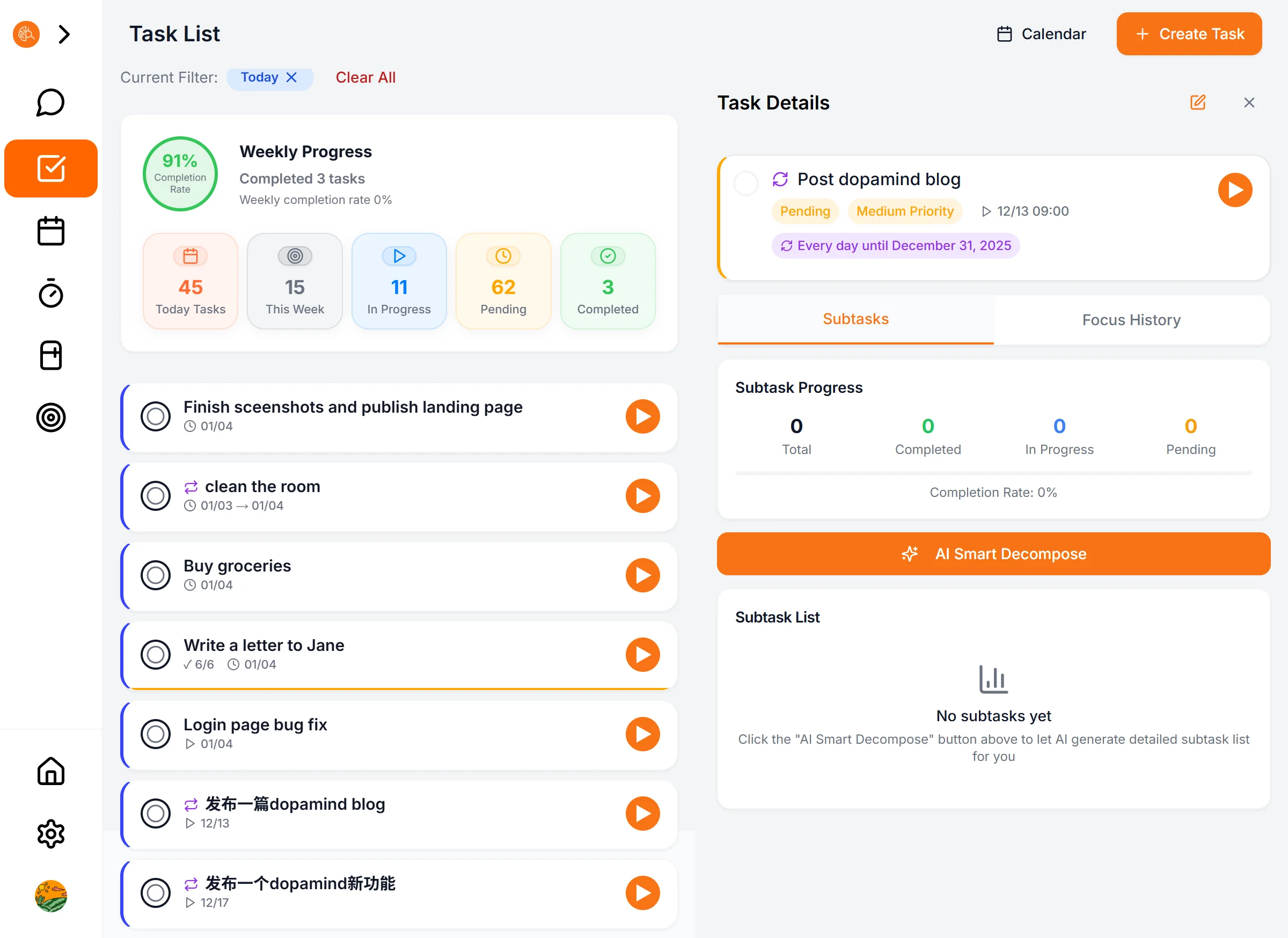
At the top of the task page, you'll see 5 vibrant cards. These aren't just stats; they are powerful **quick filters**.
Tap any card, and the list below switches instantly:
* 📅 **Today:** Your core battlefield. Contains tasks "scheduled for today" and "overdue" items.
* 📥 **Pending:** Your **Inbox**. All ideas that haven't started and have no specific date are safely stored here, waiting for triage.
* ▶️ **In Progress:** Your **Tracker**. Once you start a Focus Timer on a task, it automatically jumps here. It helps you quickly regain context and continue working.
* 🗓️ **This Week:** Your **Tactical View**. See everything scheduled for the current week.
* ✅ **Completed:** Your **Hall of Fame**. Review all your victories.
> **💡 Pro Tip:** Need a granular view? Tap the filter icon 🌪️ at the top right. You can select multiple tags (e.g., "High Priority" + "In Progress") to pinpoint specific tasks.
---
## 2. Auto-Flow Logic: It Categorizes Better Than You
The magic of Dopamind is that task states aren't static.
### 📥 The Inbox Rule
When you voice-capture something like "Learn Japanese" or "Buy toothpaste" without a specific time, AI defaults them to **Pending**.
* **The Benefit:** Keeps your "Today" view clean. Only schedule it when you are ready to do it.
### 🚨 The Overdue Rule
Things you didn't finish yesterday won't disappear or hide in history.
They automatically reappear at the top of your **Today** view, marked in red.
* **The Benefit:** You must face them—either finish them today or reschedule them.
### 🔄 The Flow Rule
This is designed for ADHD minds. As soon as you click the "Focus" button (even for 5 minutes), the task is automatically marked as **In Progress**.
* **The Benefit:** Next time you open the app, tap the blue card, and you're instantly back in the zone, reducing friction.
---
## 3. Visual Language: Less Reading, More Sensing
Notice how your task list isn't just walls of tiny text?
We use **color** to carry information, reducing cognitive load:
* 🔴 **Red Border/Tag:** Urgent, High Priority, or Overdue. Needs immediate attention.
* 🔵 **Blue Highlight:** In Progress. This is your current focus.
* 🟢 **Green Ring:** Progress. Visually shows how many subtasks are done (e.g., 3/5).
* ⚪️ **Gray:** Pending. Doesn't require your attention right now.
You don't need to read; just **scan the color blocks** to understand your pressure distribution for the day.
---
## 4. Creating Tasks: Manual vs. AI
You can do it the traditional way, or the lazy (smart) way.
### 🤖 AI Smart Scheduling (Recommended)
Tap the microphone or chat box and tell the AI:
> *"Remind me to join the meeting next Wednesday at 2 PM, alert me 30 mins early."*
AI automatically recognizes:
* **Time:** Next Wednesday, 14:00
* **Reminder:** 13:30 (Auto-set)
* **Title:** Join meeting
### 🖐️ Manual Fine Control
Tap the **"+ New Task"** button at the top right to control every detail:
* **Recurring:** e.g., "Every 2 days," "Last day of every month."
* **Priority:** Low/Medium/High/Urgent.
* **Subtasks:** Manually input your checklist.
---
## 5. Smart Reminders: Never Miss a Thing
For ADHDers, "forgetting to check the phone" is normal. That's why our reminder mechanism comes with **"Double Safety."**
* **AI Default Settings:**
As soon as you set a time (e.g., 10:00), AI automatically adds two reminders for you:
1. 🔔 **30 mins before:** Mental prep time. Get ready to switch tasks.
2. 🚨 **5 mins before:** Final call to action.
* **Custom Strategy:**
You can manually add more reminders (e.g., 1 day before, 1 hour before) until it effectively gets you moving.
### Focus & Feedback
URL: https://dopamind.app/docs/workflow/focus-and-feedback
Not your average Pomodoro. AI cheers you on before and celebrates after. Being seen is the secret. For ADHD, instant feedback beats any reward. Pure dopamine.
## ⏳ Focus & Feedback: The Secret to Addictive Execution
At Dopamind, focusing is no longer a lonely grind.
We’ve turned the standard "Pomodoro Timer" into a **"Dopamine Generator."** You have AI to hype you up at the start, and AI to celebrate with you at the finish line.
---
## 1. The Launch Ritual: Your Pre-Focus Hype
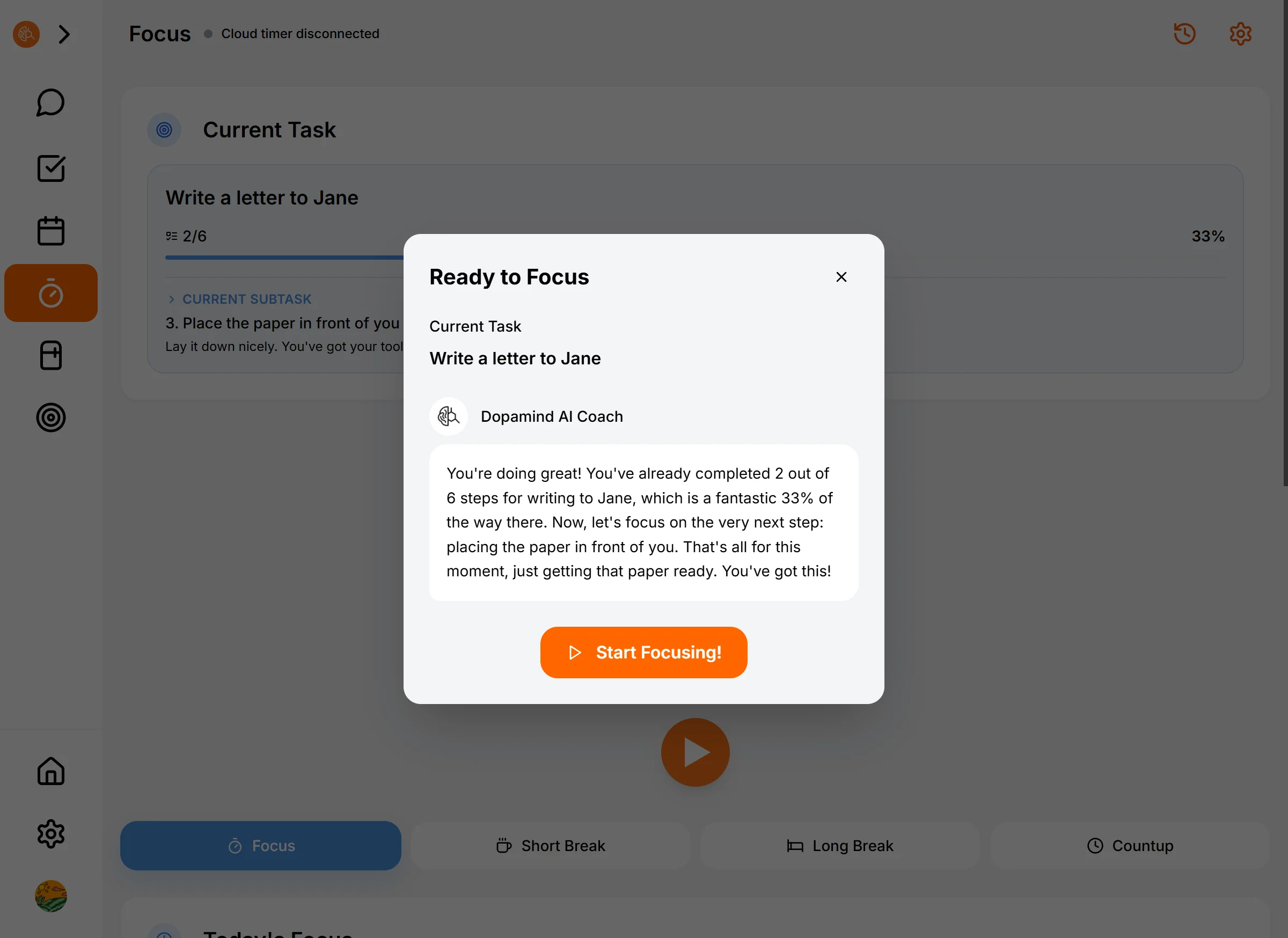
When you click the **"Focus"** button, the timer doesn't start immediately.
First, you'll see a message from the AI.
* **It sees your task:** If you're about to "write code," it might say: *"Code wizard ready? Let's build something cool!"*
* **It gets your vibe:** This personalized encouragement gives you a moment of **"being seen,"** helping you cross that mental threshold before starting.
> **💡 Pro Tip:** Find the encouragement too cheesy? Go to Settings and change the AI Persona to "Strict Coach." It’ll give you the tough love you need to get moving.
---
## 2. Focus Mode: Your Digital Sanctuary
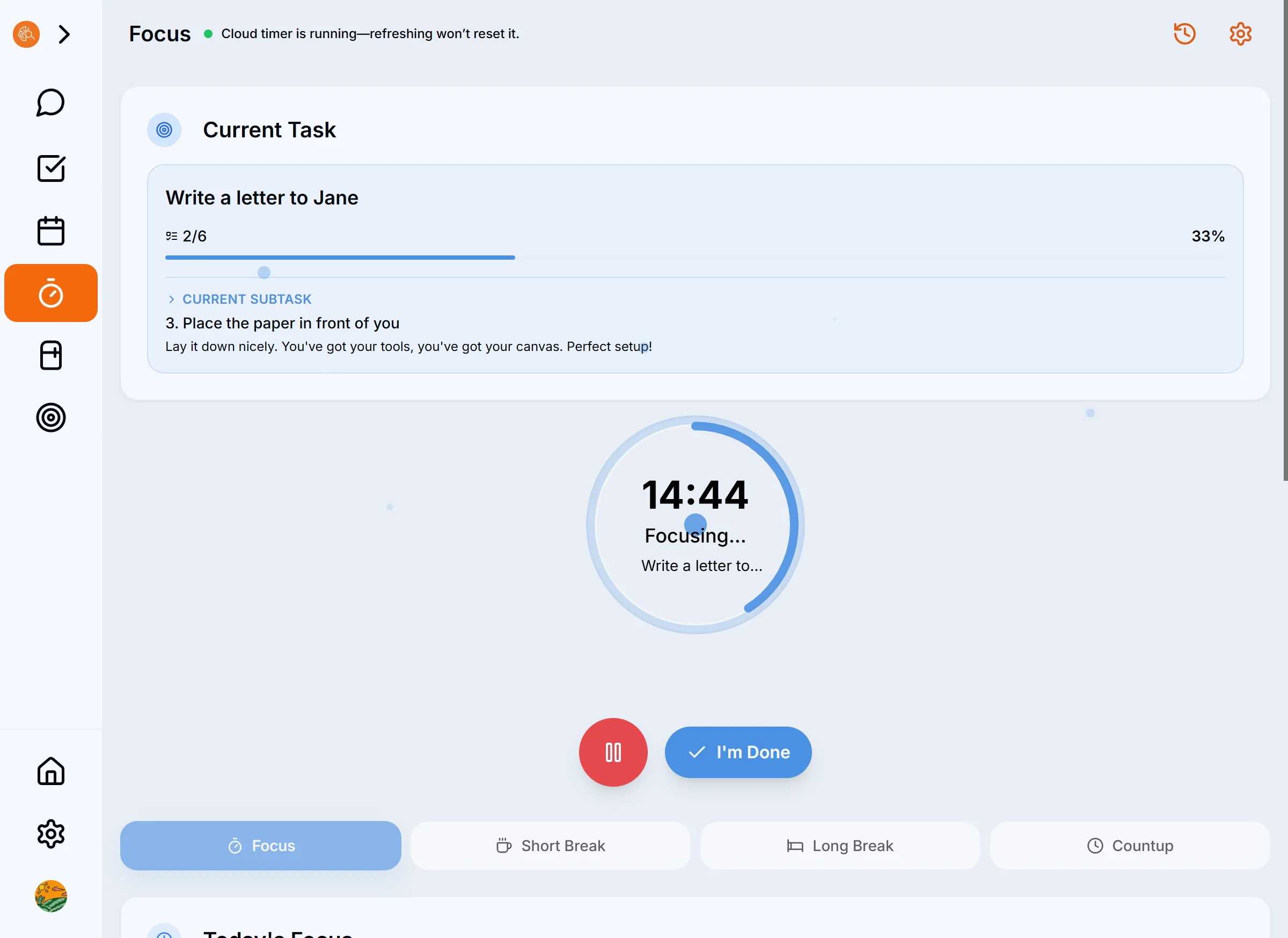
The countdown begins. The interface becomes incredibly clean.
* **Immersive Atmosphere:** Watch the breathing animation of the countdown (Pro tip: It looks amazing as a desk clock on an iPad with a stand).
* **White Noise:** Turn on rain sounds or café ambiance to block out the distractions around you.
* **Stuck?** Don't forget the **"I'm Stuck"** button. Pause anytime and ask the AI for help.
---
## 3. The Dopamine Loop: The Most Important Step! 🎉
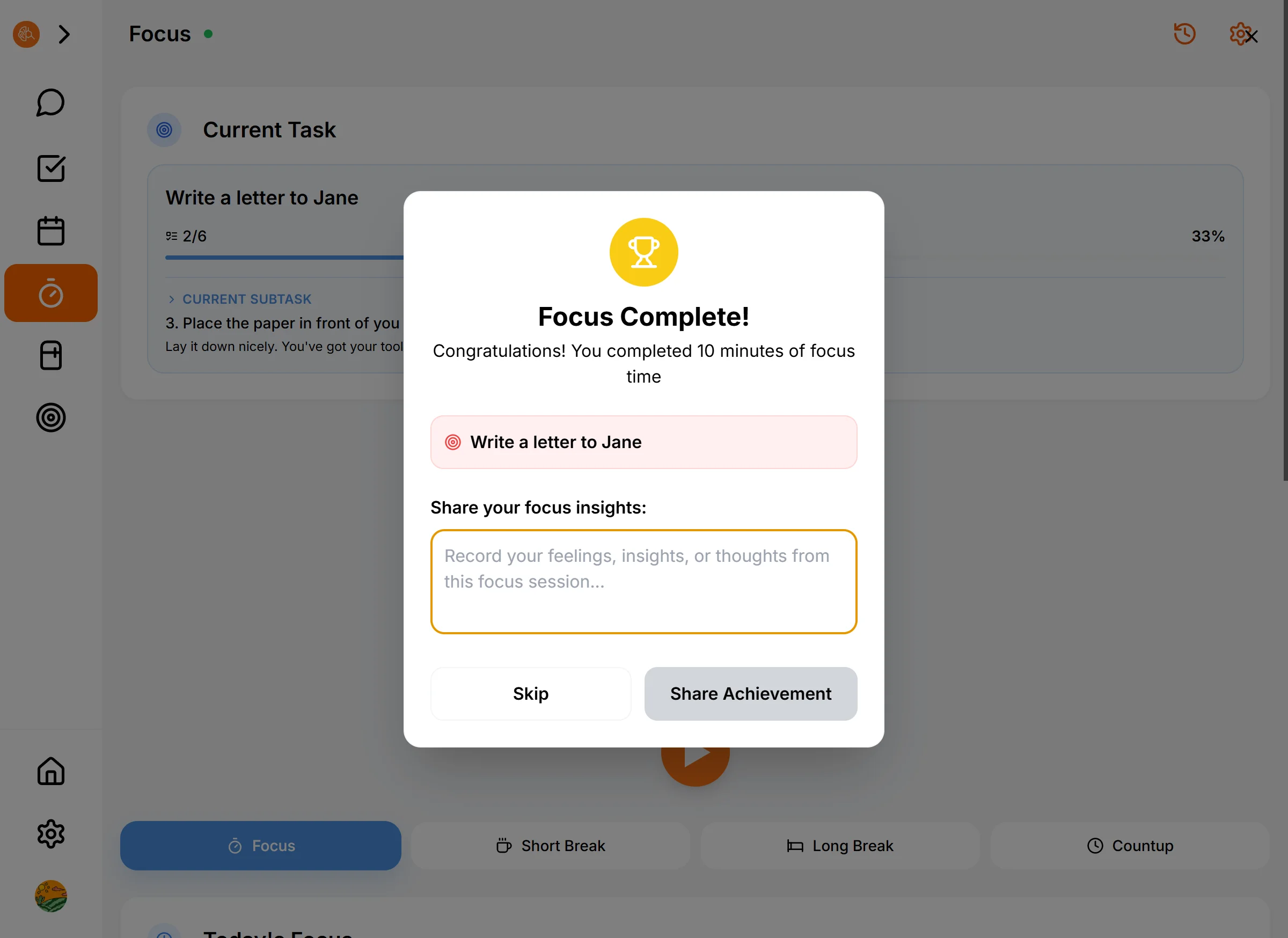
When the timer hits zero, or you click "Finish," **do not close the app immediately.**
This is the moment you collect your reward.
1. **One-Sentence Summary:** A popup will ask, "What did you get done?"
* *No need for a formal report. Just write: "Finished the first paragraph" or "Did some research."*
2. **Send:** Your message goes straight to the AI.
3. **Get Praised:** The AI replies instantly. It celebrates exactly what you accomplished.
* *AI:* "Wow! Getting that first paragraph down is the hardest part. You're in the zone—keep it up!"
**This is the loop.** This immediate feedback tricks your brain into loving the feeling of finishing tasks.
---
## 4. Auto-Generated "Achievement Report"
Your day is never wasted.
* Every task you focused on;
* Every "one-sentence summary" you wrote;
All of these are automatically collected by the AI. When you open the **Calendar** page at night and click **"Generate Daily Report,"** you'll get a perfect review of your day.
Looking at that long list of achievements, you'll realize: **I didn't waste today. I did great.**
---
**You have now mastered the core philosophy of Dopamind.**
**Input -> Breakdown -> Focus -> Feedback.**
[ **Next: Managing Life Admin with Life OS →** ]
### The Vibe Working Method
URL: https://dopamind.app/docs/workflow/introduction
For ADHD/ASD brains. Skip willpower. 5 steps: log, focus, break, celebrate, review. Dopamine hits make it addictive. AI handles executive function.
## ✨ The Vibe Working Method: Make Execution Addictive
Ever wonder how to maintain that explosive ADHD creative spark without letting your daily life descend into chaos?
The answer isn't about "trying harder" or "fighting your brain." It's about adopting a **system designed for the ADHD/ASD mind**. At Dopamind, we call this **"Vibe Working."**
## What is Vibe Working?
It's not just about using an app; it's a **lifestyle**.
Its core is a rapid feedback loop: **"Create Task -> Execute -> Feedback."**
For the ADHD brain, long-term delayed gratification doesn't work. We need **immediate feedback** to generate dopamine. Vibe Working uses high-frequency "micro-feedback" to eliminate executive paralysis and get you into a flow state—just like playing a video game.
---
## 🔁 The 5-Step Loop
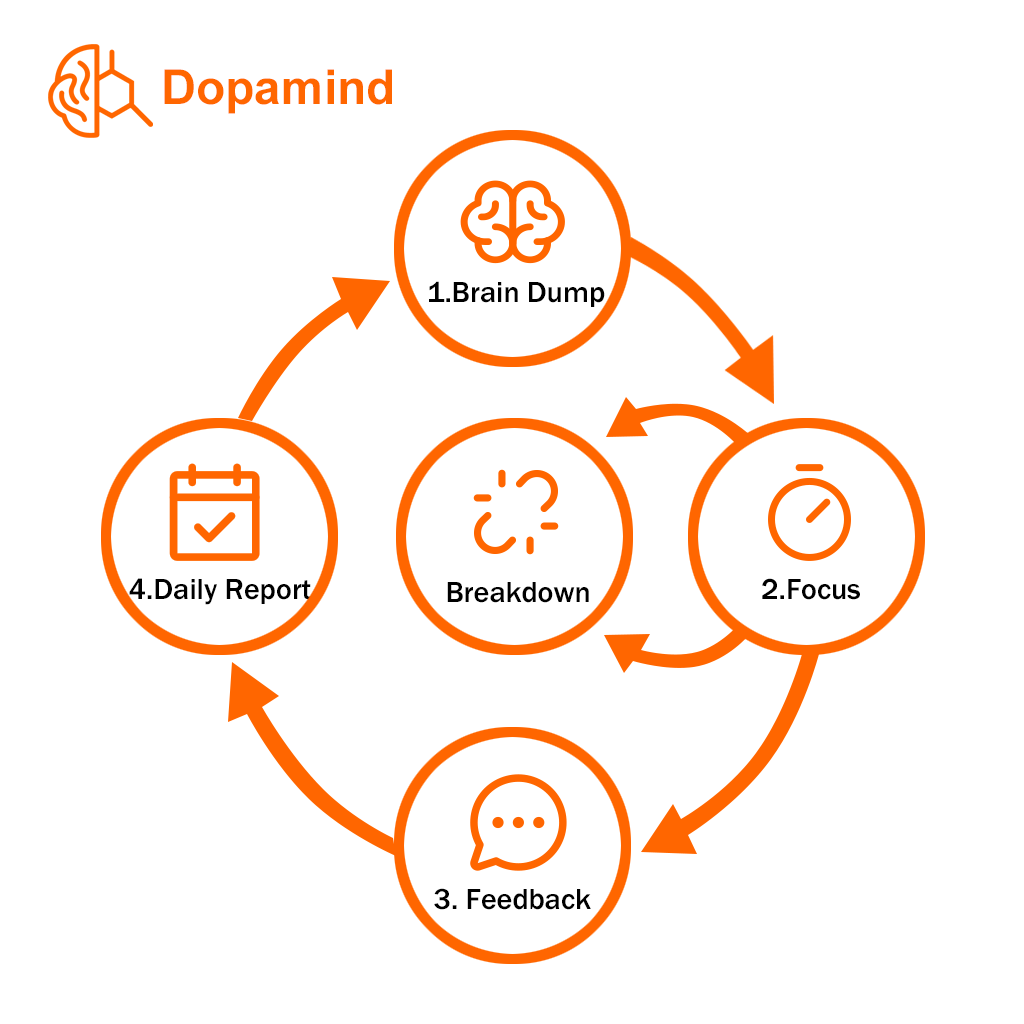 When AI teams up perfectly with your brain, magic happens.
### Step 1: Brain Dump (Clear the Noise)
**A cluttered brain = terrible focus.**
Before you start working, you need to dump the noise out of your head.
* **How:** Tap the microphone and ramble just like you're complaining to a friend. Spill out everything you want to do or are worried about.
* **AI's Role:** It automatically converts your voice into a clear, organized task list. With the mental clutter gone, you can travel light.
### Step 2: Focus (The Execution)
Don't stare at a long list and freeze. Pick one, and just start.
* **How:** Tap the **"Focus"** button on the task detail page.
* **AI's Role:** Right before the countdown starts, the AI generates a **personalized hype message** based on the task content. Start your Pomodoro timer with that warmth and motivation.
### Step 3: Breakdown (Safety Net)
**💡 Stuck? Don't force it.**
If you start a focus session but find yourself unable to move, it's usually because the task is too complex or vague.
* **How:** Click **"I'm Stuck"** and tell the AI your struggle.
* **AI's Role:** Like peeling an onion, it breaks the massive task down into pressure-free micro-steps like "Open the document" or "Write the first line."
* **The Effect:** This gentle assistance instantly dissolves startup paralysis.
### Step 4: Instant Feedback (The Dopamine Hit) ⭐️ Crucial!
**This is the soul of the loop.** Never skip this step.
* **How:** When the timer ends, a popup appears. Write a one-sentence summary of what you just did (e.g., "I finished the rough draft of the email").
* **AI's Role:** This message goes straight to the AI, and it gives you **immediate** validation and encouragement.
* **The Effect:** You feel that **every minute of your effort is being seen**. This feeling of being acknowledged is the fuel that launches your next loop.
### Step 5: Daily Report (The Review)
At the end of the day, don't focus on what you didn't do. Look at what you *did* do.
* **How:** Go to the Calendar page and click "Generate Daily Report."
* **AI's Role:** It strings together all your focus sessions and completion summaries to auto-generate a daily journal full of accomplishments.
* **The Effect:** You'll be surprised to discover: "Wow, I actually did great today."
---
## 🧠 Why does it work for ADHD? (The Science)
> **"I call this state 'Vibe Working.' Those chaotic thoughts no longer occupy your precious RAM."**
This is a **benign hack** for your brain:
1. **Externalized Executive Function:** You stop relying on willpower to remember and break down tasks. The AI acts as your "Frontal Lobe."
2. **Shortened Feedback Loops:** Standard work methods reward you only when the project is done. Vibe Working rewards you every 25 minutes.
3. **Eliminating Shame:** Through fridge and subscription management, you reduce waste (both food and money), eliminating that shame of "losing control of life."
**Now, not just work, but every aspect of your life can stay structured through low-cost decisions.**
### Ready to catch the Vibe?
Go back to the App and try starting your first loop. Don't aim for perfection—start with **Step 1: Brain Dump.**
[ **Try Voice Input Now →** ]
### AI Task Breakdown
URL: https://dopamind.app/docs/workflow/task-breakdown
Big task got you frozen? That's ADHD paralysis. Hit "AI breakdown" to turn scary tasks into tiny steps. First step is hardest—AI makes it absurdly easy.
## 🪄 Task Breakdown: Your Emergency Kit for "Overwhelm"
Have you ever experienced this: staring at a task like "Write Thesis" or "Clean Entire House," knowing time is running out, but you're paralyzed on the couch, unable to move?
This is called **ADHD Paralysis**.
It's not because you're lazy. It's because the task is too **vague**. When your brain can't see a clear path, it shuts down.
Dopamind's **AI Breakdown** feature turns these scary monsters into bite-sized Lego bricks that are easy to handle.
---
## Scenario 1: The "SOS" Breakdown in Chat
This is the fastest way to get unstuck when you are chatting with the AI or suddenly feel anxious during a focus session.
**How to do it?**
Just tell the AI, like you're venting to a friend.
1. Open the Chat interface.
2. Type: **"This task is too hard, break it down for me,"** or **"Help me break down this task."**
3. The AI will not only comfort you but also instantly generate a list of actionable sub-tasks.
> **💡 Pro Tip:** You can even include your emotions: "I really don't want to write this report, it's so annoying." The AI understands you and will give you the gentlest advice to get started.

---
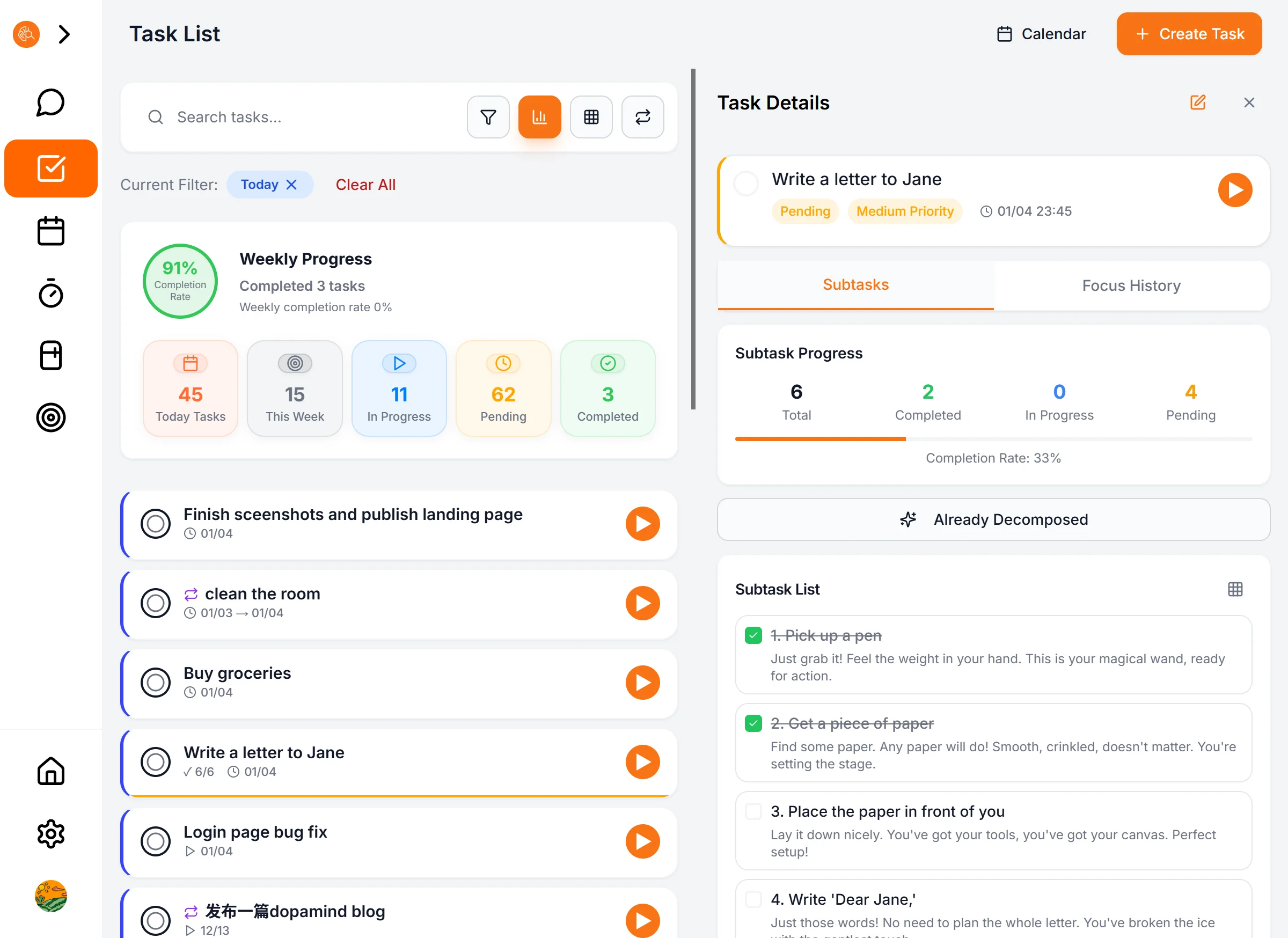
## Scenario 2: "Planning Mode" on the Detail Page
Use this mode when organizing your task list to eliminate the fear of the unknown before starting your day.
**How to do it?**
1. Tap on any task to open the **Detail Page**.
2. Find the ✨ **AI Breakdown** button in the middle.
3. Tap it and watch the magic happen. The AI will automatically generate 3-5 concrete steps based on the task title and description.
**You are in control:**
Don't like how the AI broke it down? You can **manually delete, edit, or add** new steps at any time.
*Writing a more detailed and personalized task description can make the breakdown results even more satisfying.*
---
## 🧠 Best Practices: How to Make Breakdowns Work?
Breaking it down isn't the goal; taking action is. Follow these 3 rules:
### 1. The First Step Rule
After breaking a task down, **don't look at the whole list** (that's still stressful).
Stare only at the **first step**.
* ❌ Goal: Finish Thesis
* ✅ First Step: **Open Word Document**
### 2. Granular Control
If you still can't move after breaking it down, it means **it's not detailed enough**.
* Is "Write Chapter 1" still too hard?
* Ask AI to break it down further: "Write the first paragraph of Chapter 1" -> "Write the first sentence."
* Keep going until the step is so simple that **you'd feel silly not doing it**.
### 3. Gamify with Checkboxes
Every sub-task has a checkbox.
Every time you check one off, your brain gets a micro-dose of **dopamine**. That's the secret to getting addicted to productivity.
---
## Ready to take the first step?
Right now, go to your task list and find the task you've been **avoiding the longest**.
Open its detail page and press that ✨ button.
You'll find that the giant monster is actually just a paper tiger.
[ **Next: Managing Chores with Life OS →** ]
### Voice Capture
URL: https://dopamind.app/docs/workflow/voice-input
Stop typing. Just talk. Let AI turn scattered thoughts into organized tasks. For ADHD brains, speaking beats typing. Capture anywhere, anytime.
## 🗣️ Voice Capture: The Gateway to Your Second Brain
For the ADHD mind, **typing is friction, but speaking is instinct.**
Dopamind's Voice Capture isn't just speech-to-text; it is an **Intelligent Organizer**.
## When to use it?
Build these micro-habits, and your brain will thank you later.
### 1. The "Morning Brain Dump"
When you're still groggy in bed, hold the mic button and dump every worry for the day.
> **Try saying:** "I need to pay rent today, take my meds at noon, there's a meeting at 3 PM, and oh, I need to buy cat litter."
> **AI generates:**
> * [ ] Pay rent (Today)
> * [ ] Take meds (Today 12:00)
> * [ ] Meeting (Today 15:00)
> * [ ] Buy cat litter (To-Do)
### 2. "On-the-Go" Capture
Walking, driving, or in the shower (if your phone is waterproof). When inspiration strikes, catch it.
> **Try saying:** "Just thought of a title for the article: 'Make Execution Addictive', note that down."
## 📱 iOS Exclusive: Lock Screen Widget (Coming Soon)
For maximum speed, add Dopamind to your Lock Screen.
1. Long press Lock Screen -> Customize.
2. Add the Dopamind **"Voice Capture"** widget.
3. **The Result:** Pick up phone -> Tap once -> Speak. No unlocking required. Straight to AI.
---
**Ready to free up your brain's RAM?**
Pick up your phone right now and try saying 3 things in one breath.
[ **Next: Master AI Task Breakdown →** ]
## Blog
### How to Be Productive Working From Home: 12 Tactics for Easily Distracted Brains
URL: https://dopamind.app/blog/how-to-be-productive-working-from-home
Struggling to focus while working from home? Discover 12 research-backed tactics for easily distracted minds. From fake commutes to voice brain-dumps, learn how to beat WFH procrastination.
Category: Productivity
Tags: Productivity, Work From Home, ADHD, Focus, Remote Work, Dopamind
Date: 2026-03-06
You sat down to work two hours ago.
Since then, you've made coffee, checked Instagram "for a second," reorganized your desk, and Googled whether plants really improve productivity. The actual work? **Still untouched.**
If this sounds painfully familiar, please stop beating yourself up. You are not lazy. You just have an **easily distracted brain**—and working from home (WFH) is basically an obstacle course designed to derail you.
This guide is for people like us. No generic "set goals and stay positive" fluff. Just practical tactics that actually work when your brain aggressively resists the task in front of you.
---
## Why WFH is Brutal for Distractible Minds
Before we fix the problem, let's understand why your brain hits the brakes when you work remotely.
1. **Your environment is a minefield of triggers.** In an office, social pressure keeps you somewhat in check. At home, your bed is right there. So is the fridge. And your gaming console.
2. **Zero external structure.** No commute to signal "work mode." No boss walking by. Your brain has to generate 100% of the motivation internally, which rapidly depletes your willpower.
3. **Blurred boundaries.** When your living room is your office, your brain never fully switches into "work mode." You're always half-working and half-resting, meaning you're never fully doing either.
The good news? **Don't try to change your brain; change your system.** Here are 12 strategies to help you rebuild your focus.
---
## 12 Tactics to Overcome WFH Paralysis
### 1. Create a Dedicated Workspace (Even a Tiny One)
You don't need a fancy home office. You just need a spot that screams "WORK."
Even if it's just a specific corner of your kitchen table, the key is **consistency**. When you sit there, you work. When you leave, you stop. This builds a mental trigger that automatically shifts your brain into gear.
### 2. Fake Your Commute
That morning commute you used to hate? It was actually a crucial transition ritual. It separated "Home You" from "Work You." (We explore this concept deeper in [Why Your Morning Routine Keeps Failing](/blog/why-morning-routine-fails).)
**Create a fake commute:** Get dressed, walk around the block, grab a coffee, and then sit down at your desk. This physical shift signals your brain that it's time to perform.
### 3. Put Your Phone in "Jail"
Not on silent. Not face-down. **In another room.**
Studies show that just having your phone visible reduces cognitive capacity. Your brain burns precious energy just resisting the urge to check it. Out of sight, out of mind.
### 4. Hide the List, Focus on the "One Thing"
Staring at a 20-item to-do list is paralyzing. In psychology, this overwhelming feeling is often tied to *[executive dysfunction](/blog/adhd-paralysis)* (a common trait in ADHD and burnout). Your brain sees a mountain and instinctively shuts down.
**The Rule:** Write your absolute highest-priority task on a sticky note. Stick it to your monitor. That is your *only* job right now. Hide the rest of the list.
---
> 💡 **Exhausted from fighting your own attention span?**
>
> Traditional to-do apps are built for "organized" people. **[Dopamind](/)** is an AI productivity exoskeleton built for easily distracted minds. It uses voice input instead of typing, and AI to instantly break down overwhelming tasks so you can finally stop procrastinating.
> 👉 **[Try Dopamind for Free - Reclaim your focus today.](/register)**
---
### 5. "Speak" Your Tasks Instead of Typing Them
When your mind is racing with a million thoughts, the friction of typing them out is often enough to make you give up.
* **The Hard Way:** Trying to manually categorize your scattered thoughts into folders and tags.
* **The Dopamind Way:** Try a **"Voice Brain-Dump."** Just hold the mic and vent: *"I need to finish the weekly report today, oh and remind me to pick up the package tomorrow, so stressed."* Dopamind's AI automatically extracts the action items, sets deadlines, and organizes your chaos into a clean list. Free up your mental RAM for actual work.
### 6. Slice the "Mountain" into "Lego Bricks"
"Write Annual Report" is not a task; it's a terrifying project. Your brain doesn't know what the very first step is, leading to **[activation paralysis](/blog/adhd-paralysis)**.
* **The Hard Way:** Forcing yourself to sit and map out a 10-step plan when you already have zero energy.
* **The Dopamind Way:** Paralyzed by a big task? Click the ✨ **Magic Breakdown** button. In one second, "Write Annual Report" becomes: 1. Open Word doc; 2. Copy last year's template; 3. Write the title.
* **You don't need the willpower to finish the project; you only need the energy to "Open Word doc."**
### 7. Sprint for Dopamine
Telling yourself "I will focus for 4 hours straight" is a lie.
* **The Hard Way:** Using a basic Pomodoro timer and relying purely on discipline to keep going.
* **The Dopamind Way:** Experience **Vibe Working**. It's not just a timer; it's a dopamine loop. Before you start, AI gives you a personalized hype message. When you finish a 25-minute sprint, tell the AI what you accomplished. It responds with instant praise and logs your win. This immediate positive feedback tricks your brain into *wanting* to do the next task.
### 8. Use "Broad-Stroke" Time Blocking
Don't micromanage your day into rigid 15-minute intervals. The moment your schedule slips, you'll feel like a failure and abandon the whole plan.
**Try broad time blocking instead:**
* **Morning:** Deep work (your hardest task, zero notifications).
* **After Lunch:** Meetings and comms.
* **Late Afternoon:** Admin and light tasks.
### 9. Engineer Your Background Noise
Total silence can make your mind wander, while music with lyrics hijacks your language processing center.
Find your "Goldilocks zone" for background noise: Lo-fi beats, rain sounds, or Coffitivity (coffee shop chatter). Give the distractible part of your brain just enough stimulation so the rest of your brain can focus.
### 10. Take Breaks *Before* You Crash
Most people work until they are completely burned out, which leads to "revenge procrastination" (mindlessly scrolling TikTok for 2 hours).
**Be proactive:** Step away from the screen for 10 minutes every 90 minutes. Stretch, get water, look out a window. **Do not look at your phone during this break.**
### 11. Create a "Shutdown" Ritual
The worst part of WFH is that work never truly ends. It bleeds into your evening.
**Establish a shutdown routine:** Review what you did, write down tomorrow's #1 priority, close your laptop, and literally say out loud, "Work is done." Give your brain a definitive off-switch.
### 12. Track Patterns, Forgive the Bad Days
No productivity hack works 100% of the time.
Track what methods work best for you. More importantly, **practice self-forgiveness**. Everyone has days where their brain just refuses to cooperate—especially if you have neurodivergent traits. Instead of spiraling into guilt, call it a wash, get some rest, and try a different tactic tomorrow.
---
## The Bottom Line: Build a System That Cares
Working from home with a distractible brain is playing life on hard mode. But you don't need to be perfect; you just need better tools.
Pick one tactic from this list and try it today.
If you are exhausted from relying solely on willpower to fight procrastination, and you want a smart system that actually *reduces* your cognitive load, give **[Dopamind](/)** a try.
It's not another rigid checklist to make you feel bad. It's an AI teammate that catches your scattered thoughts, breaks down your mountains, and cheers you on to the finish line.
*(What's your biggest distraction when working from home? Let us know in the comments!)*
---
### The AI Era Is Secretly the ADHD Era
URL: https://dopamind.app/blog/ai-era-adhd-era
Why the AI era belongs to ADHD brains. AI commoditized execution and follow-through, finally giving ADHD minds the leverage to turn ideas into reality.
Category: ADHD Tips
Tags: ADHD, AI, Productivity, Founder Story
Date: 2026-02-17
ADHD has always been treated as a deficit. Can't focus, can't follow through, can't finish things. You know the drill.
But they got it backwards.
ADHD brains are idea machines.
The problem was never coming up with ideas. It was finishing them. By breakfast, I've already had like 47 brilliant concepts, but turning them into reality requires linear, step-by-step execution. For us, that's like swimming through concrete.
Ideas are cheap. Execution is the scarce resource.
This has always been our struggle.
Then AI showed up.
Let me use myself as an example.
My hard drive used to be a graveyard of "someday" projects. Each one started during some hyperfocus-fueled night, then slowly died in the following weeks. I wanted to finish them. I just couldn't. The repetitive work, the sustained effort, the tasks with no immediate feedback. That's slow torture for an ADHD brain.
Now it's different.
I'm a full-stack engineer. Right now I'm developing and maintaining multiple products at the same time. Frontend, backend, deployment, ops, all of it. This would have been unthinkable before. Context-switching costs were just too high. Every time I jumped to a different project, just figuring out "where did I leave off" would eat up half an hour. And that half hour was enough to kill whatever motivation I had left.
AI changed the game.
Now I just dump the complete context of a project to an AI assistant and switch whenever I want. It remembers every detail, every decision, every TODO. My brain can finally do what it's actually good at: jumping around, making connections, discovering new possibilities. It doesn't have to act as a crappy RAM stick anymore.
And all those "boring but necessary" tasks that used to paralyze me? AI handles most of them now. Writing tests, docs, handling edge cases, refactoring code. Not roadblocks anymore. Just a few lines in a prompt.
The result?
I'm not just doing engineering. I'm reading, writing, painting. Actually making progress on all of them, not just dabbling. This was impossible before AI. Not because I didn't have time. I just didn't have enough execution bandwidth to keep that many things going.
I used to think it was my fault.
Not disciplined enough. Not focused enough. Needed more pomodoros, more productivity hacks.
Now I realize I never lacked ideas or passion. What I lacked was an execution layer that could keep up with my brain.
AI is that layer. It commoditized the neurotypical advantage: consistency and follow-through.
So what can't AI do?
The weird associations. The lateral thinking. Seeing patterns that "shouldn't" exist.
ADHD brains are wired this way. We can't control where our attention jumps, but that's exactly why we see connections others miss.
While everyone else is drawing a straight line from A to B, we've already looped around to Z and found a shortcut back to A that nobody noticed.
It's not a bug. It's a feature. Until now, this feature was just buried under terrible execution.
Our brains are built like hunters. Explosive bursts of energy, quick reflexes, think fast, act fast. But modern society wants us to sit still and do the same thing day after day. We spent decades trying to fit square pegs into round holes. Didn't work so well.
But now, the AI era is here. And this is our time.
---
## Related Reading
- **[ADHD Paralysis: 8 Ways to Break Free](/blog/adhd-paralysis)** – Understand the 3 types of paralysis and proven strategies to get unstuck.
- **[Why Your Morning Routine Keeps Failing](/blog/why-morning-routine-fails)** – It's not discipline—it's how your brain produces dopamine.
*Join the discussion on [Reddit](https://www.reddit.com/r/Dopamind/comments/1r6s2z4/the_ai_era_is_secretly_the_adhd_era_heres_why/).*
---
### Why Your Morning Routine Keeps Failing (It's Not Discipline)
URL: https://dopamind.app/blog/why-morning-routine-fails
Morning routines failing? It's not laziness—it's your brain's dopamine. Learn why ADHD brains need a different startup and 3 principles that work.
Category: ADHD Tips
Tags: ADHD, Morning Routine, Productivity, Dopamine, Executive Function
Date: 2026-02-12
*You've tried the 5am club, cold showers, and habit stacking. None of it stuck. The problem isn't willpower — it's how your brain produces dopamine.*
---
You've probably tried waking up at 5am. You set seven alarms, each two minutes apart, because you know you'll dismiss the first six. You do. You dismiss the seventh too. You wake up at 9:47 and feel like a failure before the day has even started.
You've probably tried the "don't touch your phone" rule. But the moment your eyes open, your hand is already reaching for the screen — your brain needs *some kind of stimulation* before it can boot up, and scrolling Instagram for 40 minutes is the only way it knows how to generate enough energy to get vertical. You know those 40 minutes could've been spent on something meaningful. You know that while you're scrolling. It doesn't help.
You've probably tried habit stacking. "After I brush my teeth, I will journal for 5 minutes." What actually happens: you brush your teeth, then stand in the bathroom staring at the wall for 15 minutes, completely blank, unsure what to do next despite having planned it the night before. It's a strange feeling — looking at yourself in the mirror, knowing you should walk to your desk and sit down, but your body feels like it belongs to someone else.
You've probably tried the classic "just start with one small thing." You know what you need to do. You can see the task. You can describe the task. You can explain to someone else how to do the task. But your body won't move. It's not that you don't want to — it's that you can't *start*.
Over the years, each failure adds another layer of proof: "See, I knew it. I just don't have it in me." I spent a long time believing that was the truth — that I was simply a person with zero self-discipline.
If any of this sounds like you, I want you to know something: **there is nothing wrong with your willpower.** These routines were designed for brains that work differently from yours. The advice isn't bad. It's just not meant for you.
---
## It's not laziness. It's your brain's startup sequence.
Think of it like booting a computer.
Most people's brains are SSDs. Press the power button, and within seconds they're at the desktop, ready to work. Your brain is more like an old hard drive — it needs a longer startup sequence, loads things one at a time, and if something interrupts it mid-boot, it has to start over from scratch.
This metaphor is surprisingly accurate. It's close to what's actually happening in your neurochemistry.
**Your executive system is offline.** Your brain knows what to do — the plan is right there. But the part responsible for *initiating action* hasn't come online yet. It's like having a GPS that calculated the perfect route, except the car won't shift out of park — you're sitting in the driver's seat, frustrated, foot on the gas, and nothing happens. This disconnect between knowing exactly what to do and being unable to do it might be the most maddening part of the whole experience.
**Your dopamine is running low.** For most people, waking up comes with enough baseline dopamine to start moving through their morning. Your brain doesn't have that. So it goes hunting for stimulation — the phone, the snooze button, the rabbit hole. Your brain is trying to self-medicate, doing exactly what it's designed to do with the resources it has. You think you're being lazy. Your brain is actually working overtime just to get itself running.
**Transitions are expensive.** Switching from "sleep mode" to "action mode" isn't a single step for you — it's a ramp. A long, gradual ramp that most morning routines don't account for, because their creators never needed one.
This pattern has a name. It's called ADHD — Attention Deficit Hyperactivity Disorder. And you don't need a formal diagnosis to recognize that your brain works this way.
I'm not asking you to self-diagnose. I'm asking you to stop fighting your own hardware and start working with it.
---
## Design your morning for your brain, not against it.
I'm not going to give you a minute-by-minute schedule. "7:00 wake up, 7:05 meditate, 7:15 journal" — for me, that kind of thing is just a recipe for another failed attempt.
What I'll give you instead are three principles. They work because they're built on how your brain actually operates, not how productivity influencers think it should.
### Principle 1: Lower the activation energy to near zero.
Of course you want to do the thing. But the gap between "lying in bed" and "doing the thing" is a canyon, and every morning you're expected to leap across it.
Stop trying to jump. Build a bridge instead.
The night before, reduce your first morning action to something that requires zero decisions. Lay your clothes on the chair. Pre-set the coffee machine. Open the document you need to work on and leave it on your screen. The key is that your first action should not require thinking — decisions burn dopamine, and dopamine is exactly what you don't have at 7am. If your first move requires you to choose what to wear, decide what to eat, or figure out what to work on, you've already burned through whatever fuel you had before you even got started.
"Sit up" counts as a win. Start there.
### Principle 2: Bribe your brain — on purpose.
Your brain needs dopamine to start moving. So give it some.
Not the junk dopamine of doom-scrolling — that's like eating candy for breakfast, a spike then a crash. Instead, pair your startup sequence with a *quality* reward: a coffee you genuinely love, a playlist that makes you feel something, a podcast episode you've been saving.
The trick is *bundling*. "I listen to my favorite podcast while getting dressed." Your brain gets the stimulation it's craving, your body starts moving, and by the time the episode hooks you, you're already up, dressed, and halfway through your coffee — you didn't even notice the moment you "woke up."
This is dopamine-driven productivity. The craving for stimulation, looked at from a different angle, is actually your engine. You just need to give it the right fuel.
### Principle 3: Don't plan your morning. Let something else plan it for you.
Here's a truth that took me years to accept: the worst time to decide what to do is the moment you need to start doing it.
Planning requires executive function. Prioritizing requires executive function. Your executive function is the last thing that comes online in the morning. Asking your brain to figure out what to do *and* start doing it at the same time is like asking someone to draw a map while running a race.
Separate thinking from doing. Do your planning the night before, when your brain still has fuel. Or better yet, offload the planning entirely — to a checklist, a partner, or a tool. Your morning self should only have one job: execute. The "what" and "when" should already be decided by the time your alarm goes off.
---
## What this looks like in practice: a real morning with an AI assistant
I want to be upfront: what I'm about to show you isn't the only way to do this. It's *my* way. I built a tool called Dopamind specifically for brains like mine, and I use it every day. Here's what a real morning looks like.
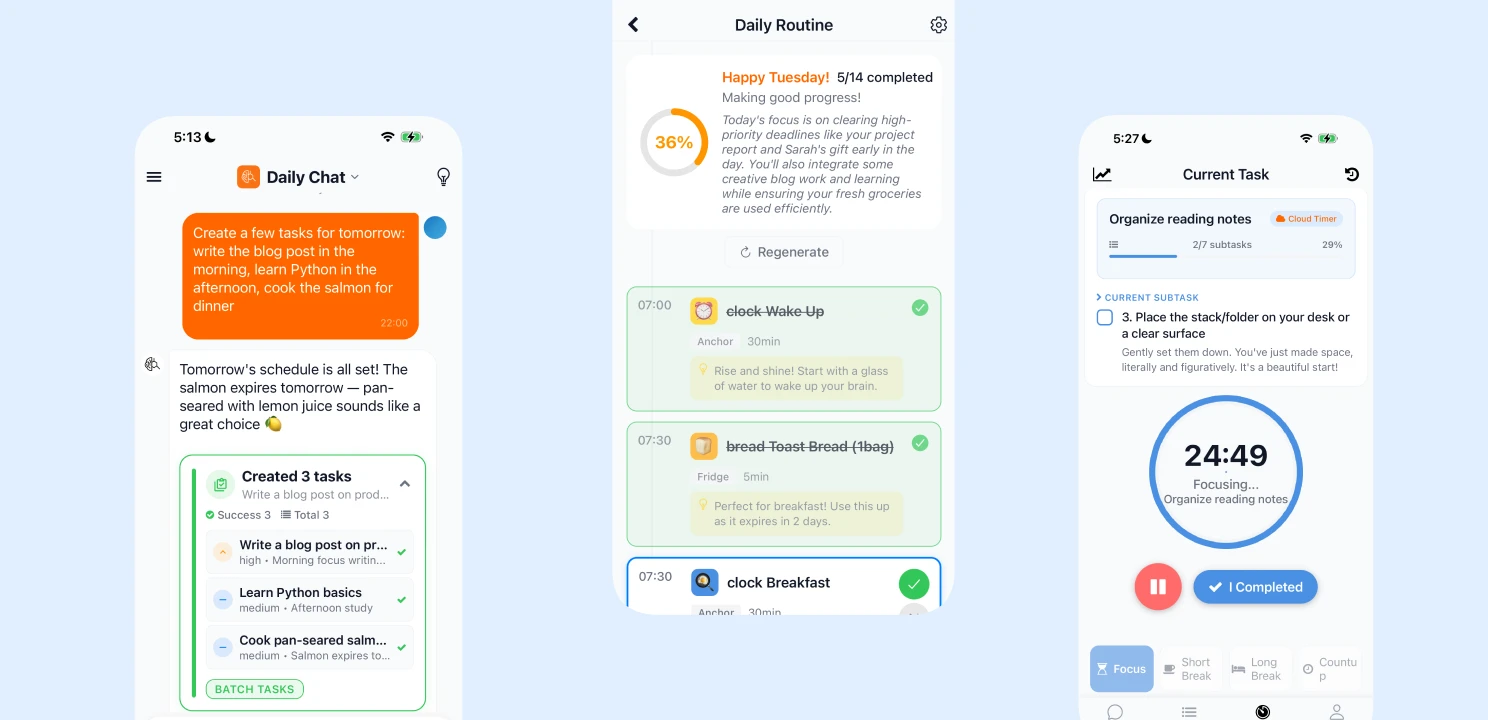
### The night before (30 seconds)
Before bed, I open Dopamind and tell the AI what I need to do tomorrow: "Finish the blog draft, reply to 3 emails, review the App Store screenshots."
The AI breaks these down into smaller steps and prioritizes them. I don't think about it again — tomorrow-morning-me will not have to plan anything, it's already done. There's something genuinely relieving about offloading tomorrow's burden onto tonight. I sleep a little easier every time I do it.
That's Principle 3. The thinking is done. Morning-me only has to execute.
### Waking up (the startup period)
I don't look at my task list. I don't open any work apps. I make coffee. I put on music. I let my brain boot up on its own schedule.
I used to feel guilty about this slow start — like I was already falling behind while everyone else was being productive. Now I know this ramp-up time isn't optional. It's required. The coffee and music are the fuel my brain needs to shift out of park.
### Sitting down (1 minute)
Once I'm at my desk, I open Dopamind. Today's Routine is already laid out — the AI generated a timeline from what I told it last night, and the first step is right there waiting for me.
No need to think about "what should I do first." I just look and I know.
That's Principle 1. I'm not being asked to "write a blog post." I'm being asked to "open the draft and read one paragraph." I can do that. And the progress ring sitting at 0% doesn't stress me out — I know once I finish the first item, it'll start moving.
Almost every time, reading that paragraph turns into writing the next one. The hardest part is always starting. Once the engine turns over, it tends to keep running on its own.
### Focusing, then getting stuck
I tap the task in my Routine and enter Focus Mode. The timer starts, particles drift across the screen, the world goes quiet. These are my favorite minutes of the day — nothing to think about, just the one thing in front of me.
But it doesn't last. Twenty minutes in, I've written two sentences and I'm stuck. I tap "I'm Stuck," and it takes me to the AI chat.
The AI doesn't say "you got this!" It gives me a concrete suggestion: "Skip the intro. Write the section you're most excited about. We'll rearrange later." This feeling of being helped without being judged — of someone just quietly pointing you to the next step instead of cheerleading — honestly, it works better than most advice I've gotten from real people.
Most productivity tools can't do this. They tell you *what* to do, but when you're stuck, they just stare back at you with an unchecked box. They don't know the difference between "I need a break" and "I need a different angle."
Your morning needs a system that understands how your brain starts — slowly, reluctantly, and in need of a gentle push. Not a drill sergeant.
---
## Your brain isn't broken. It just needs a different launchpad.
Every morning routine you've tried and failed wasn't a bad routine. It was a routine designed for a brain with plenty of dopamine, fast executive function, and smooth transitions between states. A brain that can hear "wake up at 5am and journal" and just... do it.
That's not your brain. And that's fine.
Understanding how your brain works isn't making excuses — it's the first step to finding the right tools. You wouldn't install Windows software on a Mac and blame the Mac when it crashes. You'd get the right software. Same principle.
If anything in this post made you think "wait, that's me" — consider exploring whether your brain runs on a different operating system. Talk to a professional if you can. And in the meantime, build a morning that works *with* your wiring, not against it.
I built [Dopamind](https://dopamind.app) for exactly this — an AI assistant designed for brains that need a gentler start. [Try it free →](https://dopamind.app)
Tomorrow morning, don't set 7 alarms. Just set one, and let something else handle the rest.
---
## Related Reading
- **[How to Be Productive Working From Home](/blog/how-to-be-productive-working-from-home)** – 12 tactics for easily distracted brains struggling with WFH paralysis.
- **[ADHD Paralysis: 8 Ways to Break Free](/blog/adhd-paralysis)** – Understand the 3 types of paralysis and proven strategies to get unstuck.
---
### Founding Member Launch: A Letter to Every Evolving ADHD Mind
URL: https://dopamind.app/blog/founding-member-launch
Dopamind Founding Member program launches! 4 months of development, iOS/Android/Web now live. AI task breakdown smarter, focus mode more immersive. A letter from founder Philo on managing dopamine with AI. Limited to 500 members, $120 for lifetime access.
Category: Founder Story
Tags: Founder Story, ADHD, Founding Member, Product Update
Date: 2026-01-07
Hey there,
If you're reading this, you're probably like me: an ADHD mind trying to find order in the chaos.
Today, I want to share what's been happening with Dopamind, and why we chose this moment to launch our **Founding Member program**.
---
## What We've Built in the Past 4 Months
From September 2025 to now, Dopamind has undergone a complete transformation.
### Seamless Cross-Platform Experience
We've officially launched on **iOS, Android, and Web**. Whether you're using an iPhone, Android phone, or computer browser, your tasks, habits, and focus records sync in real-time.
Capture ideas with voice on the subway, then continue planning on your computer at home—this **seamless cross-platform experience** has been one of our biggest breakthroughs.
### The AI Got Smarter
Our AI engine has gone through multiple iterations and now understands your intent more precisely:
- **[Voice input](/docs/workflow/voice-input)** feels more natural, supporting mixed multilingual speech
- **[Task breakdown](/docs/workflow/task-breakdown)** is smarter, generating truly actionable micro-steps based on your description
- **[Focus feedback](/docs/workflow/focus-and-feedback)** is more thoughtful, with instant AI encouragement after every completion
### Documentation Upgrade
We've added extensive **[user guides](/docs/start-here/quick-start)**, from quick start to advanced tips, helping you maximize Dopamind.
If you're torn between Notion and Dopamind, check out our **[Notion vs. Dopamind deep dive](/blog/notion-vs-dopamind)**—spoiler: Notion is the best warehouse, but it's not a good executor.
---
## Why Build This App? Back to Our Mission
Let me quote what's on our homepage:
> **Get an unfair advantage by using AI to trigger hyperfocus**
>
> Don't just plan. Execute. The First AI OS designed to trigger a **dopamine loop**.
This is why Dopamind exists.
We're not another to-do list app. Our core goal is: **manage dopamine and attention to help you go from "wanting to do" to "done"**.
The biggest pain for ADHD minds isn't "not knowing what to do"—it's "knowing but can't start." Traditional task tools punish you with red overdue warnings, while Dopamind uses AI to **help you cross that starting threshold**.
---
## A Letter from the Founder
*To every evolving ADHD mind:*
As Dopamind's developer and an ADHDer myself, I often feel like our brains are riding a rollercoaster: we're either at 0% focus (paralysis, can't start) or 300% hyperfocus (flow state, unstoppable).
This "heaven and hell" instability is exhausting. But I firmly believe that **ADHD isn't a defect—it's more like a rapidly evolving gene**. We have incredible burst energy; we just lack the "switch" to control it reliably.
I built Dopamind to create that switch.
This isn't an ordinary to-do list. It's a neuroscience-backed **brain exoskeleton**. The core logic is using AI to lower cognitive load, eliminate starting resistance, and let you actively control that 300% hyperfocus instead of passively waiting for it.
In my own 6 months of using it, I achieved **2x focus duration** and **2x productivity output**.
I finally unlocked my sealed potential and became the more productive version of myself I always imagined.
The secret lies in two things:
First, I completely outsourced the willpower-draining trivial tasks to AI—no more mental exhaustion;
But more importantly, we've infused neuroscience into every interaction detail.
At its core, Dopamind is actually a dopamine management system. Through rapid "action-feedback" loops, it successfully "tricks" my brain, transforming boring execution into a game-like rush, making me truly addicted to getting things done.
This isn't just a victory for code—it's a victory for neuroscience. Now, I want to hand this entire system over to you.
---
## You're Not Alone: Nearly 2,000 Brains Made the Same Choice
And I'm not the only one.
In just a few months, Dopamind has brought together **nearly 2,000 users** just like you and me. We're all here, reclaiming control of our lives through AI.
Now, I want to invite you deeper into this core circle.
---
## Invitation: [Dopamind Founding Member Program](/founding-member)
Running an advanced AI system (servers and large model APIs) is expensive. While subscriptions are industry standard, I know ADHD users fear the anxiety of "forgetting to cancel"—the so-called **"ADHD Tax"**.
I want to give you peace of mind.
I don't need you worrying about monthly bills. I want you to **pay once and own this system forever**. Your support funds continued product development, and you get a Second Brain that lasts a lifetime.
### What's Included?
- **Unlimited AI Access**: Unlimited voice input, unlimited task breakdowns, unlimited AI conversations
- **All Current + Future Features**: Everything as of January 2026 plus future updates, permanently free
- **Exclusive Gold Badge**: Unique "Founding Member" identity in the app
- **Price Lock**: Even if prices increase later, you're locked in at today's rate
- **Join the Founding Community**: Discuss the product with other founding members—your voice directly shapes future features
- **Generous Quota**: The current plan is more than enough for daily use. If future pro-level features require heavy token usage, founding members can connect their own API key for unlimited access
### Limited to 500 Members
Yes, Founding Member spots are limited. **$120 for lifetime access**—that's one year's price for your Second Brain for life.
---
## You Deserve Tools Designed for Your Brain
If you're tired of:
- [Spending hours decorating in Notion yet still procrastinating](/blog/notion-vs-dopamind)
- [ADHD paralysis](/blog/adhd-paralysis) when facing complex tasks
- Anxiety from subscriptions quietly charging you monthly
Then it's time to try Dopamind.
We don't expect you to become "organized"—we just want you to **start moving**.
This is a win-win investment. Thank you for supporting my dream. I hope Dopamind helps you unlock your 300% potential.
— Philo, Founder of Dopamind
---
## Related Reading
- **[Why I Built Dopamind for ADHD Minds](/blog/why-i-built-dopamind)** – The full origin story behind Dopamind.
- **[ADHD Paralysis: 8 Ways to Break Free](/blog/adhd-paralysis)** – The science behind why you freeze and how to unfreeze.
---
### Love Goblin Tools? Here's the Pro Workflow You're Missing
URL: https://dopamind.app/blog/dopamind-vs-goblin-tools
Love Goblin Tools' task breakdown? Dopamind goes beyond with built-in focus timer, voice input & AI feedback—helping you finish what you start.
Category: Tool Comparison
Tags: Goblin Tools, AI Task Breakdown, ADHD Tools, Productivity
Date: 2025-12-28
If you have ADHD, you probably know and love **Goblin Tools (Magic ToDo)**.
It's a genius utility. You type in "Clean the house," hit the magic wand, and it spits out a step-by-step list. For a brain that gets paralyzed by big tasks, this is a lifesaver.
**But here is the problem:** Once you have that list... what happens next?
You usually have to copy-paste it into another app, or keep the browser tab open until you accidentally close it. The magic stops at the "planning" phase.
**Breaking down a task is only half the battle. Doing it is the other half.**
This is where **Dopamind** comes in. Think of us as the "Integrated Version" of Goblin Tools—a complete operating system that takes you from breakdown to execution.
---
## The "Disconnected Tool" Trap
Goblin Tools is a **Single-Player Tool**. It does one thing perfectly, but it lives outside your daily system.
* ❌ **No Context:** It doesn't know your schedule.
* ❌ **No Execution:** It doesn't have a focus timer to help you start.
* ❌ **No Memory:** It doesn't track what you've accomplished over time.
You end up with a perfect list of subtasks, but you're still stuck in "ADHD Paralysis" because the friction of moving that list to a calendar is too high.
---
## Dopamind: The Complete "Breakdown-to-Done" Loop
Dopamind takes the core "Magic Breakdown" feature and embeds it into a full productivity workflow.
### 1. Same Magic, Less Friction 🪄
You don't need to open a separate website. In Dopamind, just click the **["Breakdown"](/docs/workflow/task-breakdown)** button on *any* task in your list.
* "Write Essay" → Instantly becomes 5 actionable steps inside your task card.
* No copy-pasting required. It's already where it needs to be.
### 2. From Planning to Flow 🍅
This is the game-changer. Once your task is broken down, you simply click **["Focus."](/docs/workflow/focus-and-feedback)**
Dopamind immediately starts a [Pomodoro timer](/docs/workflow/focus-and-feedback) for that specific subtask.
* **Goblin Tools:** Gives you a list.
* **Dopamind:** Gives you a list AND a distraction-free environment to finish it.
### 3. The Dopamine Reward 🎉
When you finish a subtask in Dopamind, you don't just check a box. You get instant [AI feedback and encouragement](/docs/workflow/focus-and-feedback). This closes the loop and makes your brain want to do it again.
---
## Comparison: Tool vs. System
| Feature | Goblin Tools 🛠️ | Dopamind 🧠 |
| :--- | :--- | :--- |
| **[Task Breakdown](/docs/workflow/task-breakdown)** | ✅ Excellent | ✅ Excellent (Built-in) |
| **Platform** | Web / App (Utility) | **Complete [Life OS](/docs/life-os/introduction)** |
| **Execution** | Checkbox only | **[Focus Timer](/docs/workflow/focus-and-feedback) + White Noise** |
| **Input** | Typing | **[Voice Capture](/docs/workflow/voice-input)** |
| **History** | None | **Daily Reports & Heatmaps** |
---
## Stop Switching Apps
If Goblin Tools is your favorite "hammer," Dopamind is the entire workshop.
You don't need to give up the magic of AI breakdown. You just need to put it inside a system that actually helps you **finish** what you start.
**Ready to upgrade your workflow?**
---
## Related Reading
- **[ADHD Paralysis: 8 Ways to Break Free](/blog/adhd-paralysis)** – Breaking down tasks is step one. Here are 7 more strategies.
- **[How to Be Productive Working From Home](/blog/how-to-be-productive-working-from-home)** – 12 tactics for when you need more than task breakdown.
---
### ADHD Paralysis: 8 Ways to Break Free and Get Unstuck
URL: https://dopamind.app/blog/adhd-paralysis
ADHD paralysis isn't laziness—it's your brain on overload. Discover the 3 types of paralysis and 8 proven strategies to break free and regain productivity.
Category: ADHD Tips
Tags: ADHD, Productivity, Mental Health, Dopamind, Strategies
Date: 2025-12-11
You really need to get things done, but you just… *can't*.
You’re staring at your computer screen. You know you have a deadline. You know exactly *what* needs to be done. But your body feels like it’s encased in concrete. You are overwhelmed, frozen in place, and the harder you try to force yourself to move, the heavier the weight becomes.
If this sounds familiar, you aren’t "lazy," and you aren't "broken." You are experiencing a very real, very frustrating symptom known as **ADHD Paralysis**.
In this guide, we’ll decode why your brain hits the brakes and, more importantly, share 8 proven strategies to help you get the ball rolling again.
---
## What is ADHD Paralysis?
Also known as **"ADHD shutdown"** or **"analysis paralysis,"** ADHD Paralysis happens when a person with ADHD is overwhelmed by information, emotions, or their environment.
While procrastination is often a choice to delay a task because it's unpleasant, ADHD paralysis is an **involuntary reaction**. It is linked to the unique wiring of the ADHD brain—specifically how it processes dopamine and regulates executive functions.
When your brain’s "command center" (executive function) gets overloaded with too much noise, too many choices, or too much pressure, it pulls the emergency brake. You crash.
---
## The 3 Types of ADHD Paralysis
Understanding *which* type of paralysis you are facing is the first step to beating it.
### 1. ADHD Mental Paralysis (The "Brain Crash")
This occurs when you are overwhelmed by thoughts, emotions, or sensory input. It feels like brain fog or a computer crashing. You can’t organize your thoughts, and you might zone out mid-conversation.
* **Trigger:** A loud environment, too many instructions at once, or emotional dysregulation.
### 2. ADHD Choice Paralysis (The "Overthinking Loop")
Faced with too many options? You might freeze. Whether it’s deciding on a major career move or just picking what to eat for dinner, the fear of making the "wrong" decision stops you from making *any* decision.
### 3. ADHD Task Paralysis (The "Procrastination Freeze")
This is the fear or hesitation to start a specific task. Usually, because the task feels too big, too complex, or—let's be honest—too boring (under-stimulating). You know you need to start, but you physically feel like you can't.
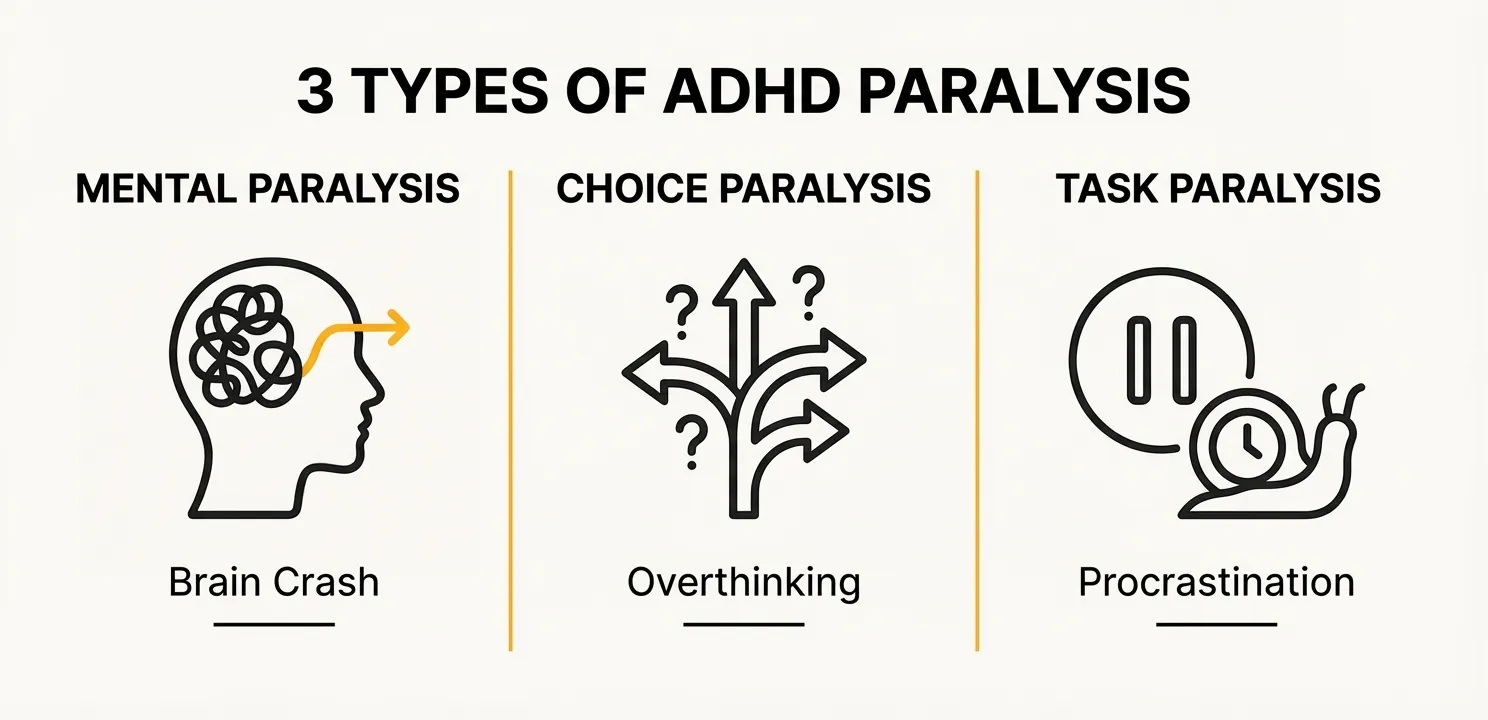
---
## 8 Strategies to Overcome ADHD Paralysis
The key to unfreezing isn't "trying harder." It's about building structures that work *with* your brain, not against it. Here are 8 ways to hack your executive function.
### 1. The "Brain Dump" Ritual
When Mental Paralysis hits, your working memory is full. You need to offload that data immediately.
* **The Manual Way:** Grab a pen and paper and scribble down everything cluttering your mind.
* **The Dopamind Way:** Typing can sometimes feel like too much friction. Use **[Dopamind's Voice Input](/docs/workflow/voice-input)**. Just speak your chaos. Vent about your groceries, your deadlines, and your worries. Our AI listens, understands, and automatically sorts your ramblings into a clear to-do list. Unlike complex tools like Notion that require multiple clicks and decisions, Dopamind eliminates friction (learn more in our [Notion vs. Dopamind comparison](/blog/notion-vs-dopamind)).
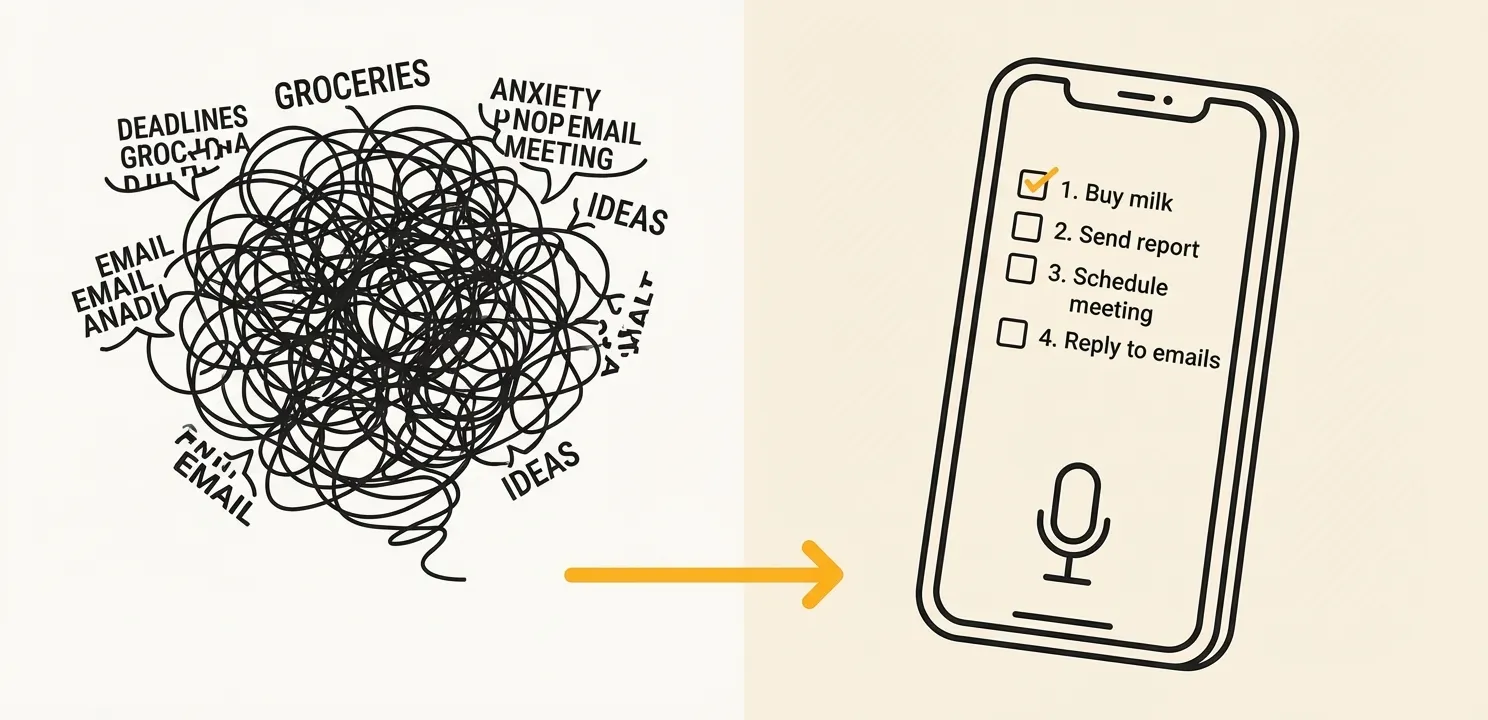
### 2. Break Tasks Into "Micro-Steps"
Task Paralysis often comes from seeing a project as a giant mountain.
* **The Strategy:** Don't write "Finish Report." Break it down until the steps look ridiculous. *1. Open laptop. 2. Open Word. 3. Write title.*
* **How Dopamind Helps:** Facing a scary task? Click the **[AI Breakdown](/docs/workflow/task-breakdown)** button. Dopamind instantly turns "Finish Report" into actionable, bite-sized steps. You just need to focus on the first one.
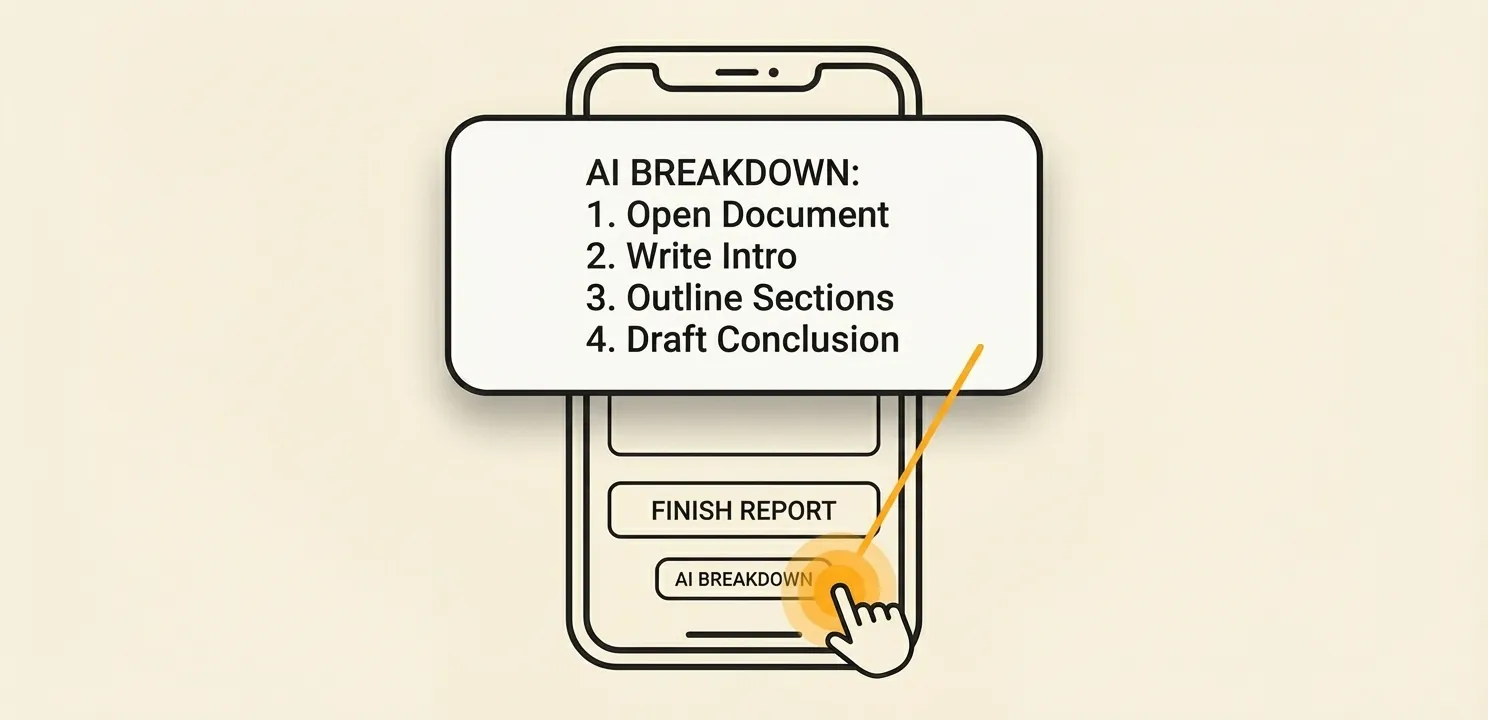
### 3. Stop The "ADHD Tax" (Reduce Choice Paralysis)
Decision fatigue drains your willpower. Save your brainpower for work by automating life choices.
* **The Strategy:** Automate your meals, your bills, and your subscriptions.
* **How Dopamind Helps:** Use the **[Life OS](/docs/life-os/introduction)** features. Our **Subscription Tracker** warns you before a renewal (saving you money), and the **Fridge Manager** tells you what to eat before it expires. Fewer decisions = less paralysis.
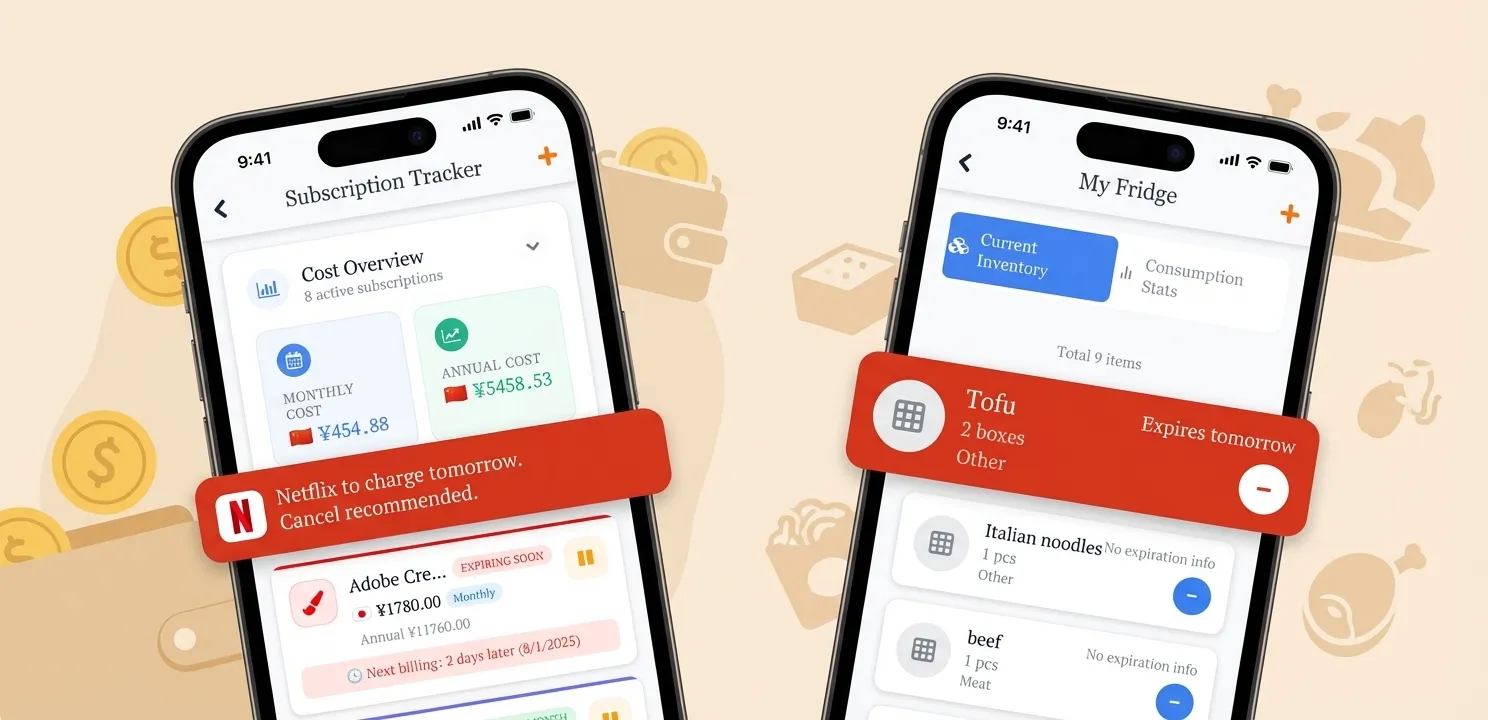
### 4. Designate Time for *One* Task
Time blindness can make a day feel infinite yet empty. Instead of a massive to-do list, create a "Block" for just one thing.
* **The Strategy:** Use time-blocking. Assign specific hours to specific tasks.
* **How Dopamind Helps:** Our **Visual Calendar** lets you see your day as concrete blocks. Seeing the time visually helps ground you in reality and reduces the anxiety of "not enough time."
### 5. Gamify Your Dopamine
The ADHD brain is starved for dopamine. You can hack this by creating immediate rewards.
* **The Strategy:** Celebrate small wins. Check a box, eat a snack, do a happy dance.
* **How Dopamind Helps:** We built the **[Vibe Working](/docs/workflow/focus-and-feedback)** loop. Every time you finish a focus session, tell the AI what you did. It gives you immediate, personalized praise and encouragement. It turns work into a game you want to win.
### 6. Body Doubling
Sometimes, you just need someone else there to keep you accountable.
* **The Strategy:** Work alongside a friend or colleague. Their presence acts as an anchor.
* **How Dopamind Helps:** Think of our AI as your **Digital Body Double**. It’s always there, ready to listen if you get stuck ("I'm stuck" button), guiding you back to focus without judgment.
### 7. Focus on "Good Enough"
Perfectionism is paralysis in disguise. Give yourself permission to do a "bad job" on the first draft. Completion is better than perfection.
### 8. Movement Breaks
When your brain freezes, move your body. A 5-minute walk or some stretching can reset your dopamine levels and clear the mental fog. Research shows that exercise can significantly improve executive function.
---
## FAQ: Common Questions About ADHD Paralysis
### Is ADHD Paralysis a medical diagnosis?
No, it is not an official medical diagnosis in the DSM-5. However, it is a widely recognized symptom experienced by many people with ADHD, often categorized under executive dysfunction.
### How is this different from executive dysfunction?
They are closely related. **Executive dysfunction** is the broader *deficit* in skills (planning, organizing, regulating), while **ADHD paralysis** is the specific *experience* of being frozen or overwhelmed caused by that dysfunction.
### Can medication help with ADHD paralysis?
Yes, for many people, ADHD medication helps regulate neurotransmitters like dopamine and norepinephrine, which can make it easier to initiate tasks. Always consult a medical professional for treatment options.
---
## Related Reading
- **[How to Be Productive Working From Home](/blog/how-to-be-productive-working-from-home)** – 12 practical tactics for easily distracted brains struggling with remote work.
- **[Why Your Morning Routine Keeps Failing](/blog/why-morning-routine-fails)** – It's not discipline—it's how your brain produces dopamine.
---
## Ready to Unfreeze Your Potential?
ADHD paralysis is tough, but you don't have to fight it alone using just willpower. You deserve tools designed for *your* brain.
**Dopamind** is more than a to-do list; it's an AI-powered exoskeleton for your executive function. From voice-captured brain dumps to instant task breakdowns, it’s built to get you moving.
---
### Why I Built Dopamind for ADHD Minds
URL: https://dopamind.app/blog/why-i-built-dopamind
Why I built Dopamind for ADHD minds. Stop procrastinating, trigger hyperfocus, replace complex planners. AI-powered task management for neurodivergent brains.
Category: Founder Story
Tags: Founder Story, ADHD, Productivity, Second Brain, ADHD Planner
Date: 2025-11-28
## To Every Busy and Chaotic Mind: Why I Built Dopamind
Hi, I’m Philo.
If you clicked on this post, I have a feeling we might be the same kind of person.
Does your brain feel like it has ten TV channels playing at once? Do you ever find yourself paralyzed on the couch, **feeling overwhelmed** by the simplest tasks?
You scroll through your phone for hours while guilt eats you alive because you *know* you have important things to do. You’ve frantically searched Google for **"how to stop procrastinating,"** only to find advice that doesn't work for your brain.
Have you bought every **ADHD planner** on the market and downloaded dozens of productivity apps, only for them to end up in your phone's **"digital graveyard"**?
**I know that feeling. Because that used to be my entire life.**
Disorganized, unable to start tasks, chronic procrastination... these labels followed me for years. It wasn't until I was diagnosed with ADHD a few years ago that I finally found relief: **It wasn't entirely my fault. My brain's operating system just wasn't compatible with the standard world.**
But I didn't want to give up. I tried every mainstream tool out there, but I found they all shared a common flaw:
> **They are designed for people who are already organized, not for people who *need* to get organized.**
Faced with dense lists, complex tagging systems, and bright red overdue alerts, I didn't feel "in control." I felt **judged**. Most tools felt like toys or rigid spreadsheets; I couldn't find a serious **ADHD app for adults** that actually respected how my brain worked.
I thought, *there has to be a better way.* So, I decided to save myself. I wrote the first line of code—for me, and for everyone else struggling in the chaos.
This is how **[Dopamind](/)** was born.
---
## The Philosophy: The First AI OS for Your Brain
Building Dopamind taught me one crucial lesson: **Willpower is a finite fuel.**
For ADHD and Autism minds, our fuel tank is already smaller than others, and yet we are constantly leaking fuel:
* Agonizing over "What should I eat for dinner?"
* Worrying "Did I forget to cancel that subscription?"
* Trying to recall "Wait, what was I just doing?"
These micro-decisions and anxieties act like background processes on a computer, quietly eating up your precious **Brain RAM**. By the time you finally sit down to work, your battery is already dead.
**Dopamind has one core design philosophy: To be your AI OS.**
We don't want you to become a perfect "Time Management Master." We want to provide you with an **unfair advantage** by offloading all those messy, energy-draining tasks to AI.
---
## Not Just Another ADHD App: How We Trigger Hyperfocus
Dopamind isn't a cold tool. It's your **AI Exoskeleton**—designed to turn the chaos of planning into an addictive flow state.
### 1. Clear Your Mind Like You're Chatting
Stop forcing yourself to fill out complex forms found in a standard **ADHD planner**.
When your brain is a mess, just hold the mic and vent like you're talking to a friend: *"Remind me to buy milk tomorrow afternoon, and ugh, I really don't want to write that report..."*
Our AI understands. It turns "Buy milk" into a task and "Don't want to write" into an emotion log.
**Goodbye forgetfulness. Goodbye anxiety.**
### 2. Smash the "Wall of Awful" (Task Paralysis)
Does "Write a Thesis" feel too huge to handle? That's **ADHD Paralysis**.
In Dopamind, you just tell the AI: "I'm stuck."
It peels the onion, breaking that scary task down into pressure-free micro-steps like "Open Word Doc" or "Write the Title."
**You only need to finish the first step to regain control.**
### 3. Vibe Working: Make Execution Addictive
We created the **"Vibe Working" Flow Method** to engineer a rapid **Dopamine Loop**.
By combining a distraction-free Focus Mode with real-time AI encouragement, we help you **trigger hyperfocus** on command.
Finish a micro-task -> Get AI praise -> Dopamine hit -> Motivation for the next one.
It's no longer a chore; it's a game. We make finishing tasks feel **addictive**.
### 4. Your "Life Firewall" (Life OS)
Beyond work, life's chaos is often the straw that breaks the camel's back.
Dopamind watches your fridge expiration dates and tracks your subscription renewals. We plug these "invisible leaks" for you so you can focus on what matters.
---
## The Vision: Unleashing Locked Potential
Let me share a real stat:
**During the development of Dopamind, my effective daily working hours increased by 200%.**
I used to think focusing for 4 hours a day was a miracle. Now, I frequently enter high-efficiency flow states for over 10 hours. Without Dopamind managing my chaotic thoughts, this **ADHD app** itself would never have been born.
**This reinforced my belief: ADHD isn't a defect; it's a different kind of energy.**
We possess incredible creativity, sharp intuition, and hyperfocus on things we love. We just lack the right "exoskeleton" to support us.
I hope Dopamind can be that exoskeleton, giving every busy brain that **unfair advantage** against distraction.
Whether you are a student, a freelancer, or new to the workforce, I hope that here, you can **unload the burden, unleash your potential, and meet the better version of yourself.**
Welcome home.
---
## Related Reading
- **[ADHD Paralysis: 8 Ways to Break Free](/blog/adhd-paralysis)** – Understand the 3 types of paralysis and proven strategies to get unstuck.
- **[Why Your Morning Routine Keeps Failing](/blog/why-morning-routine-fails)** – It's not discipline—it's how your brain produces dopamine.
---
### Todoist vs. Dopamind: Do You Need a List, or Do You Need a Coach?
URL: https://dopamind.app/blog/todoist-vs-dopamind
Todoist helps you remember, but ADHD brains need help starting. Dopamind offers AI coach, voice input & focus timer for execution.
Category: Tool Comparison
Tags: Todoist Alternative, ADHD Apps, Productivity, Comparison
Date: 2025-10-20
We need to talk about the **"Wall of Awful."**
If you use Todoist (or TickTick/Things 3), you know exactly what I mean. You open the app, and you are greeted by a wall of **red overdue dates**.
- "Call mom (Overdue 5 days)"
- "Finish report (Overdue 2 weeks)"
- "Cancel subscription (Overdue... forever)"
Todoist is a masterpiece of design. It's fast, clean, and ubiquitous. **But for the ADHD brain, Todoist often becomes a graveyard where tasks go to die.**
Why? Because Todoist assumes your only problem is *memory*. It assumes that if you write it down, you will do it.
But if you are neurodivergent, your problem isn't knowing *what* to do. It's **getting started**.
Here is why swapping your static list for an **AI Coach** like Dopamind might be the change you need.
---
## The "Capture" Gap: Typing vs. Venting
**Todoist** is great for quick capture—if you like typing. But when you are overwhelmed, even opening an app and typing feels like work.
**Dopamind** removes the keyboard friction.
- **[Voice-First](/docs/workflow/voice-input):** Just hold the button and vent. *"I'm stressed about the project, and I need to buy milk, and oh god, remind me to call the bank."*
- **AI Sorting:** You don't need to manually set dates or projects. The AI listens, understands the context, and organizes it for you. It turns your anxiety into a plan.
---
## The "Overwhelm" Gap: Big Tasks vs. Micro-Steps
In **Todoist**, if you write "Write Thesis," it sits there staring at you. It's too big. You create subtasks manually, but that takes executive function you don't have.
In **Dopamind**, we have the **Magic Button**.
- Click **["AI Breakdown"](/docs/workflow/task-breakdown)** on any scary task.
- Instantly, "Write Thesis" becomes: *1. Open Laptop. 2. Create Document. 3. Write Title.*
- We lower the bar so much that you can't say no.
---
## The "Execution" Gap: Checkbox vs. Dopamine Loop
**Todoist** is passive. It waits for you to check the box. If you don't, it just judges you with red text.
**Dopamind** is active.
- **Pre-Game Hype:** When you hit "Focus," AI gives you a personalized pep talk.
- **[The Vibe Working Loop](/docs/workflow/focus-and-feedback):** We combine a Pomodoro timer with immediate feedback. When you finish, you tell AI what you did, and it celebrates with you. This creates a dopamine rush that makes you want to keep going.
---
## Feature Comparison
| Feature | Todoist | Dopamind |
| :--- | :--- | :--- |
| **Philosophy** | A digital filing cabinet | **An AI exoskeleton** |
| **Input** | Typing / Quick Add | **[Voice "Brain Dump"](/docs/workflow/voice-input)** |
| **[Task Breakdown](/docs/workflow/task-breakdown)** | Manual subtasks | **One-click AI Breakdown** |
| **Execution** | Checkbox only | **[Focus Timer](/docs/workflow/focus-and-feedback) + AI Coach** |
| **Life Admin** | Manual lists | **Auto-[Fridge](/docs/life-os/fridge) & [Subscription Manager](/docs/life-os/subscription-tracker)** |
| **Daily Review** | Karma points | **AI-Written Daily Journal** |
---
## The Verdict
**Stick with Todoist if:** You are naturally organized, love tweaking workflows, and just need a place to store tasks. It is the best "List App" in the world.
**Switch to Dopamind if:** You have ADHD, struggle with "starting," or feel guilty looking at your current to-do list. You don't need another list; you need a system that helps you **execute**.
**Ready to clear the graveyard?**
---
## Related Reading
- **[ADHD Paralysis: 8 Ways to Break Free](/blog/adhd-paralysis)** – Why your to-do list grows but nothing gets done.
- **[Why Your Morning Routine Keeps Failing](/blog/why-morning-routine-fails)** – The real reason you can't start your day.
---
### Tiimo vs. Dopamind: 'Pretty Schedule' or 'Done List'?
URL: https://dopamind.app/blog/tiimo-vs-dopamind
Tiimo's visual planning is beautiful but draining. Discover why Dopamind's zero-friction approach helps ADHD brains start doing.
Category: Tool Comparison
Tags: Tool Comparison, Visual Planner, ADHD, Executive Dysfunction
Date: 2025-10-13
If you have looked for ADHD apps, you have definitely seen **Tiimo**.
It is stunning. It's colorful. It turns your day into a beautiful visual timeline.
Many of us downloaded Tiimo, spent 3 hours customizing icons and colors, and felt incredibly productive.
**But then... we stopped using it.**
Why? Because maintaining a perfect visual schedule takes a lot of energy. And for ADHD brains, **Planning Fatigue** is real.
Today, let's compare **Tiimo (The Visual Planner)** vs. **Dopamind (The AI Execution System)**.
---
## Tiimo: The "Setup Trap"
Tiimo is fantastic if you love the *process* of planning. It's like digital scrapbooking for your day.
### The Hidden Friction
* **The "Dollhouse" Effect:** You spend so much time decorating your schedule (picking icons, colors, exact times) that you use up your dopamine *before* you even start the first task.
* **Rigidity:** If you miss your "10:00 AM Gym" block, the whole beautiful timeline breaks. You feel like you've "ruined the day," so you quit.
* **Manual Input:** Every event needs to be manually created and dragged. It requires high executive function just to set up.
> **The Reality:** Tiimo assumes you have the energy to be your own secretary every single morning.
---
## Dopamind: The "Zero-Friction" Way
Dopamind isn't trying to win an art contest. It's trying to get you to **start working**. We replaced "manual setup" with **AI automation**.
### 1. Voice vs. Tapping
In Tiimo, you tap buttons to build a routine.
In Dopamind, you just speak: *"I need to focus on coding for 2 hours, then remind me to walk the dog."*
AI instantly creates the tasks and sets the timers. **No icons to choose. No colors to pick. Just intent.**
Use **[Voice Input](/docs/workflow/voice-input)** to dump your thoughts—no friction, no setup.
### 2. "Flow" vs. "Schedule"
Tiimo locks you into a rigid timeline.
Dopamind uses **Vibe Working**. We don't care *exactly* when you start.
* Ready to work? Click "Focus."
* Need to vent? Talk to the AI.
* Stuck? Click **["Breakdown"](/docs/workflow/task-breakdown)**.
It adapts to your energy, not the clock.
### 3. Execution Support
Tiimo shows you a visual timer, which is great.
But Dopamind gives you **Active Support** through our **[Focus Mode](/docs/workflow/focus-and-feedback)**.
* **Before:** AI hypes you up.
* **During:** White noise blocks distractions.
* **After:** You log your win and get praise.
We focus on the **psychology of doing**, not just the visualization of time.
---
## Head-to-Head Comparison
| Feature | Tiimo | Dopamind |
| :--- | :--- | :--- |
| **Best For** | Visual Learners / Planners | **Doers / Action-Takers** |
| **Setup Effort** | **High** (Manual config) | **Zero** (Voice/AI) |
| **Flexibility** | Rigid Timeline | **Flexible Flow** |
| **Input Method** | Tapping & Dragging | **Natural Language Voice** |
| **Task Breakdown** | Checklist (Manual) | **AI Auto-Breakdown** |
| **Life Management** | Routines only | **Full [Life OS](/docs/life-os/introduction)** |
---
## The Verdict: Stop "Playing" with Your Planner
If you enjoy the ritual of color-coding your day and have the energy to maintain it, **Tiimo** is a lovely choice.
But if you are tired of setting up systems that you abandon after 3 days?
**You need lower friction.**
You need a tool that works even when you are tired, overwhelmed, or messy. You need Dopamind.
---
## FAQ: Common Questions About Tiimo & ADHD
**Q: Is Tiimo good for ADHD?**
A: Tiimo's visual approach helps many ADHD users *see* their day. However, the setup effort can trigger [ADHD paralysis](/blog/adhd-paralysis) for those who struggle with initiation.
**Q: Can I import Tiimo routines to Dopamind?**
A: Not directly, but with Dopamind's voice input, you can recreate your routines in seconds by simply speaking them aloud.
**Q: Which app is better for executive dysfunction?**
A: Tiimo requires executive function to set up. Dopamind is designed to work *around* executive dysfunction with AI automation and voice-first input.
---
## Related Reading
- **[ADHD Paralysis: 8 Ways to Break Free](/blog/adhd-paralysis)** – When planning fatigue meets executive dysfunction.
- **[Why Your Morning Routine Keeps Failing](/blog/why-morning-routine-fails)** – Why rigid schedules don't work for ADHD brains.
---
### Structured vs. Dopamind: Why 'Pretty' Isn't Enough for ADHD
URL: https://dopamind.app/blog/structured-vs-dopamind
Structured's visual timelines are stunning but high-maintenance. Discover why Dopamind's AI execution helps ADHD brains finish tasks.
Category: Tool Comparison
Tags: Tool Comparison, Time Blocking, ADHD, Visual Planner
Date: 2025-10-06
If you scroll through productivity TikTok, you've definitely seen **Structured**.
It is stunning. It turns your day into a beautiful, pastel-colored timeline. For an ADHD brain that craves visual order, downloading Structured feels like buying a gym membership—you feel productive just by having it.
**But here is the trap:** You spend 20 minutes picking icons and colors to build the "perfect day." Then, life happens. You oversleep, or a meeting runs late. Suddenly, your beautiful timeline is broken.
**For ADHD minds, a broken schedule often leads to "shame spiraling" and abandoning the app entirely.**
Today, we compare **Structured (The Visual Planner)** with **Dopamind (The AI Executor)** to see which one actually helps you finish your work.
---
## Structured: The "Productivity Theater"
Structured is a master of **Time Blocking**. It asks you to assign every minute of your day to a specific task.
### Where It Shines
* **Aesthetics:** It's arguably the best-looking app on the App Store.
* **Visual Clarity:** Seeing your day as a physical timeline helps with "Time Blindness."
* **Apple Integration:** Syncs perfectly with Apple Reminders and Calendar.
### The "Rigidity" Problem
* **High Maintenance:** You have to manually create blocks, pick icons, and adjust times. It's a lot of tapping.
* **Fragile Plans:** If you miss the 9:00 AM block, the whole day feels "ruined." It lacks flexibility.
* **Just a Calendar:** It tells you *when* to do something, but it doesn't help you *start*. It lacks a focus engine or task breakdown.
---
## Dopamind: Flexibility & AI Execution
Dopamind isn't just about planning; it's about **adapting**. We know your day won't go exactly as planned, and that's okay.
### The Dopamind Advantage
* **Voice-First Planning:** Don't tap around picking icons. Just hold the mic and say, *"I need to focus on coding this morning and buy groceries tonight."* AI builds the schedule for you. Use **[Voice Input](/docs/workflow/voice-input)** to dump your thoughts—zero friction.
* **Execution Support:** When it's time to work, we don't just show a notification. We give you **[AI Task Breakdowns](/docs/workflow/task-breakdown)** and a **[Focus Timer](/docs/workflow/focus-and-feedback)** with white noise.
* **Life OS:** Structured tracks time; Dopamind tracks *life*. We manage your [fridge inventory](/docs/life-os/fridge), [subscriptions](/docs/life-os/subscription-tracker), and habits—things that usually clutter your brain.
* **No Shame:** Missed a task? It automatically flows to the "Pending" or "Today" view. No broken timelines, just a flexible flow.
---
## Feature Comparison
| Feature | Structured | Dopamind |
| :--- | :--- | :--- |
| **Input Method** | Manual Tapping & Dragging | **Voice Chat & AI Creation** |
| **Philosophy** | Rigid Time Blocking | **Flexible "Vibe Working"** |
| **Task Breakdown** | Manual Subtasks | **One-Click AI Breakdown** |
| **Execution** | Simple Timer | **Immersive Focus Mode + Hype** |
| **Life Features** | None | **Fridge, Subs, Habits** |
| **Maintenance** | High (Requires organizing) | **Low (AI Auto-Report)** |
---
## The Verdict
* **Choose Structured if:** You are a visual thinker who loves organizing, has a predictable schedule, and enjoys the process of manually crafting a beautiful calendar.
* **Choose Dopamind if:** You have ADHD, struggle with "starting" tasks, hate manual data entry, and need an AI partner that handles both work and life chaos.
**Stop spending hours "planning" your day. Start living it.**
---
## FAQ: Common Questions About Structured & ADHD
### Is Structured good for ADHD?
Structured's visual approach helps many ADHD users *see* their day. However, the high setup effort and rigid timelines can trigger [ADHD paralysis](/blog/adhd-paralysis) when plans inevitably change.
### Can I use both apps together?
You could, but it defeats the purpose. Structured requires manual maintenance, while Dopamind aims to eliminate that friction entirely with AI automation.
### Which app is better for executive dysfunction?
Structured requires significant executive function to set up and maintain. Dopamind is designed to work *around* executive dysfunction with voice-first input and AI automation.
---
## Related Reading
- **[ADHD Paralysis: 8 Ways to Break Free](/blog/adhd-paralysis)** – Why setup fatigue leads to shutdown, and how to break free.
- **[How to Be Productive Working From Home](/blog/how-to-be-productive-working-from-home)** – 12 tactics that work with your brain, not against it.
---
### Notion vs. Dopamind: Best ADHD Second Brain App?
URL: https://dopamind.app/blog/notion-vs-dopamind
Is Notion too overwhelming for ADHD? We compare Notion vs. Dopamind to find the best AI planner and second brain for neurodivergent minds.
Category: Tool Comparison
Tags: Tool Comparison, Productivity, ADHD
Date: 2025-09-29
In the productivity world, **Notion** is the undisputed king. It’s powerful, flexible, and aesthetic. It feels like it can do *anything*.
I used to be a Notion zealot. I spent weeks building the "perfect" dashboard, linking a dozen databases, and creating progress bars with complex formulas.
**But here is the awkward truth: The more perfect my system became, the less I actually got done.**
For ADHD or Neurodivergent minds, the choice of tool often determines whether you "master your life" or "get mastered by the system."
Today, let’s do a deep dive: **The all-powerful Notion** vs. **The ADHD-focused Dopamind**. Which one is right for you?
---
## 🏗️ Notion: Infinite Possibilities (The Lego Box)
At its core, Notion is a **database**. It hands you a blank sheet and unlimited Lego bricks. You can build a castle, or you can build a spaceship.
### ✅ The Pros
* **Infinite Flexibility:** Use it for a Wiki, CRM, finance tracker, or personal website.
* **Collaboration:** Excellent for long-form writing and team docs.
* **Rich Ecosystem:** Thousands of templates and plugins.
### ❌ The ADHD Trap
* **High Activation Energy:** Want to jot something down? Open App -> Find Page -> Wait for Load -> Click New -> Fill Properties. By then, you’ve forgotten the idea.
* **Procrastination by Design:** We get addicted to "customizing icons," "tweaking layouts," and "optimizing formulas" instead of doing the work. This is **"Productivity Theater."**
* **Maintenance Debt:** If you stop organizing for a few days, your Notion becomes a digital junkyard you’re too scared to open.
> **Verdict:** Notion is the ultimate **Warehouse** and **Workbench**, but it is a terrible **Executor**.
---
## ⚡️ Dopamind: Wear and Go (The Iron Man Suit)
Dopamind is essentially an **AI Operating System (AI OS)**. We don’t give you bricks; we give you a **pre-assembled, powered exoskeleton**.
You don’t "build" the system; you just "step into" it.
### ✅ The Dopamind Edge
* **[Zero-Friction Input](/docs/workflow/voice-input):** Wherever you are, hold the mic and speak. AI organizes it into tasks. **No forms, no clicks, just venting.**
* **[AI Intervention](/docs/workflow/task-breakdown):** Notion waits for you to act. Dopamind comes to you. Task too hard? AI breaks it down. Stuck on the couch? AI hypes you up.
* **[Life OS Built-in](/docs/life-os/introduction):** Fridge inventory, subscription tracking, habit heatmaps—it's all pre-built. You don't need to design tables.
* **The Dopamine Loop:** Our unique **[Vibe Working](/docs/workflow/focus-and-feedback)** method uses instant feedback to make "finishing tasks" addictive.
### ❌ The Limitation
* **Not for Docs:** You can't write a novel or manage complex team wikis here (Leave that to Notion).
---
## ⚔️ Head-to-Head Comparison
Let's put them under the microscope:
| Feature | Notion 🏗️ | Dopamind 🧠 |
| :--- | :--- | :--- |
| **Philosophy** | Here are **bricks**, build it yourself. | Here is a **suit**, put it on. |
| **Learning Curve** | **High** (Databases/Formulas) | **Zero** (Just speak) |
| **Input Method** | Typing, Clicking, Properties | **Voice Chat**, Natural Language |
| **Task Breakdown** | Manual subtasks | **One-click AI Breakdown** |
| **Execution Mode** | None (Static list) | **Focus Timer + Real-time Hype** |
| **Maintenance** | **High** (Requires constant gardening) | **Low** (AI auto-archives & reports) |
| **Best For** | Organizers, Writers, Architects | **ADHDers, Doers, Minimalists** |
---
## 🧠 Why the ADHD Brain Needs Dopamind
### 1. Eliminating "Decision Fatigue"
In Notion, every step is a decision: *Which page? Which template? Which tag?*
In Dopamind, your only decision is: **"Hold to Speak."** AI handles the categorization and scheduling.
### 2. Fighting "Analysis Paralysis"
Staring at a long Notion To-Do list can feel paralyzing. This is especially challenging for people experiencing [ADHD paralysis](/blog/adhd-paralysis), where being overwhelmed by options leads to complete shutdown.
Dopamind's **Focus Mode** forces you to see only one thing at a time. Combined with **AI Breakdown**, we turn "impossible mountains" into "climbable stairs."
### 3. Fixing "Working Memory" Gaps
ADHDers often have a "now or never" memory.
Dopamind captures thoughts before they evaporate. Plus, the **Auto-generated Daily Report** remembers every small win for you, so you stop feeling like you "did nothing all day."
---
## 🙋 FAQ: Common Questions About Notion & ADHD
**Q: Is Notion good for ADHD?**
A: Notion is powerful, but its high flexibility and complex setup can trap ADHD users in "over-organization" mode (Procrastination by Design).
**Q: Is Dopamind free?**
A: Dopamind offers a free trial. It's an AI operating system designed specifically for ADHD, using voice input and AI task breakdown to lower the activation barrier.
**Q: Can I use both Notion and Dopamind together?**
A: Absolutely. Use Notion for your knowledge base (cold storage) and Dopamind for daily execution and life tasks (hot execution).
---
## 🏆 The Verdict: How to Choose?
Actually, you don't have to pick just one. **The best strategy might be "The Hybrid."**
* **Use Notion for "Cold Storage":** Keep your book notes, project docs, and long-term vision boards here. It’s your **Library**.
* **Use Dopamind for "Hot Execution":** Manage daily tasks, life chores, and habits here. It’s your **Personal Coach**.
**If you are tired of spending hours organizing Notion but still procrastinating, it’s time to try Dopamind.**
Leave the "organizing" to Notion. Give the "living" to Dopamind.
---
## Related Reading
- **[ADHD Paralysis: 8 Ways to Break Free](/blog/adhd-paralysis)** – When Notion overwhelm turns into total shutdown.
- **[How to Be Productive Working From Home](/blog/how-to-be-productive-working-from-home)** – 12 tactics for brains that resist structure.
---
### Motion vs. Dopamind: Do You Need a Boss or a Partner?
URL: https://dopamind.app/blog/motion-vs-dopamind
Motion wants to optimize every minute of your day. Dopamind wants to help you just start. Why high-pressure AI scheduling might be the wrong choice for ADHD.
Category: Tool Comparison
Tags: Tool Comparison, AI Scheduler, ADHD, Productivity
Date: 2025-09-22
If you've seen the ads for **Motion**, you know the promise: *"AI that plans your day so you get 25% more done."*
It sounds like a dream. You dump tasks in, and Motion plays Tetris with your calendar, squeezing work into every available slot.
For a busy executive managing three teams, this is heaven.
**But for an ADHD brain, this can quickly become a nightmare.**
Here is the truth: **Motion optimizes for *Efficiency* (Speed). Dopamind optimizes for *Sanity* (Flow).**
If you are debating between the $34/month Motion and Dopamind, here is what you need to know.
---
## Motion: The Aggressive "Cyber Boss"
Motion acts like a strict project manager standing over your shoulder.
### The ADHD "Panic Loop"
* **The Tetris Effect:** Seeing a calendar packed edge-to-edge with tasks induces immediate **Overwhelm**. Instead of doing the work, you freeze (ADHD Paralysis).
* **The Rescheduling Guilt:** When you miss a task (which happens), Motion automatically moves it to the next slot. It feels like the work is chasing you. You can never "catch up."
* **Over-Optimization:** Motion assumes you are a robot who can switch context instantly. It doesn't account for the "transition time" our brains desperately need.
> **Verdict:** Motion is great if your problem is "fitting it all in." It's terrible if your problem is "getting started."
---
## Dopamind: The Empathetic "Co-Pilot"
Dopamind isn't trying to squeeze more work out of you. We are trying to make the work **easier to start**.
### 1. From "Must Do" to "Can Do"
Motion tells you: *"You have 15 minutes, do this task now!"*
Dopamind asks: *"You seem stuck. Want to break this down?"*
We use **[Voice Input](/docs/workflow/voice-input)** to capture your chaos and **[AI Breakdown](/docs/workflow/task-breakdown)** to turn scary projects into tiny, harmless steps.
### 2. Focus vs. Scheduling
Motion puts the task on the calendar. Dopamind stays with you **while you do it**.
Our **[Focus Mode](/docs/workflow/focus-and-feedback)** blocks out the noise, plays white noise, and gives you a countdown. We protect your attention, not just your time slot.
### 3. Life Beyond Work
Motion is purely for productivity hustlers.
Dopamind is a **[Life OS](/docs/life-os/introduction)**. We know that if your fridge is empty or you forgot to cancel a subscription, your work suffers. We manage your life chores so your brain is free to focus on work.
---
## The Head-to-Head
| Feature | Motion | Dopamind |
| :--- | :--- | :--- |
| **Core Philosophy** | **Auto-Scheduling** (Maximize Time) | **Executive Function** (Overcome Inertia) |
| **Vibe** | High Pressure / "Hustle" | Calm / Supportive |
| **When you miss a task** | Auto-reschedules (It piles up) | Stays in "Today" (You choose) |
| **Execution Help** | None (Just a calendar block) | **Focus Timer + AI Hype** |
| **Life Features** | None | **Fridge / Habits / Subs** |
| **Price** | **$19 - $34 / mo** | **$13 / mo** (Affordable) |
---
## The Verdict: Save $200/Year and Your Sanity
If you have 10 meetings a day and need an AI to fit tasks between them, get Motion.
But if you have **ADHD** and your struggle is **initiation, distraction, and overwhelm**, Motion might just add more anxiety.
**Dopamind is built to unblock your brain, not just fill your calendar.** And we do it for less than half the price.
---
## FAQ: Common Questions About Motion & ADHD
**Q: Is Motion good for ADHD?**
A: Motion's auto-scheduling is powerful, but its high-pressure, packed calendar approach can trigger overwhelm and [ADHD paralysis](/blog/adhd-paralysis) in neurodivergent users.
**Q: Why is Motion so expensive?**
A: Motion targets enterprise users and busy executives. At $34/month, it's one of the priciest productivity tools on the market.
**Q: Can I use both Motion and Dopamind?**
A: You could, but they serve different philosophies. Motion fills your calendar; Dopamind helps you actually do the work. For ADHD users, Dopamind alone is often the better choice.
---
## Related Reading
- **[ADHD Paralysis: 8 Ways to Break Free](/blog/adhd-paralysis)** – When a packed calendar triggers overwhelm instead of action.
- **[Why Your Morning Routine Keeps Failing](/blog/why-morning-routine-fails)** – Why high-pressure scheduling backfires for ADHD brains.
---
### Habitica vs Dopamind: Why ADHD Needs Flow, Not XP
URL: https://dopamind.app/blog/habitica-vs-dopamind
Habitica is fun but can become another distraction for ADHD brains. Learn why Dopamind's AI-powered flow system beats RPG gamification for real productivity.
Category: Tool Comparison
Tags: Habitica Alternative, Gamification, ADHD Tools, Productivity
Date: 2025-09-15
If you are a geek or a gamer with ADHD, you've almost certainly tried **Habitica**.
The promise is irresistible: *Turn your life into an RPG.* Complete tasks to level up, find pets, and buy cool gear. For a brain starved of dopamine, this sounds like heaven.
**But here is the trap:** After a few weeks, many of us find ourselves spending more time choosing the perfect sword for our avatar than actually writing that report. Or worse—we miss a few daily tasks, our character dies, and the shame makes us never want to open the app again.
**When the "game" becomes another chore, it's time to rethink your system.**
Today, we compare **Habitica (The RPG)** vs. **Dopamind (The AI Flow System)**. Do you need a fantasy life, or do you need to control your real one?
---
## The Habitica Trap: Complexity & Punishment
Habitica is brilliant, but it demands **High Maintenance**.
* **Setup Fatigue:** You have to manually create Habits, Dailies, and To-Dos. It takes a lot of executive function just to set up the game.
* **The "Punishment" Anxiety:** If you don't check off your dailies, your character takes damage. For ADHDers who struggle with consistency, this negative reinforcement often leads to **avoidance**. We stop opening the app to avoid seeing our character die.
* **Distraction by Design:** Guilds, parties, challenges, pets... there are so many shiny things inside the app that pull your attention *away* from your real work.
> **Verdict:** Habitica is great if you want **social accountability** and love RPG lore. But it can easily become a form of "Productive Procrastination."
---
## Dopamind: Gamification Without the "Grind"
Dopamind is designed for **Low Maintenance** and **High Reward**.
We believe you don't need a fake sword to feel good. You need the satisfaction of **actually finishing tasks**.
* **Instant Start (No Setup):** Don't waste time typing. Just hold the mic and say, "I need to study math." AI creates the task instantly.
* **Support, Not Punishment:** Missed a task? Dopamind won't kill your avatar. It will move the task to "Overdue" and AI will gently encourage you to restart. We build you up; we don't beat you down.
* **Real-World Dopamine:** Instead of gold coins, we give you **Focus Heatmaps** and **AI Praise**. The reward is the feeling of control, not a virtual item.
---
## Feature Showdown
| Feature | Habitica | Dopamind |
| :--- | :--- | :--- |
| **Core Concept** | **RPG Game** (Avatar, Gear) | **AI OS** (Focus, Flow) |
| **Input Method** | Manual Typing | **[Voice "Brain Dump"](/docs/workflow/voice-input)** |
| **Motivation** | Gold / XP / Items | **[AI Hype](/docs/workflow/focus-and-feedback) / Heatmaps** |
| **Missed Tasks** | You lose Health (Pain) | **Rescheduled** (Support) |
| **Task Breakdown** | Manual Checklist | **[One-Click AI Breakdown](/docs/workflow/task-breakdown)** |
| **Distraction Level** | **High** (Social, Shop, Pets) | **Zero** (Minimalist Mode) |
| **Life Management** | Manual Habits only | **[Life OS](/docs/life-os/introduction) (Fridge, Subs & Habits)** |
---
## Conclusion: Do You Want to Play, or Do You Want to Live?
If you are looking for a fun community to chat with and collecting pixel pets makes you happy, **Habitica** is fantastic. Keep using it!
But if you are looking for a tool to help you **unfreeze**, **focus**, and **get your actual life together** without the mental burden of managing a game character...
**Dopamind is the upgrade you need.**
We replace the "Grind" with "Flow."
---
## Related Reading
- **[ADHD Paralysis: 8 Ways to Break Free](/blog/adhd-paralysis)** – Understand the 3 types of paralysis and how to beat them.
- **[How to Be Productive Working From Home](/blog/how-to-be-productive-working-from-home)** – 12 tactics when gamification isn't enough.
---
### Google Keep is a Messy Fridge Door. Dopamind is Your Chef.
URL: https://dopamind.app/blog/google-keep-vs-dopamind
Google Keep creates digital clutter for ADHD brains. Dopamind turns chaos into tasks with AI breakdown, voice input & focus timer.
Category: Tool Comparison
Tags: Google Keep Alternative, ADHD Apps, Digital Clutter, Comparison
Date: 2025-09-08
We all love **Google Keep**. It's colorful, it's fast, and pinning a note feels satisfying—like sticking a Post-it on your monitor.
But for the ADHD brain, Google Keep often becomes a **"Digital Hoarding Zone."**
You have a yellow note for groceries, a blue note for "Big Ideas," a red note for urgent tasks... and 500 other notes buried underneath.
**It's chaos. It's a messy fridge door.** You know the information is there, but you can't process it into action.
Google Keep captures **Noise**. Dopamind creates **Signal**.
Here is why you need to stop managing your life with sticky notes.
---
## Google Keep: The Trap of "Visual Noise"
Google Keep is designed for **Quick Capture**, not **Task Management**.
### The ADHD Friction Points
- **No Priority:** When everything is a colorful card, nothing is important. "Buy Milk" looks exactly the same size as "File Taxes." Your attention is scattered.
- **The "Bottomless Pit":** Notes get pushed down by new ones. For ADHD, "out of sight = out of mind." Old notes are simply forgotten.
- **No Execution Tools:** You can make a checklist, sure. But can you break it down? Can you start a timer for it? No. It's just static text.
---
## Dopamind: From Chaos to Structure
Dopamind takes the speed of Google Keep but adds the intelligence of a personal assistant.
### 1. Voice Input > Typing Notes
In Keep, you have to type or draw.
In Dopamind, you just **[speak](/docs/workflow/voice-input)**. "Remind me to call mom and start the marketing report."
AI doesn't just save the text; it *understands* it. It separates the two tasks, assigns deadlines, and prioritizes them.
### 2. Turning "Lists" into "Roadmaps"
A checklist in Google Keep is static. It's intimidating.
In Dopamind, if you have a task like "Plan Wedding," you click **[AI Breakdown](/docs/workflow/task-breakdown)**.
It transforms into a step-by-step roadmap. You aren't staring at a list anymore; you are following a path.
### 3. The "Do It Now" Engine
Google Keep is for *storing*. Dopamind is for *doing*.
Tap a task, and the rest of the world fades away. You get a **[Focus Timer](/docs/workflow/focus-and-feedback)**, white noise, and a distraction-free interface. We help you close the "Execution Gap."
---
## Feature Comparison
| Feature | Google Keep | Dopamind |
| :--- | :--- | :--- |
| **Metaphor** | Digital sticky notes | **AI Assistant** |
| **Organization** | Tags/Colors (Manual) | **Auto-Sorting (Today/Inbox)** |
| **Input** | Text/Image/Drawing | **[Voice Intelligence](/docs/workflow/voice-input)** |
| **Task Complexity** | Simple Checklists | **[AI Subtasks & Breakdown](/docs/workflow/task-breakdown)** |
| **Focus Aid** | None | **[Focus Timer & Soundscapes](/docs/workflow/focus-and-feedback)** |
| **Life Admin** | Manual lists | **Built-in [Fridge](/docs/life-os/fridge) & [Subscription Manager](/docs/life-os/subscription-tracker)** |
| **Outcome** | "I wrote it down." | **"I got it done."** |
---
## The Verdict: Use Keep for Groceries, Dopamind for Life
Google Keep is perfect for your shopping list or saving a random photo. Keep using it for that.
But for your **Goals, Work, and Habits**? You need a system that pushes you forward, not a wall of sticky notes that holds you back.
**Clear the clutter. Start executing.**
---
## Related Reading
- **[ADHD Paralysis: 8 Ways to Break Free](/blog/adhd-paralysis)** – When digital clutter meets brain overload.
- **[Why Your Morning Routine Keeps Failing](/blog/why-morning-routine-fails)** – Your brain needs less friction, not more notes.
---
### Google Calendar vs. Dopamind: Why Scheduling Isn't Executing
URL: https://dopamind.app/blog/google-calendar-vs-dopamind
Google Calendar tells you when to work, but it doesn't help you start. Discover why ADHD brains need an execution engine, not just a timetable.
Category: Tool Comparison
Tags: Google Calendar, Time Blindness, ADHD Tools, Time Blocking
Date: 2025-09-01
If you have ADHD, you probably have a complicated relationship with **Google Calendar**.
Maybe your calendar is beautifully color-coded via "Time Blocking," looking like a piece of modern art.
Or maybe it's completely empty because you forgot to update it for three months.
But here is the universal struggle: **The calendar says "10:00 AM - Write Report," but at 10:15 AM, you are still scrolling Twitter.**
Why? Because **Google Calendar is a Map, but you need an Engine.**
It tells you *where* to be and *when*, but it provides zero horsepower to help you actually move. Today, let's explore why replacing (or supplementing) Google Calendar with **Dopamind** might be the key to fixing your "Execution Gap."
---
## Google Calendar: The "Time Container"
Google Calendar is fantastic for **Hard Landscapes**—things that happen at a fixed time involving other people (meetings, flights, dentist appointments).
### The Problem for ADHD
- **The "Wall of Awful":** Staring at a calendar packed with tasks creates immediate overwhelm (Paralysis). You see the whole mountain, not the first step.
- **Zero Accountability:** If you ignore a calendar notification, nothing happens. It just sits there, judging you.
- **No "How":** A block named "Work on Project" is too vague. It doesn't tell your brain *how* to start, causing you to freeze.
> **In short:** Google Calendar assumes you are a robot who executes commands instantly.
---
## Dopamind: The "Execution Engine"
Dopamind is designed to bridge the gap between "planning to do it" and "actually doing it." We focus on **starting** and **finishing**.
### 1. From "Vague Block" to "Actionable Steps"
In GCal, "Write Essay" is a scary 2-hour block.
In Dopamind, you click **[AI Breakdown](/docs/workflow/task-breakdown)**, and that scary block transforms into:
1. Open Laptop.
2. Create new Doc.
3. Write 3 bullet points.
**Now, it's not a chore; it's a game.**
### 2. Time Blindness Cure
ADHD brains struggle to feel the passage of time.
Dopamind's **[Focus Timer](/docs/workflow/focus-and-feedback)** (with visual breathing animations) anchors you in the *now*.
GCal tells you "you have 1 hour." Dopamind holds your hand *during* that hour.
### 3. The Dopamine Feedback Loop
When a meeting ends in GCal, it just disappears.
When you finish a task in Dopamind, you get **celebrated**. You log your win, AI praises you, and your heatmap lights up. This positive reinforcement makes you want to do it again tomorrow.
---
## Feature Comparison
| Feature | Google Calendar 📅 | Dopamind 🧠 |
| :--- | :--- | :--- |
| **Primary Goal** | Scheduling & Meetings | **Task Execution & Focus** |
| **Task Granularity** | High-level Blocks | **[AI Micro-steps](/docs/workflow/task-breakdown)** |
| **Starting Friction** | High (Just a notification) | **Low (AI Hype + Breakdown)** |
| **During Task** | Silent / Passive | **[Focus Timer](/docs/workflow/focus-and-feedback) / White Noise** |
| **Input Method** | Typing / Clicking forms | **[Voice Capture](/docs/workflow/voice-input)** |
| **End of Day** | Events disappear | **Auto-generated Daily Report** |
---
## The Perfect Setup: The Hybrid Model
We aren't saying delete Google Calendar. You need it for meetings.
But for **your work**, you need Dopamind.
- **Use Google Calendar for:** Meetings, events, birthdays (The "Must-dos").
- **Use Dopamind for:** Your tasks, habits, and deep work sessions (The "Want-to-dos").
Stop treating your calendar like a to-do list. It's time to move from *scheduling* to *executing*.
---
## Related Reading
- **[ADHD Paralysis: 8 Ways to Break Free](/blog/adhd-paralysis)** – Why your brain freezes when facing a packed schedule.
- **[How to Be Productive Working From Home](/blog/how-to-be-productive-working-from-home)** – 12 tactics for distracted brains working remotely.
---
### Forest vs. Dopamind: Do You Need a 'Game' or a 'System'?
URL: https://dopamind.app/blog/forest-vs-dopamind
Forest is great for focus, but it can't solve ADHD paralysis. Learn why Dopamind's AI workflow beats gamification for actually getting things done.
Category: Tool Comparison
Tags: Forest App, Pomodoro Timer, Gamification, ADHD Tools
Date: 2025-08-25
We all love **Forest**. It's cute, it's satisfying, and planting a virtual tree is a great way to stop scrolling through TikTok for 25 minutes.
For many people, Forest is the gateway to productivity.
**But if you have ADHD, you might have noticed a problem:** You have a beautiful virtual forest, but your real life is still a mess. Your laundry is piling up, you forgot to cancel that subscription, and you still don't know how to start that big project.
Forest is a fantastic **Timer**, but Dopamind is a complete **AI Operating System**.
Here is why swapping "trees" for "AI" might be the breakthrough you need.
---
## The Limit of "Just Planting Trees"
Forest focuses on one single thing: **Staying off your phone.**
It punishes you for leaving the app (your tree dies). This works for focus, but it doesn't solve **Executive Dysfunction**.
* **It doesn't help you start:** Staring at a "Plant" button won't help if the task ("Write Thesis") feels too big and scary.
* **It doesn't organize your thoughts:** It can't hear your worries or sort your schedule.
* **It creates shame:** For ADHDers, seeing a withered tree because you had to answer an urgent call can trigger Rejection Sensitive Dysphoria (RSD).
---
## Dopamind: The "Full-Stack" Solution
Dopamind includes a focus timer (just like Forest), but it wraps it inside a workflow designed to help you **start, finish, and manage life.**
### 1. Before Focus: Crushing the Barrier
In Forest, you just set a time. In Dopamind, we help you get ready.
* **Brain Dump:** Use **[Voice Input](/docs/workflow/voice-input)** to clear your mind before you start.
* **AI Breakdown:** Scared of a task? Click the **[Breakdown](/docs/workflow/task-breakdown)** button, and AI breaks it down into tiny steps. You aren't just "focusing"; you are executing a plan.
### 2. During Focus: Active Encouragement
Instead of threatening you with a dead tree, Dopamind uses **positive reinforcement**.
* Our AI gives you a personalized "hype speech" before you start.
* If you get stuck, you can pause and ask AI for help. It's a coach, not a prison warden.
### 3. Beyond Focus: Managing Life
Forest lives in a vacuum. Dopamind connects to your real life.
We track your **habits**, manage your **[Fridge Inventory](/docs/life-os/fridge)**, and watch your **[Subscriptions](/docs/life-os/subscription-tracker)**. We save your willpower for the things that matter.
---
## Feature Comparison
| Feature | Forest | Dopamind |
| :--- | :--- | :--- |
| **Core Mechanic** | **Gamification** (Planting trees) | **AI Workflow** (Vibe Working) |
| **Input Method** | Typing task name | **[Voice Capture](/docs/workflow/voice-input) & AI Sorting** |
| **Task Breakdown** | None | **[One-Click AI Breakdown](/docs/workflow/task-breakdown)** |
| **Focus Feedback** | Dead tree (Punishment) | **[AI Praise](/docs/workflow/focus-and-feedback) (Reward)** |
| **Life Management** | None | **[Life OS](/docs/life-os/introduction) (Fridge/Subs)** |
| **Best For** | Phone addiction detox | **ADHD & Getting things done** |
---
## The Verdict
If your main problem is **"I look at my phone too much,"** keep using **Forest**. It's the best at what it does.
But if your problem is **"I feel overwhelmed, disorganized, and stuck,"** then you need **Dopamind**.
Stop just growing a digital forest. Start building a life you can be proud of.
---
## Related Reading
- **[ADHD Paralysis: 8 Ways to Break Free](/blog/adhd-paralysis)** – 8 proven strategies to overcome the freeze.
- **[Why Your Morning Routine Keeps Failing](/blog/why-morning-routine-fails)** – Your brain needs a different startup sequence.
---
### Apple Notes is a Graveyard. Dopamind is a Factory.
URL: https://dopamind.app/blog/apple-notes-vs-dopamind
You have 1,500 notes, but how many have you acted on? Discover why Apple Notes traps ADHD brains and how Dopamind turns ideas into completed tasks.
Category: Tool Comparison
Tags: Apple Notes, Digital Hoarding, ADHD Tools, Second Brain
Date: 2025-08-18
Open your **Apple Notes** app right now. Scroll down.
What do you see?
Old grocery lists? A movie recommendation from 2021? A "business idea" that consists of three vague sentences?
For the ADHD brain, Apple Notes is dangerous. It gives us a hit of dopamine because we "captured" the idea, so we feel productive. **But then, the idea goes there to die.**
Apple Notes is a **Storage Unit**. Dopamind is an **Assembly Line**.
Here is why you need to stop treating your notes app like a to-do list.
---
## 📝 Apple Notes: The 'Black Hole' of Productivity
Apple Notes is amazing for **Reference** (recipes, wifi passwords, scanned docs). But it is terrible for **Action**.
### The ADHD Traps
* **Out of Sight, Out of Mind:** Once you close a note, it disappears into a list of thousands. There is no urgency, no reminder, no "status."
* **Static Text:** You type "Write Book." It sits there as text. It doesn't become a project. It doesn't break itself down. It just stares at you until you feel guilty.
* **The 'Hoarding' Instinct:** We keep adding new notes without processing the old ones. It becomes digital clutter that drains your mental energy just by looking at it.
---
## ⚡️ Dopamind: Where Ideas Become Actions
Dopamind isn't for storing passwords. It's for processing **Intentions**.
### 1. From 'Static Text' to 'Active Task' 🪄
In Apple Notes, you write a bullet point.
In Dopamind, you speak an idea, and AI turns it into a **Task Card**.
It has a due date. It has a status (Pending -> In Progress). It flows through a system designed to get it *done*, not just *saved*.
### 2. The AI 'Unstuck' Button 🆘
Staring at a note that says "Plan Vacation" is overwhelming.
In Dopamind, you hit **[AI Breakdown](/docs/workflow/task-breakdown)**. Suddenly, that vague note becomes:
1. Check dates.
2. Book flight.
3. Find hotel.
**The wall of text is gone. The path is clear.**
### 3. Execution vs. Reading 🍅
Apple Notes is for reading.
Dopamind is for **Doing**. When you tap a task, you enter **[Focus Mode](/docs/workflow/focus-and-feedback)**. The interface changes. The timer starts. You aren't browsing your thoughts anymore; you are executing them.
---
## ⚔️ The Showdown
| Feature | Apple Notes 📝 | Dopamind 🧠 |
| :--- | :--- | :--- |
| **Primary Goal** | Storage & Reference | **Execution & Completion** |
| **Content Type** | Static Text/Images | **Actionable Tasks** |
| **Input** | Typing/Drawing | **[Voice 'Brain Dump'](/docs/workflow/voice-input)** |
| **Structure** | Folders (Hidden) | **Flow (Today/Pending/Done)** |
| **Active Help** | None | **AI Breakdown & Hype** |
| **Outcome** | Digital Archive | **Daily Achievements** |
---
## 🏆 The Verdict: Separate 'Reference' from 'Action'
Keep Apple Notes. It's the best place to store your insurance policy number or your grandma's cookie recipe.
But for things you need to **DO**? Move them to Dopamind.
* **Don't write:** "Buy milk" in a note. **Tell Dopamind.**
* **Don't write:** "Project ideas" in a note. **[Brain dump](/docs/workflow/voice-input) into Dopamind.**
Stop building a graveyard of great ideas. Start building a factory that makes them real.
---
## Related Reading
- **[ADHD Paralysis: 8 Ways to Break Free](/blog/adhd-paralysis)** – Why your brain freezes and how to unfreeze it.
- **[Why Your Morning Routine Keeps Failing](/blog/why-morning-routine-fails)** – It's not discipline—it's how your brain produces dopamine.
---
### Apple Calendar is for Dates. Dopamind is for Doing.
URL: https://dopamind.app/blog/apple-calendar-vs-dopamind
Apple Calendar is great for appointments, but ADHD brains need more. Dopamind adds an AI execution layer to help you do the work.
Category: Tool Comparison
Tags: Apple Calendar, iOS Productivity, ADHD Tools, Time Management
Date: 2025-08-11
If you are deep in the Apple ecosystem, **Apple Calendar** is likely your default. It's clean, it's on your wrist (Apple Watch), and it syncs perfectly between your Mac and iPhone.
But for the ADHD brain, Apple Calendar has a fatal flaw: **It is too polite.**
A notification pops up: *"2:00 PM: Project Work."*
You look at it, swipe it away, and go back to scrolling. The calendar doesn't push back. It doesn't ask if you actually started. It just sits there, looking pretty.
**Apple Calendar is a map, but you need a navigator.**
Here is why relying solely on Apple Calendar might be killing your productivity, and how **Dopamind** fills the gap.
---
## Apple Calendar: The 'Passive' Container
Apple Calendar is built for **Appointments**—places you need to be. It assumes that once you know the time, you will automatically do the thing.
### The ADHD Friction Points
* **The 'Snooze' Trap:** How many times have you hit 'Snooze' on a calendar alert until the day is over? It becomes background noise.
* **Input Friction:** Creating an event requires tapping `+`, scrolling wheels for dates, and typing titles. It's too many steps when you just want to capture a fleeting thought.
* **No 'Start' Button:** When 2:00 PM arrives, the calendar gives you no tools to initiate the task. No breakdown, no timer, no white noise.
---
## Dopamind: The 'Active' Engine
Dopamind is designed for **Action**. We took the friction out of starting and the pain out of finishing.
### 1. Faster than Siri: Voice-to-Plan
Siri is okay for 'Set a timer,' but try telling it your complex worries.
In Dopamind, just hold the button and vent: *"I need to finish the slides, but I'm also worried about the car insurance."*
AI captures it, organizes it, and schedules it. It's a **[Brain Dump](/docs/workflow/voice-input)**, not just a command.
### 2. From Notification to 'Flow'
Apple Calendar reminds you. Dopamind **transitions** you.
When it's time to work, you don't just see a text alert. You enter a **[Focus Mode](/docs/workflow/focus-and-feedback)** with a breathing animation and a countdown timer. It creates a 'container' for your attention that you can't just swipe away.
### 3. Visualizing Progress (Not Just Space)
Apple Calendar shows you empty space or filled space.
Dopamind shows you **Progress**. Our heatmaps and daily reports show you *what you accomplished*, giving you the dopamine hit that a static calendar never could.
---
## Feature Comparison
| Feature | Apple Calendar | Dopamind |
| :--- | :--- | :--- |
| **Best For** | Appointments & Meetings | **Tasks & Deep Work** |
| **Notification Style** | Passive (Dismissible) | **Active (Focus Mode)** |
| **Input Speed** | Medium (Scroll wheels) | **Fast ([Voice Capture](/docs/workflow/voice-input))** |
| **Task Complexity** | Single block | **[AI-Broken Subtasks](/docs/workflow/task-breakdown)** |
| **Accountability** | None | **Daily AI Report** |
| **Reward System** | None | **Habit Heatmaps** |
---
## The Verdict: Don't Delete It, Upgrade It.
We love Apple Calendar for knowing when our dentist appointment is. Keep using it for that.
But for **your goals**, stop treating them like appointments. Treat them like missions.
**Use Dopamind to:**
1. Capture tasks instantly via voice.
2. Break them down when you feel stuck.
3. Enter deep focus when the time comes.
Your iPhone is a powerful tool. Make sure it's helping you *do* the work, not just *schedule* it.
---
## Related Reading
- **[ADHD Paralysis: 8 Ways to Break Free](/blog/adhd-paralysis)** – Understand why you freeze and 8 strategies to get unstuck.
- **[How to Be Productive Working From Home](/blog/how-to-be-productive-working-from-home)** – 12 tactics for easily distracted brains.
---
When AI teams up perfectly with your brain, magic happens.
### Step 1: Brain Dump (Clear the Noise)
**A cluttered brain = terrible focus.**
Before you start working, you need to dump the noise out of your head.
* **How:** Tap the microphone and ramble just like you're complaining to a friend. Spill out everything you want to do or are worried about.
* **AI's Role:** It automatically converts your voice into a clear, organized task list. With the mental clutter gone, you can travel light.
### Step 2: Focus (The Execution)
Don't stare at a long list and freeze. Pick one, and just start.
* **How:** Tap the **"Focus"** button on the task detail page.
* **AI's Role:** Right before the countdown starts, the AI generates a **personalized hype message** based on the task content. Start your Pomodoro timer with that warmth and motivation.
### Step 3: Breakdown (Safety Net)
**💡 Stuck? Don't force it.**
If you start a focus session but find yourself unable to move, it's usually because the task is too complex or vague.
* **How:** Click **"I'm Stuck"** and tell the AI your struggle.
* **AI's Role:** Like peeling an onion, it breaks the massive task down into pressure-free micro-steps like "Open the document" or "Write the first line."
* **The Effect:** This gentle assistance instantly dissolves startup paralysis.
### Step 4: Instant Feedback (The Dopamine Hit) ⭐️ Crucial!
**This is the soul of the loop.** Never skip this step.
* **How:** When the timer ends, a popup appears. Write a one-sentence summary of what you just did (e.g., "I finished the rough draft of the email").
* **AI's Role:** This message goes straight to the AI, and it gives you **immediate** validation and encouragement.
* **The Effect:** You feel that **every minute of your effort is being seen**. This feeling of being acknowledged is the fuel that launches your next loop.
### Step 5: Daily Report (The Review)
At the end of the day, don't focus on what you didn't do. Look at what you *did* do.
* **How:** Go to the Calendar page and click "Generate Daily Report."
* **AI's Role:** It strings together all your focus sessions and completion summaries to auto-generate a daily journal full of accomplishments.
* **The Effect:** You'll be surprised to discover: "Wow, I actually did great today."
---
## 🧠 Why does it work for ADHD? (The Science)
> **"I call this state 'Vibe Working.' Those chaotic thoughts no longer occupy your precious RAM."**
This is a **benign hack** for your brain:
1. **Externalized Executive Function:** You stop relying on willpower to remember and break down tasks. The AI acts as your "Frontal Lobe."
2. **Shortened Feedback Loops:** Standard work methods reward you only when the project is done. Vibe Working rewards you every 25 minutes.
3. **Eliminating Shame:** Through fridge and subscription management, you reduce waste (both food and money), eliminating that shame of "losing control of life."
**Now, not just work, but every aspect of your life can stay structured through low-cost decisions.**
### Ready to catch the Vibe?
Go back to the App and try starting your first loop. Don't aim for perfection—start with **Step 1: Brain Dump.**
[ **Try Voice Input Now →** ]
### AI Task Breakdown
URL: https://dopamind.app/docs/workflow/task-breakdown
Big task got you frozen? That's ADHD paralysis. Hit "AI breakdown" to turn scary tasks into tiny steps. First step is hardest—AI makes it absurdly easy.
## 🪄 Task Breakdown: Your Emergency Kit for "Overwhelm"
Have you ever experienced this: staring at a task like "Write Thesis" or "Clean Entire House," knowing time is running out, but you're paralyzed on the couch, unable to move?
This is called **ADHD Paralysis**.
It's not because you're lazy. It's because the task is too **vague**. When your brain can't see a clear path, it shuts down.
Dopamind's **AI Breakdown** feature turns these scary monsters into bite-sized Lego bricks that are easy to handle.
---
## Scenario 1: The "SOS" Breakdown in Chat
This is the fastest way to get unstuck when you are chatting with the AI or suddenly feel anxious during a focus session.
**How to do it?**
Just tell the AI, like you're venting to a friend.
1. Open the Chat interface.
2. Type: **"This task is too hard, break it down for me,"** or **"Help me break down this task."**
3. The AI will not only comfort you but also instantly generate a list of actionable sub-tasks.
> **💡 Pro Tip:** You can even include your emotions: "I really don't want to write this report, it's so annoying." The AI understands you and will give you the gentlest advice to get started.

---
## Scenario 2: "Planning Mode" on the Detail Page
Use this mode when organizing your task list to eliminate the fear of the unknown before starting your day.
**How to do it?**
1. Tap on any task to open the **Detail Page**.
2. Find the ✨ **AI Breakdown** button in the middle.
3. Tap it and watch the magic happen. The AI will automatically generate 3-5 concrete steps based on the task title and description.
**You are in control:**
Don't like how the AI broke it down? You can **manually delete, edit, or add** new steps at any time.
*Writing a more detailed and personalized task description can make the breakdown results even more satisfying.*

---
## 🧠 Best Practices: How to Make Breakdowns Work?
Breaking it down isn't the goal; taking action is. Follow these 3 rules:
### 1. The First Step Rule
After breaking a task down, **don't look at the whole list** (that's still stressful).
Stare only at the **first step**.
* ❌ Goal: Finish Thesis
* ✅ First Step: **Open Word Document**
### 2. Granular Control
If you still can't move after breaking it down, it means **it's not detailed enough**.
* Is "Write Chapter 1" still too hard?
* Ask AI to break it down further: "Write the first paragraph of Chapter 1" -> "Write the first sentence."
* Keep going until the step is so simple that **you'd feel silly not doing it**.
### 3. Gamify with Checkboxes
Every sub-task has a checkbox.
Every time you check one off, your brain gets a micro-dose of **dopamine**. That's the secret to getting addicted to productivity.
---
## Ready to take the first step?
Right now, go to your task list and find the task you've been **avoiding the longest**.
Open its detail page and press that ✨ button.
You'll find that the giant monster is actually just a paper tiger.
[ **Next: Managing Chores with Life OS →** ]
### Voice Capture
URL: https://dopamind.app/docs/workflow/voice-input
Stop typing. Just talk. Let AI turn scattered thoughts into organized tasks. For ADHD brains, speaking beats typing. Capture anywhere, anytime.
## 🗣️ Voice Capture: The Gateway to Your Second Brain
For the ADHD mind, **typing is friction, but speaking is instinct.**
Dopamind's Voice Capture isn't just speech-to-text; it is an **Intelligent Organizer**.
## When to use it?
Build these micro-habits, and your brain will thank you later.
### 1. The "Morning Brain Dump"
When you're still groggy in bed, hold the mic button and dump every worry for the day.
> **Try saying:** "I need to pay rent today, take my meds at noon, there's a meeting at 3 PM, and oh, I need to buy cat litter."
> **AI generates:**
> * [ ] Pay rent (Today)
> * [ ] Take meds (Today 12:00)
> * [ ] Meeting (Today 15:00)
> * [ ] Buy cat litter (To-Do)
### 2. "On-the-Go" Capture
Walking, driving, or in the shower (if your phone is waterproof). When inspiration strikes, catch it.
> **Try saying:** "Just thought of a title for the article: 'Make Execution Addictive', note that down."
## 📱 iOS Exclusive: Lock Screen Widget (Coming Soon)
For maximum speed, add Dopamind to your Lock Screen.
1. Long press Lock Screen -> Customize.
2. Add the Dopamind **"Voice Capture"** widget.
3. **The Result:** Pick up phone -> Tap once -> Speak. No unlocking required. Straight to AI.
---
**Ready to free up your brain's RAM?**
Pick up your phone right now and try saying 3 things in one breath.
[ **Next: Master AI Task Breakdown →** ]
## Blog
### How to Be Productive Working From Home: 12 Tactics for Easily Distracted Brains
URL: https://dopamind.app/blog/how-to-be-productive-working-from-home
Struggling to focus while working from home? Discover 12 research-backed tactics for easily distracted minds. From fake commutes to voice brain-dumps, learn how to beat WFH procrastination.
Category: Productivity
Tags: Productivity, Work From Home, ADHD, Focus, Remote Work, Dopamind
Date: 2026-03-06
You sat down to work two hours ago.
Since then, you've made coffee, checked Instagram "for a second," reorganized your desk, and Googled whether plants really improve productivity. The actual work? **Still untouched.**
If this sounds painfully familiar, please stop beating yourself up. You are not lazy. You just have an **easily distracted brain**—and working from home (WFH) is basically an obstacle course designed to derail you.
This guide is for people like us. No generic "set goals and stay positive" fluff. Just practical tactics that actually work when your brain aggressively resists the task in front of you.
---
## Why WFH is Brutal for Distractible Minds
Before we fix the problem, let's understand why your brain hits the brakes when you work remotely.
1. **Your environment is a minefield of triggers.** In an office, social pressure keeps you somewhat in check. At home, your bed is right there. So is the fridge. And your gaming console.
2. **Zero external structure.** No commute to signal "work mode." No boss walking by. Your brain has to generate 100% of the motivation internally, which rapidly depletes your willpower.
3. **Blurred boundaries.** When your living room is your office, your brain never fully switches into "work mode." You're always half-working and half-resting, meaning you're never fully doing either.
The good news? **Don't try to change your brain; change your system.** Here are 12 strategies to help you rebuild your focus.
---
## 12 Tactics to Overcome WFH Paralysis
### 1. Create a Dedicated Workspace (Even a Tiny One)
You don't need a fancy home office. You just need a spot that screams "WORK."
Even if it's just a specific corner of your kitchen table, the key is **consistency**. When you sit there, you work. When you leave, you stop. This builds a mental trigger that automatically shifts your brain into gear.
### 2. Fake Your Commute
That morning commute you used to hate? It was actually a crucial transition ritual. It separated "Home You" from "Work You." (We explore this concept deeper in [Why Your Morning Routine Keeps Failing](/blog/why-morning-routine-fails).)
**Create a fake commute:** Get dressed, walk around the block, grab a coffee, and then sit down at your desk. This physical shift signals your brain that it's time to perform.
### 3. Put Your Phone in "Jail"
Not on silent. Not face-down. **In another room.**
Studies show that just having your phone visible reduces cognitive capacity. Your brain burns precious energy just resisting the urge to check it. Out of sight, out of mind.
### 4. Hide the List, Focus on the "One Thing"
Staring at a 20-item to-do list is paralyzing. In psychology, this overwhelming feeling is often tied to *[executive dysfunction](/blog/adhd-paralysis)* (a common trait in ADHD and burnout). Your brain sees a mountain and instinctively shuts down.
**The Rule:** Write your absolute highest-priority task on a sticky note. Stick it to your monitor. That is your *only* job right now. Hide the rest of the list.
---
> 💡 **Exhausted from fighting your own attention span?**
>
> Traditional to-do apps are built for "organized" people. **[Dopamind](/)** is an AI productivity exoskeleton built for easily distracted minds. It uses voice input instead of typing, and AI to instantly break down overwhelming tasks so you can finally stop procrastinating.
> 👉 **[Try Dopamind for Free - Reclaim your focus today.](/register)**
---
### 5. "Speak" Your Tasks Instead of Typing Them
When your mind is racing with a million thoughts, the friction of typing them out is often enough to make you give up.
* **The Hard Way:** Trying to manually categorize your scattered thoughts into folders and tags.
* **The Dopamind Way:** Try a **"Voice Brain-Dump."** Just hold the mic and vent: *"I need to finish the weekly report today, oh and remind me to pick up the package tomorrow, so stressed."* Dopamind's AI automatically extracts the action items, sets deadlines, and organizes your chaos into a clean list. Free up your mental RAM for actual work.
### 6. Slice the "Mountain" into "Lego Bricks"
"Write Annual Report" is not a task; it's a terrifying project. Your brain doesn't know what the very first step is, leading to **[activation paralysis](/blog/adhd-paralysis)**.
* **The Hard Way:** Forcing yourself to sit and map out a 10-step plan when you already have zero energy.
* **The Dopamind Way:** Paralyzed by a big task? Click the ✨ **Magic Breakdown** button. In one second, "Write Annual Report" becomes: 1. Open Word doc; 2. Copy last year's template; 3. Write the title.
* **You don't need the willpower to finish the project; you only need the energy to "Open Word doc."**
### 7. Sprint for Dopamine
Telling yourself "I will focus for 4 hours straight" is a lie.
* **The Hard Way:** Using a basic Pomodoro timer and relying purely on discipline to keep going.
* **The Dopamind Way:** Experience **Vibe Working**. It's not just a timer; it's a dopamine loop. Before you start, AI gives you a personalized hype message. When you finish a 25-minute sprint, tell the AI what you accomplished. It responds with instant praise and logs your win. This immediate positive feedback tricks your brain into *wanting* to do the next task.
### 8. Use "Broad-Stroke" Time Blocking
Don't micromanage your day into rigid 15-minute intervals. The moment your schedule slips, you'll feel like a failure and abandon the whole plan.
**Try broad time blocking instead:**
* **Morning:** Deep work (your hardest task, zero notifications).
* **After Lunch:** Meetings and comms.
* **Late Afternoon:** Admin and light tasks.
### 9. Engineer Your Background Noise
Total silence can make your mind wander, while music with lyrics hijacks your language processing center.
Find your "Goldilocks zone" for background noise: Lo-fi beats, rain sounds, or Coffitivity (coffee shop chatter). Give the distractible part of your brain just enough stimulation so the rest of your brain can focus.
### 10. Take Breaks *Before* You Crash
Most people work until they are completely burned out, which leads to "revenge procrastination" (mindlessly scrolling TikTok for 2 hours).
**Be proactive:** Step away from the screen for 10 minutes every 90 minutes. Stretch, get water, look out a window. **Do not look at your phone during this break.**
### 11. Create a "Shutdown" Ritual
The worst part of WFH is that work never truly ends. It bleeds into your evening.
**Establish a shutdown routine:** Review what you did, write down tomorrow's #1 priority, close your laptop, and literally say out loud, "Work is done." Give your brain a definitive off-switch.
### 12. Track Patterns, Forgive the Bad Days
No productivity hack works 100% of the time.
Track what methods work best for you. More importantly, **practice self-forgiveness**. Everyone has days where their brain just refuses to cooperate—especially if you have neurodivergent traits. Instead of spiraling into guilt, call it a wash, get some rest, and try a different tactic tomorrow.
---
## The Bottom Line: Build a System That Cares
Working from home with a distractible brain is playing life on hard mode. But you don't need to be perfect; you just need better tools.
Pick one tactic from this list and try it today.
If you are exhausted from relying solely on willpower to fight procrastination, and you want a smart system that actually *reduces* your cognitive load, give **[Dopamind](/)** a try.
It's not another rigid checklist to make you feel bad. It's an AI teammate that catches your scattered thoughts, breaks down your mountains, and cheers you on to the finish line.
*(What's your biggest distraction when working from home? Let us know in the comments!)*
---
### The AI Era Is Secretly the ADHD Era
URL: https://dopamind.app/blog/ai-era-adhd-era
Why the AI era belongs to ADHD brains. AI commoditized execution and follow-through, finally giving ADHD minds the leverage to turn ideas into reality.
Category: ADHD Tips
Tags: ADHD, AI, Productivity, Founder Story
Date: 2026-02-17
ADHD has always been treated as a deficit. Can't focus, can't follow through, can't finish things. You know the drill.
But they got it backwards.
ADHD brains are idea machines.
The problem was never coming up with ideas. It was finishing them. By breakfast, I've already had like 47 brilliant concepts, but turning them into reality requires linear, step-by-step execution. For us, that's like swimming through concrete.
Ideas are cheap. Execution is the scarce resource.
This has always been our struggle.
Then AI showed up.
Let me use myself as an example.
My hard drive used to be a graveyard of "someday" projects. Each one started during some hyperfocus-fueled night, then slowly died in the following weeks. I wanted to finish them. I just couldn't. The repetitive work, the sustained effort, the tasks with no immediate feedback. That's slow torture for an ADHD brain.
Now it's different.
I'm a full-stack engineer. Right now I'm developing and maintaining multiple products at the same time. Frontend, backend, deployment, ops, all of it. This would have been unthinkable before. Context-switching costs were just too high. Every time I jumped to a different project, just figuring out "where did I leave off" would eat up half an hour. And that half hour was enough to kill whatever motivation I had left.
AI changed the game.
Now I just dump the complete context of a project to an AI assistant and switch whenever I want. It remembers every detail, every decision, every TODO. My brain can finally do what it's actually good at: jumping around, making connections, discovering new possibilities. It doesn't have to act as a crappy RAM stick anymore.
And all those "boring but necessary" tasks that used to paralyze me? AI handles most of them now. Writing tests, docs, handling edge cases, refactoring code. Not roadblocks anymore. Just a few lines in a prompt.
The result?
I'm not just doing engineering. I'm reading, writing, painting. Actually making progress on all of them, not just dabbling. This was impossible before AI. Not because I didn't have time. I just didn't have enough execution bandwidth to keep that many things going.
I used to think it was my fault.
Not disciplined enough. Not focused enough. Needed more pomodoros, more productivity hacks.
Now I realize I never lacked ideas or passion. What I lacked was an execution layer that could keep up with my brain.
AI is that layer. It commoditized the neurotypical advantage: consistency and follow-through.
So what can't AI do?
The weird associations. The lateral thinking. Seeing patterns that "shouldn't" exist.
ADHD brains are wired this way. We can't control where our attention jumps, but that's exactly why we see connections others miss.
While everyone else is drawing a straight line from A to B, we've already looped around to Z and found a shortcut back to A that nobody noticed.
It's not a bug. It's a feature. Until now, this feature was just buried under terrible execution.
Our brains are built like hunters. Explosive bursts of energy, quick reflexes, think fast, act fast. But modern society wants us to sit still and do the same thing day after day. We spent decades trying to fit square pegs into round holes. Didn't work so well.
But now, the AI era is here. And this is our time.
---
## Related Reading
- **[ADHD Paralysis: 8 Ways to Break Free](/blog/adhd-paralysis)** – Understand the 3 types of paralysis and proven strategies to get unstuck.
- **[Why Your Morning Routine Keeps Failing](/blog/why-morning-routine-fails)** – It's not discipline—it's how your brain produces dopamine.
*Join the discussion on [Reddit](https://www.reddit.com/r/Dopamind/comments/1r6s2z4/the_ai_era_is_secretly_the_adhd_era_heres_why/).*
---
### Why Your Morning Routine Keeps Failing (It's Not Discipline)
URL: https://dopamind.app/blog/why-morning-routine-fails
Morning routines failing? It's not laziness—it's your brain's dopamine. Learn why ADHD brains need a different startup and 3 principles that work.
Category: ADHD Tips
Tags: ADHD, Morning Routine, Productivity, Dopamine, Executive Function
Date: 2026-02-12
*You've tried the 5am club, cold showers, and habit stacking. None of it stuck. The problem isn't willpower — it's how your brain produces dopamine.*
---
You've probably tried waking up at 5am. You set seven alarms, each two minutes apart, because you know you'll dismiss the first six. You do. You dismiss the seventh too. You wake up at 9:47 and feel like a failure before the day has even started.
You've probably tried the "don't touch your phone" rule. But the moment your eyes open, your hand is already reaching for the screen — your brain needs *some kind of stimulation* before it can boot up, and scrolling Instagram for 40 minutes is the only way it knows how to generate enough energy to get vertical. You know those 40 minutes could've been spent on something meaningful. You know that while you're scrolling. It doesn't help.
You've probably tried habit stacking. "After I brush my teeth, I will journal for 5 minutes." What actually happens: you brush your teeth, then stand in the bathroom staring at the wall for 15 minutes, completely blank, unsure what to do next despite having planned it the night before. It's a strange feeling — looking at yourself in the mirror, knowing you should walk to your desk and sit down, but your body feels like it belongs to someone else.
You've probably tried the classic "just start with one small thing." You know what you need to do. You can see the task. You can describe the task. You can explain to someone else how to do the task. But your body won't move. It's not that you don't want to — it's that you can't *start*.
Over the years, each failure adds another layer of proof: "See, I knew it. I just don't have it in me." I spent a long time believing that was the truth — that I was simply a person with zero self-discipline.
If any of this sounds like you, I want you to know something: **there is nothing wrong with your willpower.** These routines were designed for brains that work differently from yours. The advice isn't bad. It's just not meant for you.
---
## It's not laziness. It's your brain's startup sequence.
Think of it like booting a computer.
Most people's brains are SSDs. Press the power button, and within seconds they're at the desktop, ready to work. Your brain is more like an old hard drive — it needs a longer startup sequence, loads things one at a time, and if something interrupts it mid-boot, it has to start over from scratch.
This metaphor is surprisingly accurate. It's close to what's actually happening in your neurochemistry.
**Your executive system is offline.** Your brain knows what to do — the plan is right there. But the part responsible for *initiating action* hasn't come online yet. It's like having a GPS that calculated the perfect route, except the car won't shift out of park — you're sitting in the driver's seat, frustrated, foot on the gas, and nothing happens. This disconnect between knowing exactly what to do and being unable to do it might be the most maddening part of the whole experience.
**Your dopamine is running low.** For most people, waking up comes with enough baseline dopamine to start moving through their morning. Your brain doesn't have that. So it goes hunting for stimulation — the phone, the snooze button, the rabbit hole. Your brain is trying to self-medicate, doing exactly what it's designed to do with the resources it has. You think you're being lazy. Your brain is actually working overtime just to get itself running.
**Transitions are expensive.** Switching from "sleep mode" to "action mode" isn't a single step for you — it's a ramp. A long, gradual ramp that most morning routines don't account for, because their creators never needed one.
This pattern has a name. It's called ADHD — Attention Deficit Hyperactivity Disorder. And you don't need a formal diagnosis to recognize that your brain works this way.
I'm not asking you to self-diagnose. I'm asking you to stop fighting your own hardware and start working with it.
---
## Design your morning for your brain, not against it.
I'm not going to give you a minute-by-minute schedule. "7:00 wake up, 7:05 meditate, 7:15 journal" — for me, that kind of thing is just a recipe for another failed attempt.
What I'll give you instead are three principles. They work because they're built on how your brain actually operates, not how productivity influencers think it should.
### Principle 1: Lower the activation energy to near zero.
Of course you want to do the thing. But the gap between "lying in bed" and "doing the thing" is a canyon, and every morning you're expected to leap across it.
Stop trying to jump. Build a bridge instead.
The night before, reduce your first morning action to something that requires zero decisions. Lay your clothes on the chair. Pre-set the coffee machine. Open the document you need to work on and leave it on your screen. The key is that your first action should not require thinking — decisions burn dopamine, and dopamine is exactly what you don't have at 7am. If your first move requires you to choose what to wear, decide what to eat, or figure out what to work on, you've already burned through whatever fuel you had before you even got started.
"Sit up" counts as a win. Start there.
### Principle 2: Bribe your brain — on purpose.
Your brain needs dopamine to start moving. So give it some.
Not the junk dopamine of doom-scrolling — that's like eating candy for breakfast, a spike then a crash. Instead, pair your startup sequence with a *quality* reward: a coffee you genuinely love, a playlist that makes you feel something, a podcast episode you've been saving.
The trick is *bundling*. "I listen to my favorite podcast while getting dressed." Your brain gets the stimulation it's craving, your body starts moving, and by the time the episode hooks you, you're already up, dressed, and halfway through your coffee — you didn't even notice the moment you "woke up."
This is dopamine-driven productivity. The craving for stimulation, looked at from a different angle, is actually your engine. You just need to give it the right fuel.
### Principle 3: Don't plan your morning. Let something else plan it for you.
Here's a truth that took me years to accept: the worst time to decide what to do is the moment you need to start doing it.
Planning requires executive function. Prioritizing requires executive function. Your executive function is the last thing that comes online in the morning. Asking your brain to figure out what to do *and* start doing it at the same time is like asking someone to draw a map while running a race.
Separate thinking from doing. Do your planning the night before, when your brain still has fuel. Or better yet, offload the planning entirely — to a checklist, a partner, or a tool. Your morning self should only have one job: execute. The "what" and "when" should already be decided by the time your alarm goes off.
---
## What this looks like in practice: a real morning with an AI assistant
I want to be upfront: what I'm about to show you isn't the only way to do this. It's *my* way. I built a tool called Dopamind specifically for brains like mine, and I use it every day. Here's what a real morning looks like.

### The night before (30 seconds)
Before bed, I open Dopamind and tell the AI what I need to do tomorrow: "Finish the blog draft, reply to 3 emails, review the App Store screenshots."
The AI breaks these down into smaller steps and prioritizes them. I don't think about it again — tomorrow-morning-me will not have to plan anything, it's already done. There's something genuinely relieving about offloading tomorrow's burden onto tonight. I sleep a little easier every time I do it.
That's Principle 3. The thinking is done. Morning-me only has to execute.
### Waking up (the startup period)
I don't look at my task list. I don't open any work apps. I make coffee. I put on music. I let my brain boot up on its own schedule.
I used to feel guilty about this slow start — like I was already falling behind while everyone else was being productive. Now I know this ramp-up time isn't optional. It's required. The coffee and music are the fuel my brain needs to shift out of park.
### Sitting down (1 minute)
Once I'm at my desk, I open Dopamind. Today's Routine is already laid out — the AI generated a timeline from what I told it last night, and the first step is right there waiting for me.
No need to think about "what should I do first." I just look and I know.
That's Principle 1. I'm not being asked to "write a blog post." I'm being asked to "open the draft and read one paragraph." I can do that. And the progress ring sitting at 0% doesn't stress me out — I know once I finish the first item, it'll start moving.
Almost every time, reading that paragraph turns into writing the next one. The hardest part is always starting. Once the engine turns over, it tends to keep running on its own.
### Focusing, then getting stuck
I tap the task in my Routine and enter Focus Mode. The timer starts, particles drift across the screen, the world goes quiet. These are my favorite minutes of the day — nothing to think about, just the one thing in front of me.
But it doesn't last. Twenty minutes in, I've written two sentences and I'm stuck. I tap "I'm Stuck," and it takes me to the AI chat.
The AI doesn't say "you got this!" It gives me a concrete suggestion: "Skip the intro. Write the section you're most excited about. We'll rearrange later." This feeling of being helped without being judged — of someone just quietly pointing you to the next step instead of cheerleading — honestly, it works better than most advice I've gotten from real people.
Most productivity tools can't do this. They tell you *what* to do, but when you're stuck, they just stare back at you with an unchecked box. They don't know the difference between "I need a break" and "I need a different angle."
Your morning needs a system that understands how your brain starts — slowly, reluctantly, and in need of a gentle push. Not a drill sergeant.
---
## Your brain isn't broken. It just needs a different launchpad.
Every morning routine you've tried and failed wasn't a bad routine. It was a routine designed for a brain with plenty of dopamine, fast executive function, and smooth transitions between states. A brain that can hear "wake up at 5am and journal" and just... do it.
That's not your brain. And that's fine.
Understanding how your brain works isn't making excuses — it's the first step to finding the right tools. You wouldn't install Windows software on a Mac and blame the Mac when it crashes. You'd get the right software. Same principle.
If anything in this post made you think "wait, that's me" — consider exploring whether your brain runs on a different operating system. Talk to a professional if you can. And in the meantime, build a morning that works *with* your wiring, not against it.
I built [Dopamind](https://dopamind.app) for exactly this — an AI assistant designed for brains that need a gentler start. [Try it free →](https://dopamind.app)
Tomorrow morning, don't set 7 alarms. Just set one, and let something else handle the rest.
---
## Related Reading
- **[How to Be Productive Working From Home](/blog/how-to-be-productive-working-from-home)** – 12 tactics for easily distracted brains struggling with WFH paralysis.
- **[ADHD Paralysis: 8 Ways to Break Free](/blog/adhd-paralysis)** – Understand the 3 types of paralysis and proven strategies to get unstuck.
---
### Founding Member Launch: A Letter to Every Evolving ADHD Mind
URL: https://dopamind.app/blog/founding-member-launch
Dopamind Founding Member program launches! 4 months of development, iOS/Android/Web now live. AI task breakdown smarter, focus mode more immersive. A letter from founder Philo on managing dopamine with AI. Limited to 500 members, $120 for lifetime access.
Category: Founder Story
Tags: Founder Story, ADHD, Founding Member, Product Update
Date: 2026-01-07
Hey there,
If you're reading this, you're probably like me: an ADHD mind trying to find order in the chaos.
Today, I want to share what's been happening with Dopamind, and why we chose this moment to launch our **Founding Member program**.
---
## What We've Built in the Past 4 Months
From September 2025 to now, Dopamind has undergone a complete transformation.
### Seamless Cross-Platform Experience
We've officially launched on **iOS, Android, and Web**. Whether you're using an iPhone, Android phone, or computer browser, your tasks, habits, and focus records sync in real-time.
Capture ideas with voice on the subway, then continue planning on your computer at home—this **seamless cross-platform experience** has been one of our biggest breakthroughs.
### The AI Got Smarter
Our AI engine has gone through multiple iterations and now understands your intent more precisely:
- **[Voice input](/docs/workflow/voice-input)** feels more natural, supporting mixed multilingual speech
- **[Task breakdown](/docs/workflow/task-breakdown)** is smarter, generating truly actionable micro-steps based on your description
- **[Focus feedback](/docs/workflow/focus-and-feedback)** is more thoughtful, with instant AI encouragement after every completion
### Documentation Upgrade
We've added extensive **[user guides](/docs/start-here/quick-start)**, from quick start to advanced tips, helping you maximize Dopamind.
If you're torn between Notion and Dopamind, check out our **[Notion vs. Dopamind deep dive](/blog/notion-vs-dopamind)**—spoiler: Notion is the best warehouse, but it's not a good executor.
---
## Why Build This App? Back to Our Mission
Let me quote what's on our homepage:
> **Get an unfair advantage by using AI to trigger hyperfocus**
>
> Don't just plan. Execute. The First AI OS designed to trigger a **dopamine loop**.
This is why Dopamind exists.
We're not another to-do list app. Our core goal is: **manage dopamine and attention to help you go from "wanting to do" to "done"**.
The biggest pain for ADHD minds isn't "not knowing what to do"—it's "knowing but can't start." Traditional task tools punish you with red overdue warnings, while Dopamind uses AI to **help you cross that starting threshold**.
---
## A Letter from the Founder
*To every evolving ADHD mind:*
As Dopamind's developer and an ADHDer myself, I often feel like our brains are riding a rollercoaster: we're either at 0% focus (paralysis, can't start) or 300% hyperfocus (flow state, unstoppable).
This "heaven and hell" instability is exhausting. But I firmly believe that **ADHD isn't a defect—it's more like a rapidly evolving gene**. We have incredible burst energy; we just lack the "switch" to control it reliably.
I built Dopamind to create that switch.
This isn't an ordinary to-do list. It's a neuroscience-backed **brain exoskeleton**. The core logic is using AI to lower cognitive load, eliminate starting resistance, and let you actively control that 300% hyperfocus instead of passively waiting for it.
In my own 6 months of using it, I achieved **2x focus duration** and **2x productivity output**.
I finally unlocked my sealed potential and became the more productive version of myself I always imagined.
The secret lies in two things:
First, I completely outsourced the willpower-draining trivial tasks to AI—no more mental exhaustion;
But more importantly, we've infused neuroscience into every interaction detail.
At its core, Dopamind is actually a dopamine management system. Through rapid "action-feedback" loops, it successfully "tricks" my brain, transforming boring execution into a game-like rush, making me truly addicted to getting things done.
This isn't just a victory for code—it's a victory for neuroscience. Now, I want to hand this entire system over to you.
---
## You're Not Alone: Nearly 2,000 Brains Made the Same Choice
And I'm not the only one.
In just a few months, Dopamind has brought together **nearly 2,000 users** just like you and me. We're all here, reclaiming control of our lives through AI.
Now, I want to invite you deeper into this core circle.
---
## Invitation: [Dopamind Founding Member Program](/founding-member)
Running an advanced AI system (servers and large model APIs) is expensive. While subscriptions are industry standard, I know ADHD users fear the anxiety of "forgetting to cancel"—the so-called **"ADHD Tax"**.
I want to give you peace of mind.
I don't need you worrying about monthly bills. I want you to **pay once and own this system forever**. Your support funds continued product development, and you get a Second Brain that lasts a lifetime.
### What's Included?
- **Unlimited AI Access**: Unlimited voice input, unlimited task breakdowns, unlimited AI conversations
- **All Current + Future Features**: Everything as of January 2026 plus future updates, permanently free
- **Exclusive Gold Badge**: Unique "Founding Member" identity in the app
- **Price Lock**: Even if prices increase later, you're locked in at today's rate
- **Join the Founding Community**: Discuss the product with other founding members—your voice directly shapes future features
- **Generous Quota**: The current plan is more than enough for daily use. If future pro-level features require heavy token usage, founding members can connect their own API key for unlimited access
### Limited to 500 Members
Yes, Founding Member spots are limited. **$120 for lifetime access**—that's one year's price for your Second Brain for life.
---
## You Deserve Tools Designed for Your Brain
If you're tired of:
- [Spending hours decorating in Notion yet still procrastinating](/blog/notion-vs-dopamind)
- [ADHD paralysis](/blog/adhd-paralysis) when facing complex tasks
- Anxiety from subscriptions quietly charging you monthly
Then it's time to try Dopamind.
We don't expect you to become "organized"—we just want you to **start moving**.
This is a win-win investment. Thank you for supporting my dream. I hope Dopamind helps you unlock your 300% potential.
— Philo, Founder of Dopamind
---
## Related Reading
- **[Why I Built Dopamind for ADHD Minds](/blog/why-i-built-dopamind)** – The full origin story behind Dopamind.
- **[ADHD Paralysis: 8 Ways to Break Free](/blog/adhd-paralysis)** – The science behind why you freeze and how to unfreeze.
---
### Love Goblin Tools? Here's the Pro Workflow You're Missing
URL: https://dopamind.app/blog/dopamind-vs-goblin-tools
Love Goblin Tools' task breakdown? Dopamind goes beyond with built-in focus timer, voice input & AI feedback—helping you finish what you start.
Category: Tool Comparison
Tags: Goblin Tools, AI Task Breakdown, ADHD Tools, Productivity
Date: 2025-12-28
If you have ADHD, you probably know and love **Goblin Tools (Magic ToDo)**.
It's a genius utility. You type in "Clean the house," hit the magic wand, and it spits out a step-by-step list. For a brain that gets paralyzed by big tasks, this is a lifesaver.
**But here is the problem:** Once you have that list... what happens next?
You usually have to copy-paste it into another app, or keep the browser tab open until you accidentally close it. The magic stops at the "planning" phase.
**Breaking down a task is only half the battle. Doing it is the other half.**
This is where **Dopamind** comes in. Think of us as the "Integrated Version" of Goblin Tools—a complete operating system that takes you from breakdown to execution.
---
## The "Disconnected Tool" Trap
Goblin Tools is a **Single-Player Tool**. It does one thing perfectly, but it lives outside your daily system.
* ❌ **No Context:** It doesn't know your schedule.
* ❌ **No Execution:** It doesn't have a focus timer to help you start.
* ❌ **No Memory:** It doesn't track what you've accomplished over time.
You end up with a perfect list of subtasks, but you're still stuck in "ADHD Paralysis" because the friction of moving that list to a calendar is too high.
---
## Dopamind: The Complete "Breakdown-to-Done" Loop
Dopamind takes the core "Magic Breakdown" feature and embeds it into a full productivity workflow.
### 1. Same Magic, Less Friction 🪄
You don't need to open a separate website. In Dopamind, just click the **["Breakdown"](/docs/workflow/task-breakdown)** button on *any* task in your list.
* "Write Essay" → Instantly becomes 5 actionable steps inside your task card.
* No copy-pasting required. It's already where it needs to be.
### 2. From Planning to Flow 🍅
This is the game-changer. Once your task is broken down, you simply click **["Focus."](/docs/workflow/focus-and-feedback)**
Dopamind immediately starts a [Pomodoro timer](/docs/workflow/focus-and-feedback) for that specific subtask.
* **Goblin Tools:** Gives you a list.
* **Dopamind:** Gives you a list AND a distraction-free environment to finish it.
### 3. The Dopamine Reward 🎉
When you finish a subtask in Dopamind, you don't just check a box. You get instant [AI feedback and encouragement](/docs/workflow/focus-and-feedback). This closes the loop and makes your brain want to do it again.
---
## Comparison: Tool vs. System
| Feature | Goblin Tools 🛠️ | Dopamind 🧠 |
| :--- | :--- | :--- |
| **[Task Breakdown](/docs/workflow/task-breakdown)** | ✅ Excellent | ✅ Excellent (Built-in) |
| **Platform** | Web / App (Utility) | **Complete [Life OS](/docs/life-os/introduction)** |
| **Execution** | Checkbox only | **[Focus Timer](/docs/workflow/focus-and-feedback) + White Noise** |
| **Input** | Typing | **[Voice Capture](/docs/workflow/voice-input)** |
| **History** | None | **Daily Reports & Heatmaps** |
---
## Stop Switching Apps
If Goblin Tools is your favorite "hammer," Dopamind is the entire workshop.
You don't need to give up the magic of AI breakdown. You just need to put it inside a system that actually helps you **finish** what you start.
**Ready to upgrade your workflow?**
---
## Related Reading
- **[ADHD Paralysis: 8 Ways to Break Free](/blog/adhd-paralysis)** – Breaking down tasks is step one. Here are 7 more strategies.
- **[How to Be Productive Working From Home](/blog/how-to-be-productive-working-from-home)** – 12 tactics for when you need more than task breakdown.
---
### ADHD Paralysis: 8 Ways to Break Free and Get Unstuck
URL: https://dopamind.app/blog/adhd-paralysis
ADHD paralysis isn't laziness—it's your brain on overload. Discover the 3 types of paralysis and 8 proven strategies to break free and regain productivity.
Category: ADHD Tips
Tags: ADHD, Productivity, Mental Health, Dopamind, Strategies
Date: 2025-12-11
You really need to get things done, but you just… *can't*.
You’re staring at your computer screen. You know you have a deadline. You know exactly *what* needs to be done. But your body feels like it’s encased in concrete. You are overwhelmed, frozen in place, and the harder you try to force yourself to move, the heavier the weight becomes.
If this sounds familiar, you aren’t "lazy," and you aren't "broken." You are experiencing a very real, very frustrating symptom known as **ADHD Paralysis**.
In this guide, we’ll decode why your brain hits the brakes and, more importantly, share 8 proven strategies to help you get the ball rolling again.
---
## What is ADHD Paralysis?
Also known as **"ADHD shutdown"** or **"analysis paralysis,"** ADHD Paralysis happens when a person with ADHD is overwhelmed by information, emotions, or their environment.
While procrastination is often a choice to delay a task because it's unpleasant, ADHD paralysis is an **involuntary reaction**. It is linked to the unique wiring of the ADHD brain—specifically how it processes dopamine and regulates executive functions.
When your brain’s "command center" (executive function) gets overloaded with too much noise, too many choices, or too much pressure, it pulls the emergency brake. You crash.
---
## The 3 Types of ADHD Paralysis
Understanding *which* type of paralysis you are facing is the first step to beating it.
### 1. ADHD Mental Paralysis (The "Brain Crash")
This occurs when you are overwhelmed by thoughts, emotions, or sensory input. It feels like brain fog or a computer crashing. You can’t organize your thoughts, and you might zone out mid-conversation.
* **Trigger:** A loud environment, too many instructions at once, or emotional dysregulation.
### 2. ADHD Choice Paralysis (The "Overthinking Loop")
Faced with too many options? You might freeze. Whether it’s deciding on a major career move or just picking what to eat for dinner, the fear of making the "wrong" decision stops you from making *any* decision.
### 3. ADHD Task Paralysis (The "Procrastination Freeze")
This is the fear or hesitation to start a specific task. Usually, because the task feels too big, too complex, or—let's be honest—too boring (under-stimulating). You know you need to start, but you physically feel like you can't.

---
## 8 Strategies to Overcome ADHD Paralysis
The key to unfreezing isn't "trying harder." It's about building structures that work *with* your brain, not against it. Here are 8 ways to hack your executive function.
### 1. The "Brain Dump" Ritual
When Mental Paralysis hits, your working memory is full. You need to offload that data immediately.
* **The Manual Way:** Grab a pen and paper and scribble down everything cluttering your mind.
* **The Dopamind Way:** Typing can sometimes feel like too much friction. Use **[Dopamind's Voice Input](/docs/workflow/voice-input)**. Just speak your chaos. Vent about your groceries, your deadlines, and your worries. Our AI listens, understands, and automatically sorts your ramblings into a clear to-do list. Unlike complex tools like Notion that require multiple clicks and decisions, Dopamind eliminates friction (learn more in our [Notion vs. Dopamind comparison](/blog/notion-vs-dopamind)).

### 2. Break Tasks Into "Micro-Steps"
Task Paralysis often comes from seeing a project as a giant mountain.
* **The Strategy:** Don't write "Finish Report." Break it down until the steps look ridiculous. *1. Open laptop. 2. Open Word. 3. Write title.*
* **How Dopamind Helps:** Facing a scary task? Click the **[AI Breakdown](/docs/workflow/task-breakdown)** button. Dopamind instantly turns "Finish Report" into actionable, bite-sized steps. You just need to focus on the first one.

### 3. Stop The "ADHD Tax" (Reduce Choice Paralysis)
Decision fatigue drains your willpower. Save your brainpower for work by automating life choices.
* **The Strategy:** Automate your meals, your bills, and your subscriptions.
* **How Dopamind Helps:** Use the **[Life OS](/docs/life-os/introduction)** features. Our **Subscription Tracker** warns you before a renewal (saving you money), and the **Fridge Manager** tells you what to eat before it expires. Fewer decisions = less paralysis.

### 4. Designate Time for *One* Task
Time blindness can make a day feel infinite yet empty. Instead of a massive to-do list, create a "Block" for just one thing.
* **The Strategy:** Use time-blocking. Assign specific hours to specific tasks.
* **How Dopamind Helps:** Our **Visual Calendar** lets you see your day as concrete blocks. Seeing the time visually helps ground you in reality and reduces the anxiety of "not enough time."
### 5. Gamify Your Dopamine
The ADHD brain is starved for dopamine. You can hack this by creating immediate rewards.
* **The Strategy:** Celebrate small wins. Check a box, eat a snack, do a happy dance.
* **How Dopamind Helps:** We built the **[Vibe Working](/docs/workflow/focus-and-feedback)** loop. Every time you finish a focus session, tell the AI what you did. It gives you immediate, personalized praise and encouragement. It turns work into a game you want to win.
### 6. Body Doubling
Sometimes, you just need someone else there to keep you accountable.
* **The Strategy:** Work alongside a friend or colleague. Their presence acts as an anchor.
* **How Dopamind Helps:** Think of our AI as your **Digital Body Double**. It’s always there, ready to listen if you get stuck ("I'm stuck" button), guiding you back to focus without judgment.
### 7. Focus on "Good Enough"
Perfectionism is paralysis in disguise. Give yourself permission to do a "bad job" on the first draft. Completion is better than perfection.
### 8. Movement Breaks
When your brain freezes, move your body. A 5-minute walk or some stretching can reset your dopamine levels and clear the mental fog. Research shows that exercise can significantly improve executive function.
---
## FAQ: Common Questions About ADHD Paralysis
### Is ADHD Paralysis a medical diagnosis?
No, it is not an official medical diagnosis in the DSM-5. However, it is a widely recognized symptom experienced by many people with ADHD, often categorized under executive dysfunction.
### How is this different from executive dysfunction?
They are closely related. **Executive dysfunction** is the broader *deficit* in skills (planning, organizing, regulating), while **ADHD paralysis** is the specific *experience* of being frozen or overwhelmed caused by that dysfunction.
### Can medication help with ADHD paralysis?
Yes, for many people, ADHD medication helps regulate neurotransmitters like dopamine and norepinephrine, which can make it easier to initiate tasks. Always consult a medical professional for treatment options.
---
## Related Reading
- **[How to Be Productive Working From Home](/blog/how-to-be-productive-working-from-home)** – 12 practical tactics for easily distracted brains struggling with remote work.
- **[Why Your Morning Routine Keeps Failing](/blog/why-morning-routine-fails)** – It's not discipline—it's how your brain produces dopamine.
---
## Ready to Unfreeze Your Potential?
ADHD paralysis is tough, but you don't have to fight it alone using just willpower. You deserve tools designed for *your* brain.
**Dopamind** is more than a to-do list; it's an AI-powered exoskeleton for your executive function. From voice-captured brain dumps to instant task breakdowns, it’s built to get you moving.
---
### Why I Built Dopamind for ADHD Minds
URL: https://dopamind.app/blog/why-i-built-dopamind
Why I built Dopamind for ADHD minds. Stop procrastinating, trigger hyperfocus, replace complex planners. AI-powered task management for neurodivergent brains.
Category: Founder Story
Tags: Founder Story, ADHD, Productivity, Second Brain, ADHD Planner
Date: 2025-11-28
## To Every Busy and Chaotic Mind: Why I Built Dopamind
Hi, I’m Philo.
If you clicked on this post, I have a feeling we might be the same kind of person.
Does your brain feel like it has ten TV channels playing at once? Do you ever find yourself paralyzed on the couch, **feeling overwhelmed** by the simplest tasks?
You scroll through your phone for hours while guilt eats you alive because you *know* you have important things to do. You’ve frantically searched Google for **"how to stop procrastinating,"** only to find advice that doesn't work for your brain.
Have you bought every **ADHD planner** on the market and downloaded dozens of productivity apps, only for them to end up in your phone's **"digital graveyard"**?
**I know that feeling. Because that used to be my entire life.**
Disorganized, unable to start tasks, chronic procrastination... these labels followed me for years. It wasn't until I was diagnosed with ADHD a few years ago that I finally found relief: **It wasn't entirely my fault. My brain's operating system just wasn't compatible with the standard world.**
But I didn't want to give up. I tried every mainstream tool out there, but I found they all shared a common flaw:
> **They are designed for people who are already organized, not for people who *need* to get organized.**
Faced with dense lists, complex tagging systems, and bright red overdue alerts, I didn't feel "in control." I felt **judged**. Most tools felt like toys or rigid spreadsheets; I couldn't find a serious **ADHD app for adults** that actually respected how my brain worked.
I thought, *there has to be a better way.* So, I decided to save myself. I wrote the first line of code—for me, and for everyone else struggling in the chaos.
This is how **[Dopamind](/)** was born.
---
## The Philosophy: The First AI OS for Your Brain
Building Dopamind taught me one crucial lesson: **Willpower is a finite fuel.**
For ADHD and Autism minds, our fuel tank is already smaller than others, and yet we are constantly leaking fuel:
* Agonizing over "What should I eat for dinner?"
* Worrying "Did I forget to cancel that subscription?"
* Trying to recall "Wait, what was I just doing?"
These micro-decisions and anxieties act like background processes on a computer, quietly eating up your precious **Brain RAM**. By the time you finally sit down to work, your battery is already dead.
**Dopamind has one core design philosophy: To be your AI OS.**
We don't want you to become a perfect "Time Management Master." We want to provide you with an **unfair advantage** by offloading all those messy, energy-draining tasks to AI.
---
## Not Just Another ADHD App: How We Trigger Hyperfocus
Dopamind isn't a cold tool. It's your **AI Exoskeleton**—designed to turn the chaos of planning into an addictive flow state.
### 1. Clear Your Mind Like You're Chatting
Stop forcing yourself to fill out complex forms found in a standard **ADHD planner**.
When your brain is a mess, just hold the mic and vent like you're talking to a friend: *"Remind me to buy milk tomorrow afternoon, and ugh, I really don't want to write that report..."*
Our AI understands. It turns "Buy milk" into a task and "Don't want to write" into an emotion log.
**Goodbye forgetfulness. Goodbye anxiety.**
### 2. Smash the "Wall of Awful" (Task Paralysis)
Does "Write a Thesis" feel too huge to handle? That's **ADHD Paralysis**.
In Dopamind, you just tell the AI: "I'm stuck."
It peels the onion, breaking that scary task down into pressure-free micro-steps like "Open Word Doc" or "Write the Title."
**You only need to finish the first step to regain control.**
### 3. Vibe Working: Make Execution Addictive
We created the **"Vibe Working" Flow Method** to engineer a rapid **Dopamine Loop**.
By combining a distraction-free Focus Mode with real-time AI encouragement, we help you **trigger hyperfocus** on command.
Finish a micro-task -> Get AI praise -> Dopamine hit -> Motivation for the next one.
It's no longer a chore; it's a game. We make finishing tasks feel **addictive**.
### 4. Your "Life Firewall" (Life OS)
Beyond work, life's chaos is often the straw that breaks the camel's back.
Dopamind watches your fridge expiration dates and tracks your subscription renewals. We plug these "invisible leaks" for you so you can focus on what matters.
---
## The Vision: Unleashing Locked Potential
Let me share a real stat:
**During the development of Dopamind, my effective daily working hours increased by 200%.**
I used to think focusing for 4 hours a day was a miracle. Now, I frequently enter high-efficiency flow states for over 10 hours. Without Dopamind managing my chaotic thoughts, this **ADHD app** itself would never have been born.
**This reinforced my belief: ADHD isn't a defect; it's a different kind of energy.**
We possess incredible creativity, sharp intuition, and hyperfocus on things we love. We just lack the right "exoskeleton" to support us.
I hope Dopamind can be that exoskeleton, giving every busy brain that **unfair advantage** against distraction.
Whether you are a student, a freelancer, or new to the workforce, I hope that here, you can **unload the burden, unleash your potential, and meet the better version of yourself.**
Welcome home.
---
## Related Reading
- **[ADHD Paralysis: 8 Ways to Break Free](/blog/adhd-paralysis)** – Understand the 3 types of paralysis and proven strategies to get unstuck.
- **[Why Your Morning Routine Keeps Failing](/blog/why-morning-routine-fails)** – It's not discipline—it's how your brain produces dopamine.
---
### Todoist vs. Dopamind: Do You Need a List, or Do You Need a Coach?
URL: https://dopamind.app/blog/todoist-vs-dopamind
Todoist helps you remember, but ADHD brains need help starting. Dopamind offers AI coach, voice input & focus timer for execution.
Category: Tool Comparison
Tags: Todoist Alternative, ADHD Apps, Productivity, Comparison
Date: 2025-10-20
We need to talk about the **"Wall of Awful."**
If you use Todoist (or TickTick/Things 3), you know exactly what I mean. You open the app, and you are greeted by a wall of **red overdue dates**.
- "Call mom (Overdue 5 days)"
- "Finish report (Overdue 2 weeks)"
- "Cancel subscription (Overdue... forever)"
Todoist is a masterpiece of design. It's fast, clean, and ubiquitous. **But for the ADHD brain, Todoist often becomes a graveyard where tasks go to die.**
Why? Because Todoist assumes your only problem is *memory*. It assumes that if you write it down, you will do it.
But if you are neurodivergent, your problem isn't knowing *what* to do. It's **getting started**.
Here is why swapping your static list for an **AI Coach** like Dopamind might be the change you need.
---
## The "Capture" Gap: Typing vs. Venting
**Todoist** is great for quick capture—if you like typing. But when you are overwhelmed, even opening an app and typing feels like work.
**Dopamind** removes the keyboard friction.
- **[Voice-First](/docs/workflow/voice-input):** Just hold the button and vent. *"I'm stressed about the project, and I need to buy milk, and oh god, remind me to call the bank."*
- **AI Sorting:** You don't need to manually set dates or projects. The AI listens, understands the context, and organizes it for you. It turns your anxiety into a plan.
---
## The "Overwhelm" Gap: Big Tasks vs. Micro-Steps
In **Todoist**, if you write "Write Thesis," it sits there staring at you. It's too big. You create subtasks manually, but that takes executive function you don't have.
In **Dopamind**, we have the **Magic Button**.
- Click **["AI Breakdown"](/docs/workflow/task-breakdown)** on any scary task.
- Instantly, "Write Thesis" becomes: *1. Open Laptop. 2. Create Document. 3. Write Title.*
- We lower the bar so much that you can't say no.
---
## The "Execution" Gap: Checkbox vs. Dopamine Loop
**Todoist** is passive. It waits for you to check the box. If you don't, it just judges you with red text.
**Dopamind** is active.
- **Pre-Game Hype:** When you hit "Focus," AI gives you a personalized pep talk.
- **[The Vibe Working Loop](/docs/workflow/focus-and-feedback):** We combine a Pomodoro timer with immediate feedback. When you finish, you tell AI what you did, and it celebrates with you. This creates a dopamine rush that makes you want to keep going.
---
## Feature Comparison
| Feature | Todoist | Dopamind |
| :--- | :--- | :--- |
| **Philosophy** | A digital filing cabinet | **An AI exoskeleton** |
| **Input** | Typing / Quick Add | **[Voice "Brain Dump"](/docs/workflow/voice-input)** |
| **[Task Breakdown](/docs/workflow/task-breakdown)** | Manual subtasks | **One-click AI Breakdown** |
| **Execution** | Checkbox only | **[Focus Timer](/docs/workflow/focus-and-feedback) + AI Coach** |
| **Life Admin** | Manual lists | **Auto-[Fridge](/docs/life-os/fridge) & [Subscription Manager](/docs/life-os/subscription-tracker)** |
| **Daily Review** | Karma points | **AI-Written Daily Journal** |
---
## The Verdict
**Stick with Todoist if:** You are naturally organized, love tweaking workflows, and just need a place to store tasks. It is the best "List App" in the world.
**Switch to Dopamind if:** You have ADHD, struggle with "starting," or feel guilty looking at your current to-do list. You don't need another list; you need a system that helps you **execute**.
**Ready to clear the graveyard?**
---
## Related Reading
- **[ADHD Paralysis: 8 Ways to Break Free](/blog/adhd-paralysis)** – Why your to-do list grows but nothing gets done.
- **[Why Your Morning Routine Keeps Failing](/blog/why-morning-routine-fails)** – The real reason you can't start your day.
---
### Tiimo vs. Dopamind: 'Pretty Schedule' or 'Done List'?
URL: https://dopamind.app/blog/tiimo-vs-dopamind
Tiimo's visual planning is beautiful but draining. Discover why Dopamind's zero-friction approach helps ADHD brains start doing.
Category: Tool Comparison
Tags: Tool Comparison, Visual Planner, ADHD, Executive Dysfunction
Date: 2025-10-13
If you have looked for ADHD apps, you have definitely seen **Tiimo**.
It is stunning. It's colorful. It turns your day into a beautiful visual timeline.
Many of us downloaded Tiimo, spent 3 hours customizing icons and colors, and felt incredibly productive.
**But then... we stopped using it.**
Why? Because maintaining a perfect visual schedule takes a lot of energy. And for ADHD brains, **Planning Fatigue** is real.
Today, let's compare **Tiimo (The Visual Planner)** vs. **Dopamind (The AI Execution System)**.
---
## Tiimo: The "Setup Trap"
Tiimo is fantastic if you love the *process* of planning. It's like digital scrapbooking for your day.
### The Hidden Friction
* **The "Dollhouse" Effect:** You spend so much time decorating your schedule (picking icons, colors, exact times) that you use up your dopamine *before* you even start the first task.
* **Rigidity:** If you miss your "10:00 AM Gym" block, the whole beautiful timeline breaks. You feel like you've "ruined the day," so you quit.
* **Manual Input:** Every event needs to be manually created and dragged. It requires high executive function just to set up.
> **The Reality:** Tiimo assumes you have the energy to be your own secretary every single morning.
---
## Dopamind: The "Zero-Friction" Way
Dopamind isn't trying to win an art contest. It's trying to get you to **start working**. We replaced "manual setup" with **AI automation**.
### 1. Voice vs. Tapping
In Tiimo, you tap buttons to build a routine.
In Dopamind, you just speak: *"I need to focus on coding for 2 hours, then remind me to walk the dog."*
AI instantly creates the tasks and sets the timers. **No icons to choose. No colors to pick. Just intent.**
Use **[Voice Input](/docs/workflow/voice-input)** to dump your thoughts—no friction, no setup.
### 2. "Flow" vs. "Schedule"
Tiimo locks you into a rigid timeline.
Dopamind uses **Vibe Working**. We don't care *exactly* when you start.
* Ready to work? Click "Focus."
* Need to vent? Talk to the AI.
* Stuck? Click **["Breakdown"](/docs/workflow/task-breakdown)**.
It adapts to your energy, not the clock.
### 3. Execution Support
Tiimo shows you a visual timer, which is great.
But Dopamind gives you **Active Support** through our **[Focus Mode](/docs/workflow/focus-and-feedback)**.
* **Before:** AI hypes you up.
* **During:** White noise blocks distractions.
* **After:** You log your win and get praise.
We focus on the **psychology of doing**, not just the visualization of time.
---
## Head-to-Head Comparison
| Feature | Tiimo | Dopamind |
| :--- | :--- | :--- |
| **Best For** | Visual Learners / Planners | **Doers / Action-Takers** |
| **Setup Effort** | **High** (Manual config) | **Zero** (Voice/AI) |
| **Flexibility** | Rigid Timeline | **Flexible Flow** |
| **Input Method** | Tapping & Dragging | **Natural Language Voice** |
| **Task Breakdown** | Checklist (Manual) | **AI Auto-Breakdown** |
| **Life Management** | Routines only | **Full [Life OS](/docs/life-os/introduction)** |
---
## The Verdict: Stop "Playing" with Your Planner
If you enjoy the ritual of color-coding your day and have the energy to maintain it, **Tiimo** is a lovely choice.
But if you are tired of setting up systems that you abandon after 3 days?
**You need lower friction.**
You need a tool that works even when you are tired, overwhelmed, or messy. You need Dopamind.
---
## FAQ: Common Questions About Tiimo & ADHD
**Q: Is Tiimo good for ADHD?**
A: Tiimo's visual approach helps many ADHD users *see* their day. However, the setup effort can trigger [ADHD paralysis](/blog/adhd-paralysis) for those who struggle with initiation.
**Q: Can I import Tiimo routines to Dopamind?**
A: Not directly, but with Dopamind's voice input, you can recreate your routines in seconds by simply speaking them aloud.
**Q: Which app is better for executive dysfunction?**
A: Tiimo requires executive function to set up. Dopamind is designed to work *around* executive dysfunction with AI automation and voice-first input.
---
## Related Reading
- **[ADHD Paralysis: 8 Ways to Break Free](/blog/adhd-paralysis)** – When planning fatigue meets executive dysfunction.
- **[Why Your Morning Routine Keeps Failing](/blog/why-morning-routine-fails)** – Why rigid schedules don't work for ADHD brains.
---
### Structured vs. Dopamind: Why 'Pretty' Isn't Enough for ADHD
URL: https://dopamind.app/blog/structured-vs-dopamind
Structured's visual timelines are stunning but high-maintenance. Discover why Dopamind's AI execution helps ADHD brains finish tasks.
Category: Tool Comparison
Tags: Tool Comparison, Time Blocking, ADHD, Visual Planner
Date: 2025-10-06
If you scroll through productivity TikTok, you've definitely seen **Structured**.
It is stunning. It turns your day into a beautiful, pastel-colored timeline. For an ADHD brain that craves visual order, downloading Structured feels like buying a gym membership—you feel productive just by having it.
**But here is the trap:** You spend 20 minutes picking icons and colors to build the "perfect day." Then, life happens. You oversleep, or a meeting runs late. Suddenly, your beautiful timeline is broken.
**For ADHD minds, a broken schedule often leads to "shame spiraling" and abandoning the app entirely.**
Today, we compare **Structured (The Visual Planner)** with **Dopamind (The AI Executor)** to see which one actually helps you finish your work.
---
## Structured: The "Productivity Theater"
Structured is a master of **Time Blocking**. It asks you to assign every minute of your day to a specific task.
### Where It Shines
* **Aesthetics:** It's arguably the best-looking app on the App Store.
* **Visual Clarity:** Seeing your day as a physical timeline helps with "Time Blindness."
* **Apple Integration:** Syncs perfectly with Apple Reminders and Calendar.
### The "Rigidity" Problem
* **High Maintenance:** You have to manually create blocks, pick icons, and adjust times. It's a lot of tapping.
* **Fragile Plans:** If you miss the 9:00 AM block, the whole day feels "ruined." It lacks flexibility.
* **Just a Calendar:** It tells you *when* to do something, but it doesn't help you *start*. It lacks a focus engine or task breakdown.
---
## Dopamind: Flexibility & AI Execution
Dopamind isn't just about planning; it's about **adapting**. We know your day won't go exactly as planned, and that's okay.
### The Dopamind Advantage
* **Voice-First Planning:** Don't tap around picking icons. Just hold the mic and say, *"I need to focus on coding this morning and buy groceries tonight."* AI builds the schedule for you. Use **[Voice Input](/docs/workflow/voice-input)** to dump your thoughts—zero friction.
* **Execution Support:** When it's time to work, we don't just show a notification. We give you **[AI Task Breakdowns](/docs/workflow/task-breakdown)** and a **[Focus Timer](/docs/workflow/focus-and-feedback)** with white noise.
* **Life OS:** Structured tracks time; Dopamind tracks *life*. We manage your [fridge inventory](/docs/life-os/fridge), [subscriptions](/docs/life-os/subscription-tracker), and habits—things that usually clutter your brain.
* **No Shame:** Missed a task? It automatically flows to the "Pending" or "Today" view. No broken timelines, just a flexible flow.
---
## Feature Comparison
| Feature | Structured | Dopamind |
| :--- | :--- | :--- |
| **Input Method** | Manual Tapping & Dragging | **Voice Chat & AI Creation** |
| **Philosophy** | Rigid Time Blocking | **Flexible "Vibe Working"** |
| **Task Breakdown** | Manual Subtasks | **One-Click AI Breakdown** |
| **Execution** | Simple Timer | **Immersive Focus Mode + Hype** |
| **Life Features** | None | **Fridge, Subs, Habits** |
| **Maintenance** | High (Requires organizing) | **Low (AI Auto-Report)** |
---
## The Verdict
* **Choose Structured if:** You are a visual thinker who loves organizing, has a predictable schedule, and enjoys the process of manually crafting a beautiful calendar.
* **Choose Dopamind if:** You have ADHD, struggle with "starting" tasks, hate manual data entry, and need an AI partner that handles both work and life chaos.
**Stop spending hours "planning" your day. Start living it.**
---
## FAQ: Common Questions About Structured & ADHD
### Is Structured good for ADHD?
Structured's visual approach helps many ADHD users *see* their day. However, the high setup effort and rigid timelines can trigger [ADHD paralysis](/blog/adhd-paralysis) when plans inevitably change.
### Can I use both apps together?
You could, but it defeats the purpose. Structured requires manual maintenance, while Dopamind aims to eliminate that friction entirely with AI automation.
### Which app is better for executive dysfunction?
Structured requires significant executive function to set up and maintain. Dopamind is designed to work *around* executive dysfunction with voice-first input and AI automation.
---
## Related Reading
- **[ADHD Paralysis: 8 Ways to Break Free](/blog/adhd-paralysis)** – Why setup fatigue leads to shutdown, and how to break free.
- **[How to Be Productive Working From Home](/blog/how-to-be-productive-working-from-home)** – 12 tactics that work with your brain, not against it.
---
### Notion vs. Dopamind: Best ADHD Second Brain App?
URL: https://dopamind.app/blog/notion-vs-dopamind
Is Notion too overwhelming for ADHD? We compare Notion vs. Dopamind to find the best AI planner and second brain for neurodivergent minds.
Category: Tool Comparison
Tags: Tool Comparison, Productivity, ADHD
Date: 2025-09-29
In the productivity world, **Notion** is the undisputed king. It’s powerful, flexible, and aesthetic. It feels like it can do *anything*.
I used to be a Notion zealot. I spent weeks building the "perfect" dashboard, linking a dozen databases, and creating progress bars with complex formulas.
**But here is the awkward truth: The more perfect my system became, the less I actually got done.**
For ADHD or Neurodivergent minds, the choice of tool often determines whether you "master your life" or "get mastered by the system."
Today, let’s do a deep dive: **The all-powerful Notion** vs. **The ADHD-focused Dopamind**. Which one is right for you?
---
## 🏗️ Notion: Infinite Possibilities (The Lego Box)
At its core, Notion is a **database**. It hands you a blank sheet and unlimited Lego bricks. You can build a castle, or you can build a spaceship.
### ✅ The Pros
* **Infinite Flexibility:** Use it for a Wiki, CRM, finance tracker, or personal website.
* **Collaboration:** Excellent for long-form writing and team docs.
* **Rich Ecosystem:** Thousands of templates and plugins.
### ❌ The ADHD Trap
* **High Activation Energy:** Want to jot something down? Open App -> Find Page -> Wait for Load -> Click New -> Fill Properties. By then, you’ve forgotten the idea.
* **Procrastination by Design:** We get addicted to "customizing icons," "tweaking layouts," and "optimizing formulas" instead of doing the work. This is **"Productivity Theater."**
* **Maintenance Debt:** If you stop organizing for a few days, your Notion becomes a digital junkyard you’re too scared to open.
> **Verdict:** Notion is the ultimate **Warehouse** and **Workbench**, but it is a terrible **Executor**.
---
## ⚡️ Dopamind: Wear and Go (The Iron Man Suit)
Dopamind is essentially an **AI Operating System (AI OS)**. We don’t give you bricks; we give you a **pre-assembled, powered exoskeleton**.
You don’t "build" the system; you just "step into" it.
### ✅ The Dopamind Edge
* **[Zero-Friction Input](/docs/workflow/voice-input):** Wherever you are, hold the mic and speak. AI organizes it into tasks. **No forms, no clicks, just venting.**
* **[AI Intervention](/docs/workflow/task-breakdown):** Notion waits for you to act. Dopamind comes to you. Task too hard? AI breaks it down. Stuck on the couch? AI hypes you up.
* **[Life OS Built-in](/docs/life-os/introduction):** Fridge inventory, subscription tracking, habit heatmaps—it's all pre-built. You don't need to design tables.
* **The Dopamine Loop:** Our unique **[Vibe Working](/docs/workflow/focus-and-feedback)** method uses instant feedback to make "finishing tasks" addictive.
### ❌ The Limitation
* **Not for Docs:** You can't write a novel or manage complex team wikis here (Leave that to Notion).
---
## ⚔️ Head-to-Head Comparison
Let's put them under the microscope:
| Feature | Notion 🏗️ | Dopamind 🧠 |
| :--- | :--- | :--- |
| **Philosophy** | Here are **bricks**, build it yourself. | Here is a **suit**, put it on. |
| **Learning Curve** | **High** (Databases/Formulas) | **Zero** (Just speak) |
| **Input Method** | Typing, Clicking, Properties | **Voice Chat**, Natural Language |
| **Task Breakdown** | Manual subtasks | **One-click AI Breakdown** |
| **Execution Mode** | None (Static list) | **Focus Timer + Real-time Hype** |
| **Maintenance** | **High** (Requires constant gardening) | **Low** (AI auto-archives & reports) |
| **Best For** | Organizers, Writers, Architects | **ADHDers, Doers, Minimalists** |
---
## 🧠 Why the ADHD Brain Needs Dopamind
### 1. Eliminating "Decision Fatigue"
In Notion, every step is a decision: *Which page? Which template? Which tag?*
In Dopamind, your only decision is: **"Hold to Speak."** AI handles the categorization and scheduling.
### 2. Fighting "Analysis Paralysis"
Staring at a long Notion To-Do list can feel paralyzing. This is especially challenging for people experiencing [ADHD paralysis](/blog/adhd-paralysis), where being overwhelmed by options leads to complete shutdown.
Dopamind's **Focus Mode** forces you to see only one thing at a time. Combined with **AI Breakdown**, we turn "impossible mountains" into "climbable stairs."
### 3. Fixing "Working Memory" Gaps
ADHDers often have a "now or never" memory.
Dopamind captures thoughts before they evaporate. Plus, the **Auto-generated Daily Report** remembers every small win for you, so you stop feeling like you "did nothing all day."
---
## 🙋 FAQ: Common Questions About Notion & ADHD
**Q: Is Notion good for ADHD?**
A: Notion is powerful, but its high flexibility and complex setup can trap ADHD users in "over-organization" mode (Procrastination by Design).
**Q: Is Dopamind free?**
A: Dopamind offers a free trial. It's an AI operating system designed specifically for ADHD, using voice input and AI task breakdown to lower the activation barrier.
**Q: Can I use both Notion and Dopamind together?**
A: Absolutely. Use Notion for your knowledge base (cold storage) and Dopamind for daily execution and life tasks (hot execution).
---
## 🏆 The Verdict: How to Choose?
Actually, you don't have to pick just one. **The best strategy might be "The Hybrid."**
* **Use Notion for "Cold Storage":** Keep your book notes, project docs, and long-term vision boards here. It’s your **Library**.
* **Use Dopamind for "Hot Execution":** Manage daily tasks, life chores, and habits here. It’s your **Personal Coach**.
**If you are tired of spending hours organizing Notion but still procrastinating, it’s time to try Dopamind.**
Leave the "organizing" to Notion. Give the "living" to Dopamind.
---
## Related Reading
- **[ADHD Paralysis: 8 Ways to Break Free](/blog/adhd-paralysis)** – When Notion overwhelm turns into total shutdown.
- **[How to Be Productive Working From Home](/blog/how-to-be-productive-working-from-home)** – 12 tactics for brains that resist structure.
---
### Motion vs. Dopamind: Do You Need a Boss or a Partner?
URL: https://dopamind.app/blog/motion-vs-dopamind
Motion wants to optimize every minute of your day. Dopamind wants to help you just start. Why high-pressure AI scheduling might be the wrong choice for ADHD.
Category: Tool Comparison
Tags: Tool Comparison, AI Scheduler, ADHD, Productivity
Date: 2025-09-22
If you've seen the ads for **Motion**, you know the promise: *"AI that plans your day so you get 25% more done."*
It sounds like a dream. You dump tasks in, and Motion plays Tetris with your calendar, squeezing work into every available slot.
For a busy executive managing three teams, this is heaven.
**But for an ADHD brain, this can quickly become a nightmare.**
Here is the truth: **Motion optimizes for *Efficiency* (Speed). Dopamind optimizes for *Sanity* (Flow).**
If you are debating between the $34/month Motion and Dopamind, here is what you need to know.
---
## Motion: The Aggressive "Cyber Boss"
Motion acts like a strict project manager standing over your shoulder.
### The ADHD "Panic Loop"
* **The Tetris Effect:** Seeing a calendar packed edge-to-edge with tasks induces immediate **Overwhelm**. Instead of doing the work, you freeze (ADHD Paralysis).
* **The Rescheduling Guilt:** When you miss a task (which happens), Motion automatically moves it to the next slot. It feels like the work is chasing you. You can never "catch up."
* **Over-Optimization:** Motion assumes you are a robot who can switch context instantly. It doesn't account for the "transition time" our brains desperately need.
> **Verdict:** Motion is great if your problem is "fitting it all in." It's terrible if your problem is "getting started."
---
## Dopamind: The Empathetic "Co-Pilot"
Dopamind isn't trying to squeeze more work out of you. We are trying to make the work **easier to start**.
### 1. From "Must Do" to "Can Do"
Motion tells you: *"You have 15 minutes, do this task now!"*
Dopamind asks: *"You seem stuck. Want to break this down?"*
We use **[Voice Input](/docs/workflow/voice-input)** to capture your chaos and **[AI Breakdown](/docs/workflow/task-breakdown)** to turn scary projects into tiny, harmless steps.
### 2. Focus vs. Scheduling
Motion puts the task on the calendar. Dopamind stays with you **while you do it**.
Our **[Focus Mode](/docs/workflow/focus-and-feedback)** blocks out the noise, plays white noise, and gives you a countdown. We protect your attention, not just your time slot.
### 3. Life Beyond Work
Motion is purely for productivity hustlers.
Dopamind is a **[Life OS](/docs/life-os/introduction)**. We know that if your fridge is empty or you forgot to cancel a subscription, your work suffers. We manage your life chores so your brain is free to focus on work.
---
## The Head-to-Head
| Feature | Motion | Dopamind |
| :--- | :--- | :--- |
| **Core Philosophy** | **Auto-Scheduling** (Maximize Time) | **Executive Function** (Overcome Inertia) |
| **Vibe** | High Pressure / "Hustle" | Calm / Supportive |
| **When you miss a task** | Auto-reschedules (It piles up) | Stays in "Today" (You choose) |
| **Execution Help** | None (Just a calendar block) | **Focus Timer + AI Hype** |
| **Life Features** | None | **Fridge / Habits / Subs** |
| **Price** | **$19 - $34 / mo** | **$13 / mo** (Affordable) |
---
## The Verdict: Save $200/Year and Your Sanity
If you have 10 meetings a day and need an AI to fit tasks between them, get Motion.
But if you have **ADHD** and your struggle is **initiation, distraction, and overwhelm**, Motion might just add more anxiety.
**Dopamind is built to unblock your brain, not just fill your calendar.** And we do it for less than half the price.
---
## FAQ: Common Questions About Motion & ADHD
**Q: Is Motion good for ADHD?**
A: Motion's auto-scheduling is powerful, but its high-pressure, packed calendar approach can trigger overwhelm and [ADHD paralysis](/blog/adhd-paralysis) in neurodivergent users.
**Q: Why is Motion so expensive?**
A: Motion targets enterprise users and busy executives. At $34/month, it's one of the priciest productivity tools on the market.
**Q: Can I use both Motion and Dopamind?**
A: You could, but they serve different philosophies. Motion fills your calendar; Dopamind helps you actually do the work. For ADHD users, Dopamind alone is often the better choice.
---
## Related Reading
- **[ADHD Paralysis: 8 Ways to Break Free](/blog/adhd-paralysis)** – When a packed calendar triggers overwhelm instead of action.
- **[Why Your Morning Routine Keeps Failing](/blog/why-morning-routine-fails)** – Why high-pressure scheduling backfires for ADHD brains.
---
### Habitica vs Dopamind: Why ADHD Needs Flow, Not XP
URL: https://dopamind.app/blog/habitica-vs-dopamind
Habitica is fun but can become another distraction for ADHD brains. Learn why Dopamind's AI-powered flow system beats RPG gamification for real productivity.
Category: Tool Comparison
Tags: Habitica Alternative, Gamification, ADHD Tools, Productivity
Date: 2025-09-15
If you are a geek or a gamer with ADHD, you've almost certainly tried **Habitica**.
The promise is irresistible: *Turn your life into an RPG.* Complete tasks to level up, find pets, and buy cool gear. For a brain starved of dopamine, this sounds like heaven.
**But here is the trap:** After a few weeks, many of us find ourselves spending more time choosing the perfect sword for our avatar than actually writing that report. Or worse—we miss a few daily tasks, our character dies, and the shame makes us never want to open the app again.
**When the "game" becomes another chore, it's time to rethink your system.**
Today, we compare **Habitica (The RPG)** vs. **Dopamind (The AI Flow System)**. Do you need a fantasy life, or do you need to control your real one?
---
## The Habitica Trap: Complexity & Punishment
Habitica is brilliant, but it demands **High Maintenance**.
* **Setup Fatigue:** You have to manually create Habits, Dailies, and To-Dos. It takes a lot of executive function just to set up the game.
* **The "Punishment" Anxiety:** If you don't check off your dailies, your character takes damage. For ADHDers who struggle with consistency, this negative reinforcement often leads to **avoidance**. We stop opening the app to avoid seeing our character die.
* **Distraction by Design:** Guilds, parties, challenges, pets... there are so many shiny things inside the app that pull your attention *away* from your real work.
> **Verdict:** Habitica is great if you want **social accountability** and love RPG lore. But it can easily become a form of "Productive Procrastination."
---
## Dopamind: Gamification Without the "Grind"
Dopamind is designed for **Low Maintenance** and **High Reward**.
We believe you don't need a fake sword to feel good. You need the satisfaction of **actually finishing tasks**.
* **Instant Start (No Setup):** Don't waste time typing. Just hold the mic and say, "I need to study math." AI creates the task instantly.
* **Support, Not Punishment:** Missed a task? Dopamind won't kill your avatar. It will move the task to "Overdue" and AI will gently encourage you to restart. We build you up; we don't beat you down.
* **Real-World Dopamine:** Instead of gold coins, we give you **Focus Heatmaps** and **AI Praise**. The reward is the feeling of control, not a virtual item.
---
## Feature Showdown
| Feature | Habitica | Dopamind |
| :--- | :--- | :--- |
| **Core Concept** | **RPG Game** (Avatar, Gear) | **AI OS** (Focus, Flow) |
| **Input Method** | Manual Typing | **[Voice "Brain Dump"](/docs/workflow/voice-input)** |
| **Motivation** | Gold / XP / Items | **[AI Hype](/docs/workflow/focus-and-feedback) / Heatmaps** |
| **Missed Tasks** | You lose Health (Pain) | **Rescheduled** (Support) |
| **Task Breakdown** | Manual Checklist | **[One-Click AI Breakdown](/docs/workflow/task-breakdown)** |
| **Distraction Level** | **High** (Social, Shop, Pets) | **Zero** (Minimalist Mode) |
| **Life Management** | Manual Habits only | **[Life OS](/docs/life-os/introduction) (Fridge, Subs & Habits)** |
---
## Conclusion: Do You Want to Play, or Do You Want to Live?
If you are looking for a fun community to chat with and collecting pixel pets makes you happy, **Habitica** is fantastic. Keep using it!
But if you are looking for a tool to help you **unfreeze**, **focus**, and **get your actual life together** without the mental burden of managing a game character...
**Dopamind is the upgrade you need.**
We replace the "Grind" with "Flow."
---
## Related Reading
- **[ADHD Paralysis: 8 Ways to Break Free](/blog/adhd-paralysis)** – Understand the 3 types of paralysis and how to beat them.
- **[How to Be Productive Working From Home](/blog/how-to-be-productive-working-from-home)** – 12 tactics when gamification isn't enough.
---
### Google Keep is a Messy Fridge Door. Dopamind is Your Chef.
URL: https://dopamind.app/blog/google-keep-vs-dopamind
Google Keep creates digital clutter for ADHD brains. Dopamind turns chaos into tasks with AI breakdown, voice input & focus timer.
Category: Tool Comparison
Tags: Google Keep Alternative, ADHD Apps, Digital Clutter, Comparison
Date: 2025-09-08
We all love **Google Keep**. It's colorful, it's fast, and pinning a note feels satisfying—like sticking a Post-it on your monitor.
But for the ADHD brain, Google Keep often becomes a **"Digital Hoarding Zone."**
You have a yellow note for groceries, a blue note for "Big Ideas," a red note for urgent tasks... and 500 other notes buried underneath.
**It's chaos. It's a messy fridge door.** You know the information is there, but you can't process it into action.
Google Keep captures **Noise**. Dopamind creates **Signal**.
Here is why you need to stop managing your life with sticky notes.
---
## Google Keep: The Trap of "Visual Noise"
Google Keep is designed for **Quick Capture**, not **Task Management**.
### The ADHD Friction Points
- **No Priority:** When everything is a colorful card, nothing is important. "Buy Milk" looks exactly the same size as "File Taxes." Your attention is scattered.
- **The "Bottomless Pit":** Notes get pushed down by new ones. For ADHD, "out of sight = out of mind." Old notes are simply forgotten.
- **No Execution Tools:** You can make a checklist, sure. But can you break it down? Can you start a timer for it? No. It's just static text.
---
## Dopamind: From Chaos to Structure
Dopamind takes the speed of Google Keep but adds the intelligence of a personal assistant.
### 1. Voice Input > Typing Notes
In Keep, you have to type or draw.
In Dopamind, you just **[speak](/docs/workflow/voice-input)**. "Remind me to call mom and start the marketing report."
AI doesn't just save the text; it *understands* it. It separates the two tasks, assigns deadlines, and prioritizes them.
### 2. Turning "Lists" into "Roadmaps"
A checklist in Google Keep is static. It's intimidating.
In Dopamind, if you have a task like "Plan Wedding," you click **[AI Breakdown](/docs/workflow/task-breakdown)**.
It transforms into a step-by-step roadmap. You aren't staring at a list anymore; you are following a path.
### 3. The "Do It Now" Engine
Google Keep is for *storing*. Dopamind is for *doing*.
Tap a task, and the rest of the world fades away. You get a **[Focus Timer](/docs/workflow/focus-and-feedback)**, white noise, and a distraction-free interface. We help you close the "Execution Gap."
---
## Feature Comparison
| Feature | Google Keep | Dopamind |
| :--- | :--- | :--- |
| **Metaphor** | Digital sticky notes | **AI Assistant** |
| **Organization** | Tags/Colors (Manual) | **Auto-Sorting (Today/Inbox)** |
| **Input** | Text/Image/Drawing | **[Voice Intelligence](/docs/workflow/voice-input)** |
| **Task Complexity** | Simple Checklists | **[AI Subtasks & Breakdown](/docs/workflow/task-breakdown)** |
| **Focus Aid** | None | **[Focus Timer & Soundscapes](/docs/workflow/focus-and-feedback)** |
| **Life Admin** | Manual lists | **Built-in [Fridge](/docs/life-os/fridge) & [Subscription Manager](/docs/life-os/subscription-tracker)** |
| **Outcome** | "I wrote it down." | **"I got it done."** |
---
## The Verdict: Use Keep for Groceries, Dopamind for Life
Google Keep is perfect for your shopping list or saving a random photo. Keep using it for that.
But for your **Goals, Work, and Habits**? You need a system that pushes you forward, not a wall of sticky notes that holds you back.
**Clear the clutter. Start executing.**
---
## Related Reading
- **[ADHD Paralysis: 8 Ways to Break Free](/blog/adhd-paralysis)** – When digital clutter meets brain overload.
- **[Why Your Morning Routine Keeps Failing](/blog/why-morning-routine-fails)** – Your brain needs less friction, not more notes.
---
### Google Calendar vs. Dopamind: Why Scheduling Isn't Executing
URL: https://dopamind.app/blog/google-calendar-vs-dopamind
Google Calendar tells you when to work, but it doesn't help you start. Discover why ADHD brains need an execution engine, not just a timetable.
Category: Tool Comparison
Tags: Google Calendar, Time Blindness, ADHD Tools, Time Blocking
Date: 2025-09-01
If you have ADHD, you probably have a complicated relationship with **Google Calendar**.
Maybe your calendar is beautifully color-coded via "Time Blocking," looking like a piece of modern art.
Or maybe it's completely empty because you forgot to update it for three months.
But here is the universal struggle: **The calendar says "10:00 AM - Write Report," but at 10:15 AM, you are still scrolling Twitter.**
Why? Because **Google Calendar is a Map, but you need an Engine.**
It tells you *where* to be and *when*, but it provides zero horsepower to help you actually move. Today, let's explore why replacing (or supplementing) Google Calendar with **Dopamind** might be the key to fixing your "Execution Gap."
---
## Google Calendar: The "Time Container"
Google Calendar is fantastic for **Hard Landscapes**—things that happen at a fixed time involving other people (meetings, flights, dentist appointments).
### The Problem for ADHD
- **The "Wall of Awful":** Staring at a calendar packed with tasks creates immediate overwhelm (Paralysis). You see the whole mountain, not the first step.
- **Zero Accountability:** If you ignore a calendar notification, nothing happens. It just sits there, judging you.
- **No "How":** A block named "Work on Project" is too vague. It doesn't tell your brain *how* to start, causing you to freeze.
> **In short:** Google Calendar assumes you are a robot who executes commands instantly.
---
## Dopamind: The "Execution Engine"
Dopamind is designed to bridge the gap between "planning to do it" and "actually doing it." We focus on **starting** and **finishing**.
### 1. From "Vague Block" to "Actionable Steps"
In GCal, "Write Essay" is a scary 2-hour block.
In Dopamind, you click **[AI Breakdown](/docs/workflow/task-breakdown)**, and that scary block transforms into:
1. Open Laptop.
2. Create new Doc.
3. Write 3 bullet points.
**Now, it's not a chore; it's a game.**
### 2. Time Blindness Cure
ADHD brains struggle to feel the passage of time.
Dopamind's **[Focus Timer](/docs/workflow/focus-and-feedback)** (with visual breathing animations) anchors you in the *now*.
GCal tells you "you have 1 hour." Dopamind holds your hand *during* that hour.
### 3. The Dopamine Feedback Loop
When a meeting ends in GCal, it just disappears.
When you finish a task in Dopamind, you get **celebrated**. You log your win, AI praises you, and your heatmap lights up. This positive reinforcement makes you want to do it again tomorrow.
---
## Feature Comparison
| Feature | Google Calendar 📅 | Dopamind 🧠 |
| :--- | :--- | :--- |
| **Primary Goal** | Scheduling & Meetings | **Task Execution & Focus** |
| **Task Granularity** | High-level Blocks | **[AI Micro-steps](/docs/workflow/task-breakdown)** |
| **Starting Friction** | High (Just a notification) | **Low (AI Hype + Breakdown)** |
| **During Task** | Silent / Passive | **[Focus Timer](/docs/workflow/focus-and-feedback) / White Noise** |
| **Input Method** | Typing / Clicking forms | **[Voice Capture](/docs/workflow/voice-input)** |
| **End of Day** | Events disappear | **Auto-generated Daily Report** |
---
## The Perfect Setup: The Hybrid Model
We aren't saying delete Google Calendar. You need it for meetings.
But for **your work**, you need Dopamind.
- **Use Google Calendar for:** Meetings, events, birthdays (The "Must-dos").
- **Use Dopamind for:** Your tasks, habits, and deep work sessions (The "Want-to-dos").
Stop treating your calendar like a to-do list. It's time to move from *scheduling* to *executing*.
---
## Related Reading
- **[ADHD Paralysis: 8 Ways to Break Free](/blog/adhd-paralysis)** – Why your brain freezes when facing a packed schedule.
- **[How to Be Productive Working From Home](/blog/how-to-be-productive-working-from-home)** – 12 tactics for distracted brains working remotely.
---
### Forest vs. Dopamind: Do You Need a 'Game' or a 'System'?
URL: https://dopamind.app/blog/forest-vs-dopamind
Forest is great for focus, but it can't solve ADHD paralysis. Learn why Dopamind's AI workflow beats gamification for actually getting things done.
Category: Tool Comparison
Tags: Forest App, Pomodoro Timer, Gamification, ADHD Tools
Date: 2025-08-25
We all love **Forest**. It's cute, it's satisfying, and planting a virtual tree is a great way to stop scrolling through TikTok for 25 minutes.
For many people, Forest is the gateway to productivity.
**But if you have ADHD, you might have noticed a problem:** You have a beautiful virtual forest, but your real life is still a mess. Your laundry is piling up, you forgot to cancel that subscription, and you still don't know how to start that big project.
Forest is a fantastic **Timer**, but Dopamind is a complete **AI Operating System**.
Here is why swapping "trees" for "AI" might be the breakthrough you need.
---
## The Limit of "Just Planting Trees"
Forest focuses on one single thing: **Staying off your phone.**
It punishes you for leaving the app (your tree dies). This works for focus, but it doesn't solve **Executive Dysfunction**.
* **It doesn't help you start:** Staring at a "Plant" button won't help if the task ("Write Thesis") feels too big and scary.
* **It doesn't organize your thoughts:** It can't hear your worries or sort your schedule.
* **It creates shame:** For ADHDers, seeing a withered tree because you had to answer an urgent call can trigger Rejection Sensitive Dysphoria (RSD).
---
## Dopamind: The "Full-Stack" Solution
Dopamind includes a focus timer (just like Forest), but it wraps it inside a workflow designed to help you **start, finish, and manage life.**
### 1. Before Focus: Crushing the Barrier
In Forest, you just set a time. In Dopamind, we help you get ready.
* **Brain Dump:** Use **[Voice Input](/docs/workflow/voice-input)** to clear your mind before you start.
* **AI Breakdown:** Scared of a task? Click the **[Breakdown](/docs/workflow/task-breakdown)** button, and AI breaks it down into tiny steps. You aren't just "focusing"; you are executing a plan.
### 2. During Focus: Active Encouragement
Instead of threatening you with a dead tree, Dopamind uses **positive reinforcement**.
* Our AI gives you a personalized "hype speech" before you start.
* If you get stuck, you can pause and ask AI for help. It's a coach, not a prison warden.
### 3. Beyond Focus: Managing Life
Forest lives in a vacuum. Dopamind connects to your real life.
We track your **habits**, manage your **[Fridge Inventory](/docs/life-os/fridge)**, and watch your **[Subscriptions](/docs/life-os/subscription-tracker)**. We save your willpower for the things that matter.
---
## Feature Comparison
| Feature | Forest | Dopamind |
| :--- | :--- | :--- |
| **Core Mechanic** | **Gamification** (Planting trees) | **AI Workflow** (Vibe Working) |
| **Input Method** | Typing task name | **[Voice Capture](/docs/workflow/voice-input) & AI Sorting** |
| **Task Breakdown** | None | **[One-Click AI Breakdown](/docs/workflow/task-breakdown)** |
| **Focus Feedback** | Dead tree (Punishment) | **[AI Praise](/docs/workflow/focus-and-feedback) (Reward)** |
| **Life Management** | None | **[Life OS](/docs/life-os/introduction) (Fridge/Subs)** |
| **Best For** | Phone addiction detox | **ADHD & Getting things done** |
---
## The Verdict
If your main problem is **"I look at my phone too much,"** keep using **Forest**. It's the best at what it does.
But if your problem is **"I feel overwhelmed, disorganized, and stuck,"** then you need **Dopamind**.
Stop just growing a digital forest. Start building a life you can be proud of.
---
## Related Reading
- **[ADHD Paralysis: 8 Ways to Break Free](/blog/adhd-paralysis)** – 8 proven strategies to overcome the freeze.
- **[Why Your Morning Routine Keeps Failing](/blog/why-morning-routine-fails)** – Your brain needs a different startup sequence.
---
### Apple Notes is a Graveyard. Dopamind is a Factory.
URL: https://dopamind.app/blog/apple-notes-vs-dopamind
You have 1,500 notes, but how many have you acted on? Discover why Apple Notes traps ADHD brains and how Dopamind turns ideas into completed tasks.
Category: Tool Comparison
Tags: Apple Notes, Digital Hoarding, ADHD Tools, Second Brain
Date: 2025-08-18
Open your **Apple Notes** app right now. Scroll down.
What do you see?
Old grocery lists? A movie recommendation from 2021? A "business idea" that consists of three vague sentences?
For the ADHD brain, Apple Notes is dangerous. It gives us a hit of dopamine because we "captured" the idea, so we feel productive. **But then, the idea goes there to die.**
Apple Notes is a **Storage Unit**. Dopamind is an **Assembly Line**.
Here is why you need to stop treating your notes app like a to-do list.
---
## 📝 Apple Notes: The 'Black Hole' of Productivity
Apple Notes is amazing for **Reference** (recipes, wifi passwords, scanned docs). But it is terrible for **Action**.
### The ADHD Traps
* **Out of Sight, Out of Mind:** Once you close a note, it disappears into a list of thousands. There is no urgency, no reminder, no "status."
* **Static Text:** You type "Write Book." It sits there as text. It doesn't become a project. It doesn't break itself down. It just stares at you until you feel guilty.
* **The 'Hoarding' Instinct:** We keep adding new notes without processing the old ones. It becomes digital clutter that drains your mental energy just by looking at it.
---
## ⚡️ Dopamind: Where Ideas Become Actions
Dopamind isn't for storing passwords. It's for processing **Intentions**.
### 1. From 'Static Text' to 'Active Task' 🪄
In Apple Notes, you write a bullet point.
In Dopamind, you speak an idea, and AI turns it into a **Task Card**.
It has a due date. It has a status (Pending -> In Progress). It flows through a system designed to get it *done*, not just *saved*.
### 2. The AI 'Unstuck' Button 🆘
Staring at a note that says "Plan Vacation" is overwhelming.
In Dopamind, you hit **[AI Breakdown](/docs/workflow/task-breakdown)**. Suddenly, that vague note becomes:
1. Check dates.
2. Book flight.
3. Find hotel.
**The wall of text is gone. The path is clear.**
### 3. Execution vs. Reading 🍅
Apple Notes is for reading.
Dopamind is for **Doing**. When you tap a task, you enter **[Focus Mode](/docs/workflow/focus-and-feedback)**. The interface changes. The timer starts. You aren't browsing your thoughts anymore; you are executing them.
---
## ⚔️ The Showdown
| Feature | Apple Notes 📝 | Dopamind 🧠 |
| :--- | :--- | :--- |
| **Primary Goal** | Storage & Reference | **Execution & Completion** |
| **Content Type** | Static Text/Images | **Actionable Tasks** |
| **Input** | Typing/Drawing | **[Voice 'Brain Dump'](/docs/workflow/voice-input)** |
| **Structure** | Folders (Hidden) | **Flow (Today/Pending/Done)** |
| **Active Help** | None | **AI Breakdown & Hype** |
| **Outcome** | Digital Archive | **Daily Achievements** |
---
## 🏆 The Verdict: Separate 'Reference' from 'Action'
Keep Apple Notes. It's the best place to store your insurance policy number or your grandma's cookie recipe.
But for things you need to **DO**? Move them to Dopamind.
* **Don't write:** "Buy milk" in a note. **Tell Dopamind.**
* **Don't write:** "Project ideas" in a note. **[Brain dump](/docs/workflow/voice-input) into Dopamind.**
Stop building a graveyard of great ideas. Start building a factory that makes them real.
---
## Related Reading
- **[ADHD Paralysis: 8 Ways to Break Free](/blog/adhd-paralysis)** – Why your brain freezes and how to unfreeze it.
- **[Why Your Morning Routine Keeps Failing](/blog/why-morning-routine-fails)** – It's not discipline—it's how your brain produces dopamine.
---
### Apple Calendar is for Dates. Dopamind is for Doing.
URL: https://dopamind.app/blog/apple-calendar-vs-dopamind
Apple Calendar is great for appointments, but ADHD brains need more. Dopamind adds an AI execution layer to help you do the work.
Category: Tool Comparison
Tags: Apple Calendar, iOS Productivity, ADHD Tools, Time Management
Date: 2025-08-11
If you are deep in the Apple ecosystem, **Apple Calendar** is likely your default. It's clean, it's on your wrist (Apple Watch), and it syncs perfectly between your Mac and iPhone.
But for the ADHD brain, Apple Calendar has a fatal flaw: **It is too polite.**
A notification pops up: *"2:00 PM: Project Work."*
You look at it, swipe it away, and go back to scrolling. The calendar doesn't push back. It doesn't ask if you actually started. It just sits there, looking pretty.
**Apple Calendar is a map, but you need a navigator.**
Here is why relying solely on Apple Calendar might be killing your productivity, and how **Dopamind** fills the gap.
---
## Apple Calendar: The 'Passive' Container
Apple Calendar is built for **Appointments**—places you need to be. It assumes that once you know the time, you will automatically do the thing.
### The ADHD Friction Points
* **The 'Snooze' Trap:** How many times have you hit 'Snooze' on a calendar alert until the day is over? It becomes background noise.
* **Input Friction:** Creating an event requires tapping `+`, scrolling wheels for dates, and typing titles. It's too many steps when you just want to capture a fleeting thought.
* **No 'Start' Button:** When 2:00 PM arrives, the calendar gives you no tools to initiate the task. No breakdown, no timer, no white noise.
---
## Dopamind: The 'Active' Engine
Dopamind is designed for **Action**. We took the friction out of starting and the pain out of finishing.
### 1. Faster than Siri: Voice-to-Plan
Siri is okay for 'Set a timer,' but try telling it your complex worries.
In Dopamind, just hold the button and vent: *"I need to finish the slides, but I'm also worried about the car insurance."*
AI captures it, organizes it, and schedules it. It's a **[Brain Dump](/docs/workflow/voice-input)**, not just a command.
### 2. From Notification to 'Flow'
Apple Calendar reminds you. Dopamind **transitions** you.
When it's time to work, you don't just see a text alert. You enter a **[Focus Mode](/docs/workflow/focus-and-feedback)** with a breathing animation and a countdown timer. It creates a 'container' for your attention that you can't just swipe away.
### 3. Visualizing Progress (Not Just Space)
Apple Calendar shows you empty space or filled space.
Dopamind shows you **Progress**. Our heatmaps and daily reports show you *what you accomplished*, giving you the dopamine hit that a static calendar never could.
---
## Feature Comparison
| Feature | Apple Calendar | Dopamind |
| :--- | :--- | :--- |
| **Best For** | Appointments & Meetings | **Tasks & Deep Work** |
| **Notification Style** | Passive (Dismissible) | **Active (Focus Mode)** |
| **Input Speed** | Medium (Scroll wheels) | **Fast ([Voice Capture](/docs/workflow/voice-input))** |
| **Task Complexity** | Single block | **[AI-Broken Subtasks](/docs/workflow/task-breakdown)** |
| **Accountability** | None | **Daily AI Report** |
| **Reward System** | None | **Habit Heatmaps** |
---
## The Verdict: Don't Delete It, Upgrade It.
We love Apple Calendar for knowing when our dentist appointment is. Keep using it for that.
But for **your goals**, stop treating them like appointments. Treat them like missions.
**Use Dopamind to:**
1. Capture tasks instantly via voice.
2. Break them down when you feel stuck.
3. Enter deep focus when the time comes.
Your iPhone is a powerful tool. Make sure it's helping you *do* the work, not just *schedule* it.
---
## Related Reading
- **[ADHD Paralysis: 8 Ways to Break Free](/blog/adhd-paralysis)** – Understand why you freeze and 8 strategies to get unstuck.
- **[How to Be Productive Working From Home](/blog/how-to-be-productive-working-from-home)** – 12 tactics for easily distracted brains.
---